No-Code Feedback Widget: Add Customer Ideas Without a Dev Sprint
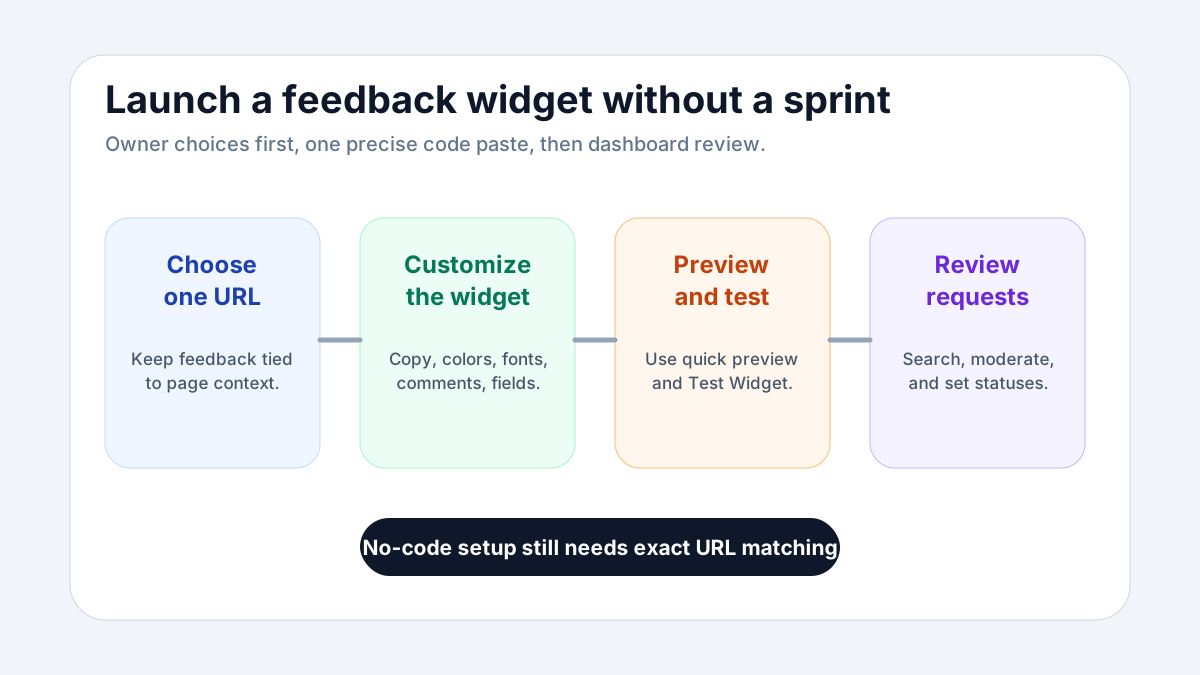
A no-code feedback widget should help a site owner open a feedback channel without turning the project into a development sprint. The goal is not to avoid every technical step forever. The goal is to make the first working version simple: choose the page, customize the widget, paste the generated code into the page body, test it, and start reviewing requests.
At FeaturAsk, we built the widget for that kind of owner-led setup. You can start with a 30-day no-credit-card trial, assign the widget to one exact webpage URL, use the quick preview and Test Widget page, and then decide whether the feedback loop is worth keeping at $29.95/year. If you want a practical no-code way to collect ideas before asking a developer for anything bigger, FeaturAsk is built around that small first launch.
What “no-code” should mean for a feedback widget
No-code should not mean magical. It should mean the owner can configure the experience without writing application logic. For a feedback widget, that usually means the setup screens handle the important choices: the page URL, the widget copy, the visual style, whether comments are available, whether status and date information display, and whether the form needs extra fields.
There is still one precise installation step. The generated widget code needs to be pasted into the body of the assigned page, and the exact URL has to match the subscription. That requirement is worth taking seriously. When the widget is connected to a specific page, the feedback has context. A visitor on a feature page is not giving the same signal as a visitor on a checkout page or help article.
A good no-code feedback widget also gives you a safe way to test before publishing broadly. Quick preview helps you see the widget configuration while you are adjusting it. The Test Widget page helps you submit sample requests and see how they appear in the dashboard. That is the moment when a non-developer can catch unclear copy, unnecessary fields, or a status display that does not fit the page.
The smallest useful setup
The smallest useful setup has five decisions. First, choose one exact webpage URL. Do not begin with every page on the site. Pick the page where feedback would be easiest to interpret. Second, write a heading that tells visitors what to submit. Third, write a short description that explains what happens after they send feedback. Fourth, decide whether comments should be enabled. Fifth, decide whether you need up to two optional fields.
Those five choices are enough to launch a meaningful first version. You can always refine colors, fonts, and display options, but the core behavior comes from the page, prompt, and review process. If the widget appears on a product page, ask for product ideas. If it appears on a docs page, ask what is missing or unclear. If it appears on a service page, ask what would make the offer easier to evaluate.
This is where no-code setup helps. A developer can paste code, but the owner usually understands the feedback goal better. The owner knows what kind of request would be actionable and what would create noise. When the widget settings are accessible, the owner can tune the prompt without waiting for a release cycle.
Customize enough to make feedback clear
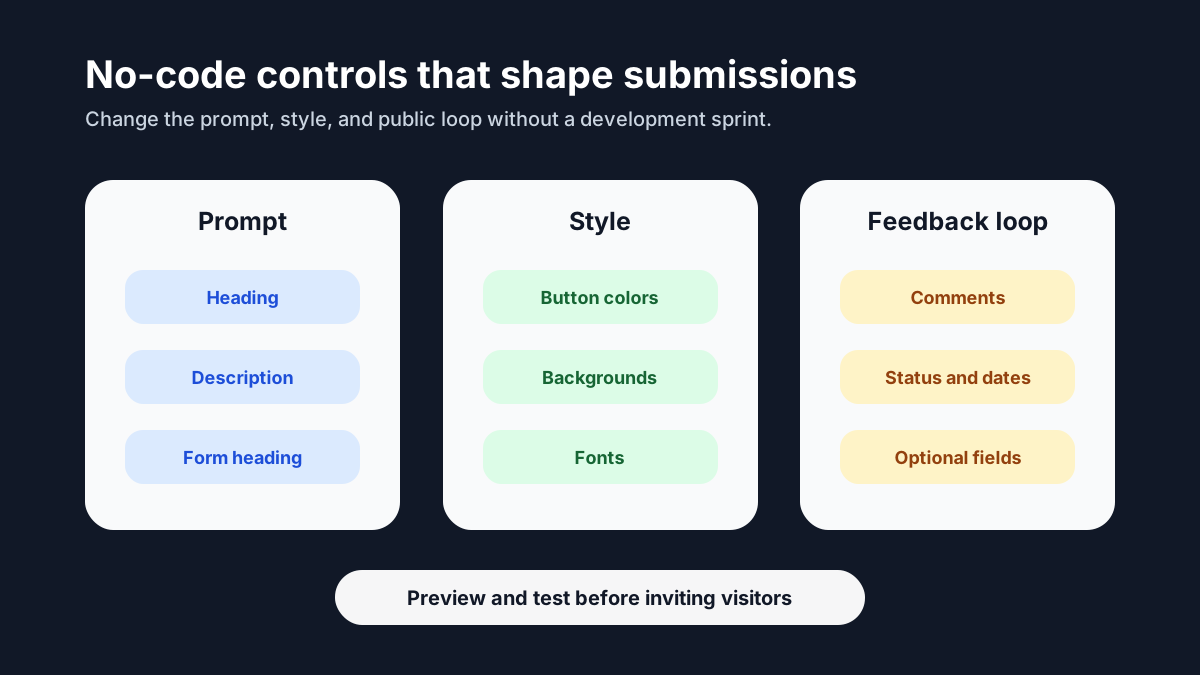
Customization should serve clarity. In FeaturAsk, we let you adjust headings, descriptions, colors, fonts, comments, reCAPTCHA v2, status display, date display, and up to two optional fields. Each setting should answer a simple question: will this help visitors submit better feedback or help the owner review it more confidently?
The heading and description are the highest-leverage controls. They set the boundary of the conversation. “Tell us what to improve” is broad and friendly. “Suggest a feature for this product” is narrower. “What is missing from this page?” is even more contextual. None is universally right. The best version depends on the page and the kind of feedback you are ready to manage.
Colors and fonts should help the widget feel native enough that visitors trust it. The widget does not need to dominate the page. It needs to be easy to notice when a visitor has feedback and easy to ignore when they do not.
Comments, status display, and date display shape the public loop. If comments are enabled, visitors can add context or discuss an idea. If statuses are visible, people can see whether a request is Pending, Under Consideration, In Progress, Completed, or Declined. If dates are displayed, the board feels less like a static form and more like an active feedback space. Use these options deliberately. A quiet board may not need every display option on day one, but a growing board benefits from visible follow-through.
Optional fields should be rare and useful. If you need an email address, product area, or customer type to review a request, add it. If the answer will not change the decision, skip it. A no-code widget should stay lightweight; too many questions can make the form feel like a survey.
Managing requests without building an internal tool
Collecting feedback is easy compared with managing it. The no-code promise falls apart if every submission has to be copied into another document before anyone can decide what to do. A useful widget needs a dashboard where the owner can review, moderate, search, filter, and update requests.
FeaturAsk keeps the request states simple: Pending, Under Consideration, In Progress, Completed, and Declined. Those statuses cover the lifecycle without forcing a complex roadmap process. New ideas can stay Pending until reviewed. Promising items can move to Under Consideration. Active work can move to In Progress. Finished work can move to Completed. Requests that are not a fit can be Declined.
The dashboard also needs cleanup tools. Some submissions should be deleted or moderated. Some need the comment thread opened before a decision. Some require the optional-field data that came through the form. Some are easy to find only through search or status filtering. That is why the management layer is part of the no-code value: it lets the owner handle real feedback without building an admin panel.
If you are deciding where this fits in your broader feedback system, our feature request widget, feature voting widget, and product feedback widget guides show related patterns for idea capture, voting, and product-focused requests.
A no-code launch plan for one afternoon
A no-code feedback widget can be launched in a focused afternoon if the scope is narrow. Start by choosing the page. The page should already have enough traffic or importance to justify a feedback entry point. Next, create the website subscription for that exact URL. Then write the widget heading and description in plain language. Avoid clever copy. Visitors should know what you want and why their feedback matters.
After that, adjust the basic visual settings. Choose colors that fit the page, set fonts that feel readable, and decide whether comments, status display, request dates, and reCAPTCHA v2 should be enabled. If you need extra context, add one optional field first. Add a second only if it clearly changes review quality.
Then use quick preview. Look for friction: a heading that is too long, a description that sounds vague, or optional fields that make the form feel heavy. Submit test items from the Test Widget page. Create one realistic feature idea, one unclear request, and one request you would decline. In the dashboard, open each item, inspect comments and details, check optional-field data, try search, try status filtering, and move the items through the statuses.
Only after that should the widget go live on the assigned page. Paste the generated widget code into the page body, confirm the exact URL matches, and submit one final test. This is the no-code workflow at its best: owner decisions first, a small code-paste step, and then dashboard review.
What to say in the widget prompt
The prompt should be specific enough to improve submissions but open enough to invite useful surprises. A good prompt has three parts: what to share, what not to share, and what will happen next. For example: “Share an idea that would make this page or product easier to use. Please avoid support questions here. We review suggestions and update their status when we decide what to do.”
That copy does not promise that every idea will ship. It promises that feedback will be reviewed. That distinction matters. A feedback widget should create a trustworthy channel, not an unlimited product commitment.
If you expect sensitive support issues, clarify that the widget is for ideas and improvement suggestions. If the page is public, do not ask visitors to paste private account details into a public request. FeaturAsk gives you optional fields and moderation controls, but the best protection is clear copy that guides people toward the right kind of submission.
How no-code helps after launch
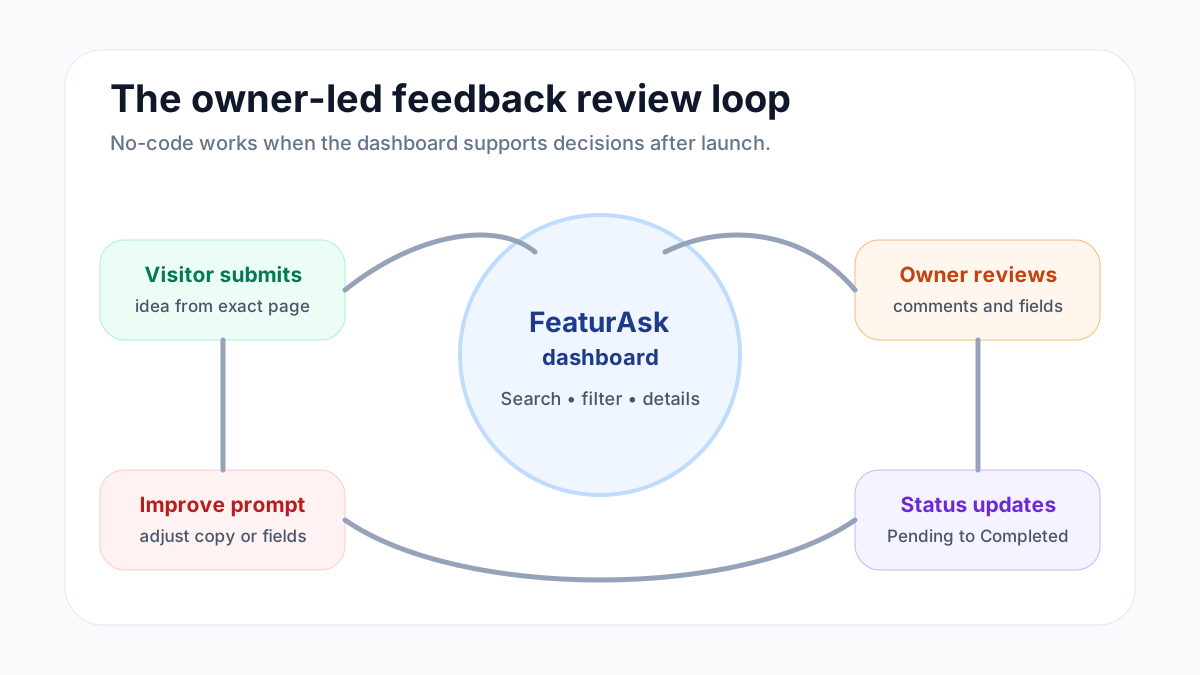
The biggest benefit of no-code is not the first installation. It is the ability to adjust without reopening a technical task. After a week, you may learn that the widget heading is too general. You may learn that comments should be enabled because visitors are adding useful context. You may decide request dates should display so the board feels active. You may add an optional field because every useful request needs the same extra detail.
When the owner can make those changes directly, the feedback channel improves faster. The team does not need to wait for a developer to change one sentence. The widget can evolve as the page and audience teach you what works.
The same is true for request management. A small team can search for a request during a customer conversation, filter for Pending items during a review session, open details to check optional-field answers, and update statuses when decisions are made. That routine is what turns a widget into a feedback system.
What a no-code widget should not claim to do
A no-code feedback widget should not claim to understand your entire business automatically. It should not pretend to replace product judgment. It should not hide every decision behind automation. The owner still has to decide what belongs, what to decline, what to build, and what to explain publicly.
That is healthy. Feedback tools are most useful when they make listening easier, not when they remove responsibility. FeaturAsk gives you the collection point, customization controls, public interaction options, statuses, deletion or moderation, filtering, search, details, and comments. You bring the context and the decision-making.
For many small sites, that is the right balance. You do not need a large implementation project to learn from visitors. You need a simple place to collect ideas and a simple process for responding.
When to keep it after the trial
Keep the widget after the trial if it changes your behavior. Did you review requests more consistently? Did customers or visitors submit ideas you would not have heard otherwise? Did statuses help you close the loop? Did the exact-page setup make feedback easier to interpret? If yes, the widget is doing useful work.
If you want to test that without a procurement process, FeaturAsk gives you a 30-day trial with no credit card required. If the widget earns its place, it is $29.95/year. That pricing makes sense for owners who want a lightweight feedback channel without committing to a large platform.
A no-code feedback widget is not about avoiding care. It is about lowering the cost of starting. Choose one page, write a clear prompt, preview it, test it, paste the generated code into the page body, and review what comes in. When the loop works, you can expand with confidence.
For a broader website-listening angle, read our customer feedback widget and customer suggestion box for website guides. They pair well with a no-code setup because they focus on what to collect and how to keep public feedback useful.
If you are ready to try the owner-led version, start with FeaturAsk: 30 days, no credit card, one exact page, and a simple $29.95/year plan if the feedback loop proves valuable.