Feature Voting Widget: How to Use Votes Without Letting Them Run the Roadmap
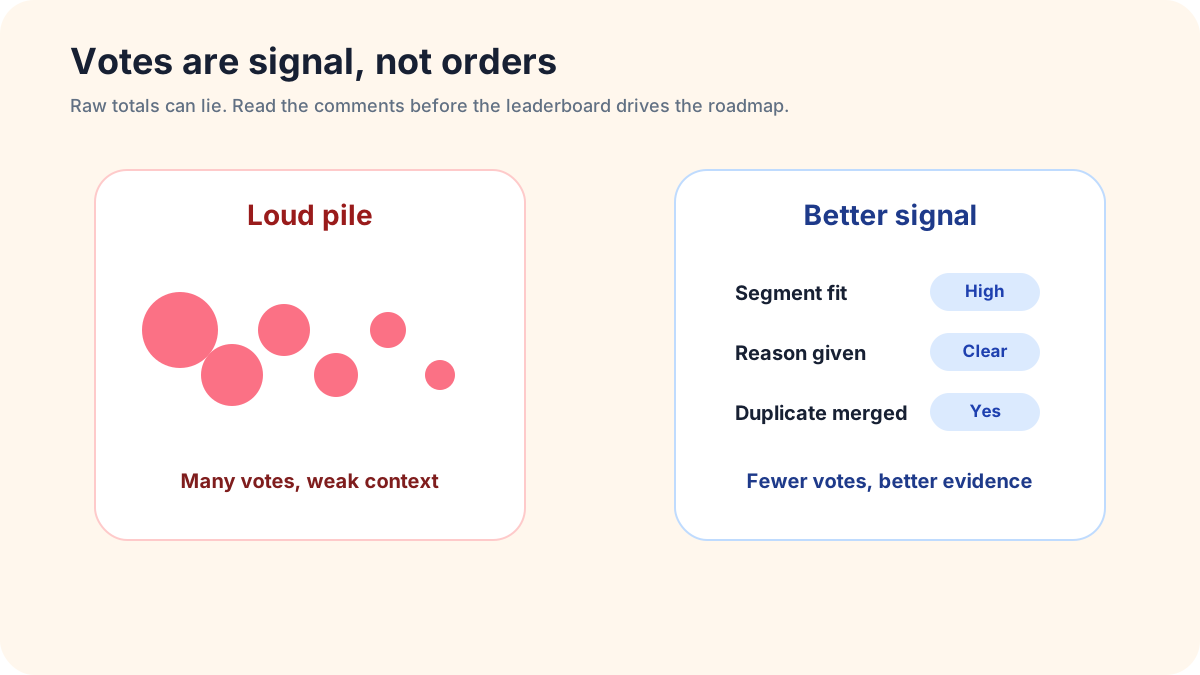
A feature voting widget gives customers a visible way to say what they want next. That sounds simple, but the operating rule matters. If the team treats the highest count as an automatic command, the board becomes a public popularity contest. If the team treats votes as one kind of evidence, the same board can make roadmap discussions sharper, calmer, and easier to explain.
The point is not to make every product decision democratic. Customers see their own pain. The team has to see effort, positioning, support cost, technical risk, and the long-term shape of the product. A good voting workflow respects both sides: users get a transparent place to raise demand, while the team keeps responsibility for the decision.
This guide explains how to run a voting widget so it creates useful product evidence. It covers vote quality, comment prompts, duplicate review, segment weighting, status language, campaign spikes, quiet requests, and the review cadence that keeps the board from becoming a noisy wall of promises.
Start with a narrow promise
A feature voting widget should not promise that popular ideas will ship. It should promise that the team will read requests, compare demand, and explain outcomes when possible. That difference protects trust. Users are more likely to accept a declined idea when the rules were clear before they voted.
Write that promise near the widget. A short line is enough: “Votes help us understand demand, but we also review customer fit, effort, and product direction.” This keeps the board honest. It also prevents the loudest group from assuming that a temporary spike gives them ownership of the roadmap.
A better public rule for voters
Tell voters what useful participation looks like. Ask them to vote when an idea would change their workflow, not simply because the title sounds nice. Invite a short comment about what they are trying to do, what workaround they use now, and what happens if the request is not built.
That instruction changes the quality of the board. A vote plus a concrete use case is easier to evaluate than a vote alone. It also gives the team language it can use later in discovery calls, release notes, or status updates.
Separate vote count from vote meaning
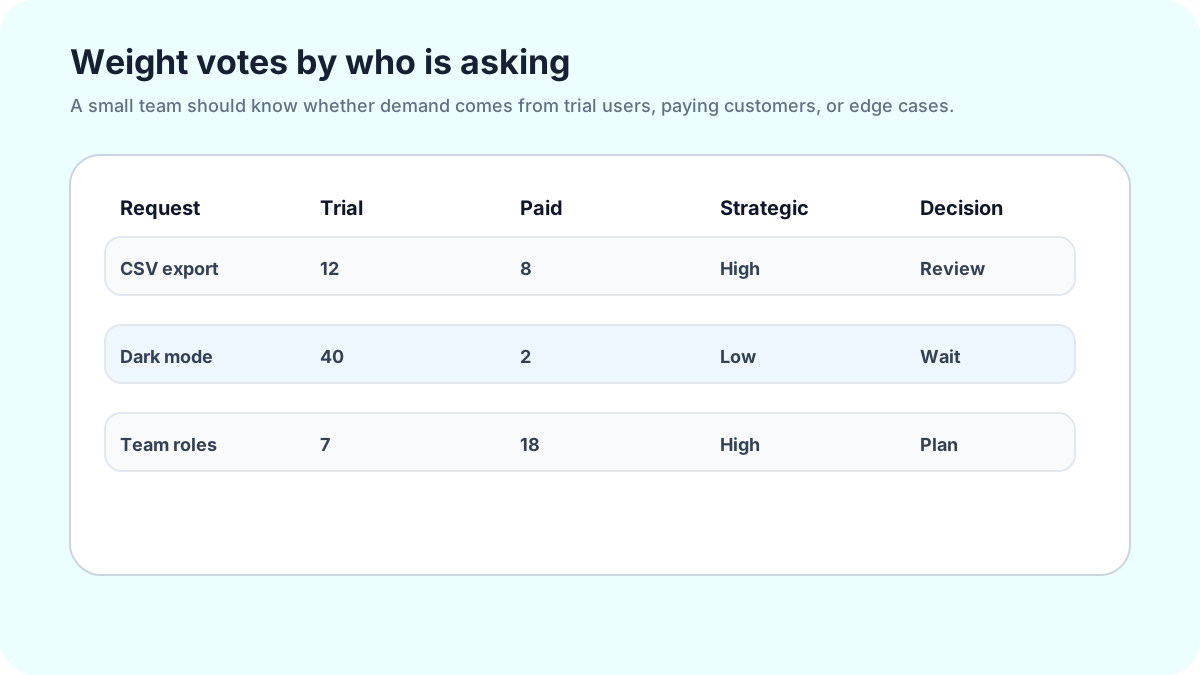
Vote totals are easy to sort and easy to misread. Fifty votes from casual visitors may matter less than eight votes from the customer segment the product is built for. A low-count request may be critical if it removes churn risk, completes an onboarding path, or removes a workflow blocker target users repeatedly mention.
Use vote count as the first question, not the final answer. A high count asks, “Why do so many people care?” A low count with strong comments asks, “Is this pain narrow but important?” A request with no votes asks, “Is this isolated, unclear, or simply hard for users to find?” Each answer leads to a different next step.
What to capture behind the number
During review, look for the voter’s relationship to the product. Are they a trial user, active customer, power user, admin, buyer, or visitor? Look for the job behind the request. Are they trying to save time, reduce confusion, satisfy a policy, compare options, publish faster, or make a purchase decision?
You do not need a complex scoring model. A small note beside the request can be enough: customer type, use case, effort guess, and business relevance. The widget collects public signal; the team adds judgment.
Ask for comments that explain the job
A weak comment prompt asks, “Why do you want this?” A stronger prompt asks, “What would this help you finish?” The second question moves the conversation from preference to workflow. It helps the team discover whether the request is a feature, a documentation gap, a confusing interface, or a workaround that already exists but is hard to find.
For SaaS products, ask what task is blocked. For ecommerce, ask what would make the shopper confident enough to buy. For course businesses, ask what skill gap the idea solves. For creators, ask what question the viewer wants answered. A feature voting widget becomes more useful when the comment prompt matches the page and audience.
Keep the comment optional but visible
Do not force every voter to write a paragraph. That reduces participation and makes the board feel like a survey. Instead, make the comment box visible, friendly, and specific. A vote alone still provides a demand signal. A vote with context gives the team evidence.
This balance matters for small teams. You want enough detail to compare ideas, but not so much friction that customers stop contributing. The best prompt is the one users actually answer.
Review related requests before ranking anything
Related requests can split demand. One user asks for “CSV export,” another asks for “download report,” and another asks for “save table data.” Those may be three different ideas, or they may be the same underlying need in different words. If the team ranks them separately without review, the board undercounts the real pattern.
Make related-request cleanup part of the review process. Search the dashboard before judging the top items. Open the details and comments. Decide whether several cards describe one outcome, or whether they point to different jobs. If they are related, group them during review and choose the clearest wording for the decision conversation.
Do not imply a promise that the tool will automatically combine everything for you. The valuable work is human judgment: understanding whether users are describing the same problem or only using similar words.
Watch for campaign voting
Public boards can attract vote spikes. A customer may share a request in a community, a Slack group, a newsletter, or a social post. Sometimes that is meaningful. A campaign can reveal that many relevant users share the same problem. It can also produce shallow clicks from people who barely understand the product.
When a spike happens, slow down. Read the comments. Check whether the new voters look like the audience you serve. Look for repeated explanations, not just repeated clicks. If the spike comes with clear use cases from relevant users, it deserves attention. If it comes with no context, treat it as awareness rather than a roadmap command.
How to answer a public surge
A simple status note can defuse pressure: “We see the interest here and are reviewing the use cases. Votes help us understand demand; we still need to compare fit, effort, and timing.” That note shows users they were heard without promising a delivery date.
This is especially important for small teams. Silence after a spike creates suspicion. A quick, plain update keeps the board credible.
Give quiet requests a fair review
Some important ideas never win a public vote. They may come from admins, buyers, compliance-minded users, internal champions, or advanced customers with less visible workflows. A voting widget should not bury those requests simply because they are less exciting to the crowd.
Create a review habit for quiet evidence. Look at low-vote requests with detailed comments. Look at requests from target customers. Look at old items that suddenly gained new activity. These views help the team notice signals that a public leaderboard would hide.
Quiet requests do not deserve automatic promotion. They deserve questions. Is the pain frequent for the right segment? Is the workaround expensive? Would solving it strengthen the product direction? If yes, it may move into discovery even without a crowd behind it.
Use statuses to teach the process
Statuses are more than labels. They teach users what happens after they contribute. Use Pending for new requests, Under Consideration when the team is comparing evidence, In Progress when work has started, Completed when the outcome is available, and Declined when the request does not fit or will not be pursued.
The status should match reality. Do not leave everything in Pending because declining feels uncomfortable. Do not mark an item In Progress because the team might build it someday. Honest status updates make the board more useful for both customers and the team.
Write notes that reduce repeat confusion
A good status note is short, specific, and human. “Declined because this would pull the product toward enterprise admin workflows, while this year’s focus is simpler setup for small teams” is more useful than “not planned.” Users may still disagree, but they can understand the boundary.
Status notes also reduce duplicate debates. The next visitor sees the boundary before starting the same debate from zero.
How FeaturAsk fits a voting workflow
FeaturAsk is built for teams that want a lightweight voting and request loop on a specific webpage. A subscription is assigned to one exact URL. You paste the generated widget code into the page body, then customize the heading, description, colors, fonts, comment behavior, reCAPTCHA v2, status display, date display, and up to two optional fields.
That setup is useful when voting should live near the relevant decision. A SaaS team can place the widget near a feature page. A creator can place it near a content request page. A course business can place it near a curriculum page. Visitors do not need to find a separate portal; they can contribute where the context is fresh.
In the dashboard, you can search and filter requests, open details and comments, moderate or delete noise, and update statuses such as Pending, Under Consideration, In Progress, Completed, and Declined. That is enough structure for a small team to run a review habit without buying a heavy feedback platform.
FeaturAsk includes a 30-day free trial with no credit card required. If the workflow helps, pricing is $29.95/year for a webpage integration. Start with one page and one review cadence before expanding the voting loop.
A weekly review agenda that keeps votes useful
Open the board at the same time each week. Start with new requests, then recently active requests, then top-voted requests. This order prevents the board from becoming only a popularity list. It also gives new evidence a chance to be seen before old winners dominate every conversation.
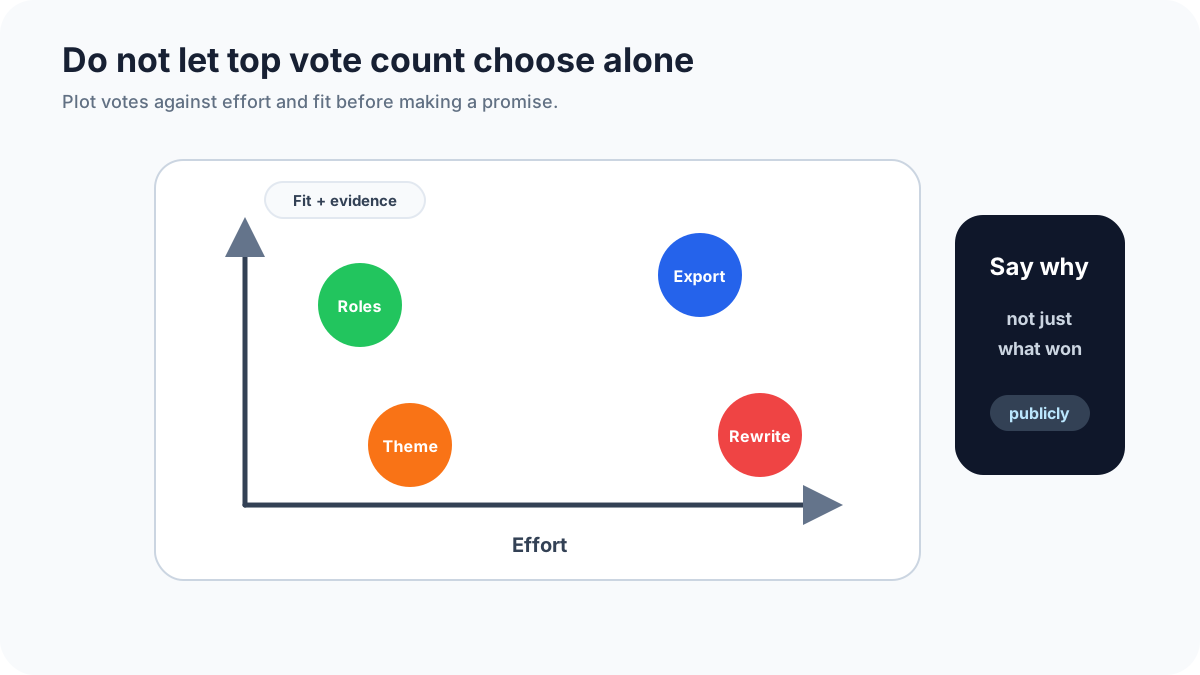
For each serious request, ask six questions: What problem does this describe? Who asked for it? How many people added useful context? What workaround exists today? How hard would a small first version be? Does it fit the direction of the product? The answers matter more than the raw count.
End the review by changing statuses or writing notes. A board that never changes teaches users that voting is theater. A board with visible decisions teaches users that feedback has a real path.
When votes disagree with strategy
Sometimes users vote for something that does not fit the strategy. That does not mean the widget failed. It means the board revealed a tension. Handle it directly.
If the request belongs to a customer segment you are not serving, say so. If the idea is good but badly timed, mark it Under Consideration or Declined with a clear note about current focus. If the idea would create too much complexity, explain the tradeoff in plain language.
Avoid vague corporate language. Users can accept a no when the reasoning is specific. What damages trust is pretending the idea is still open when the team has already decided it is not a fit.
Final guidance for better voting boards
A feature voting widget should make product judgment stronger, not replace it. Count votes, but read comments. Notice popular ideas, but investigate quiet ones. Group related requests during review, but do not pretend the board can do the thinking for you. Update statuses honestly, and keep the promise narrow enough that the team can honor it.
The best voting board feels alive. Users can see what others requested, add their own context, and understand how the team responds. The team gets a cleaner source of product evidence without surrendering strategy to a counter. That is the balance worth building.