Product Feedback Widget: Turn In-App Comments Into Prioritized Requests
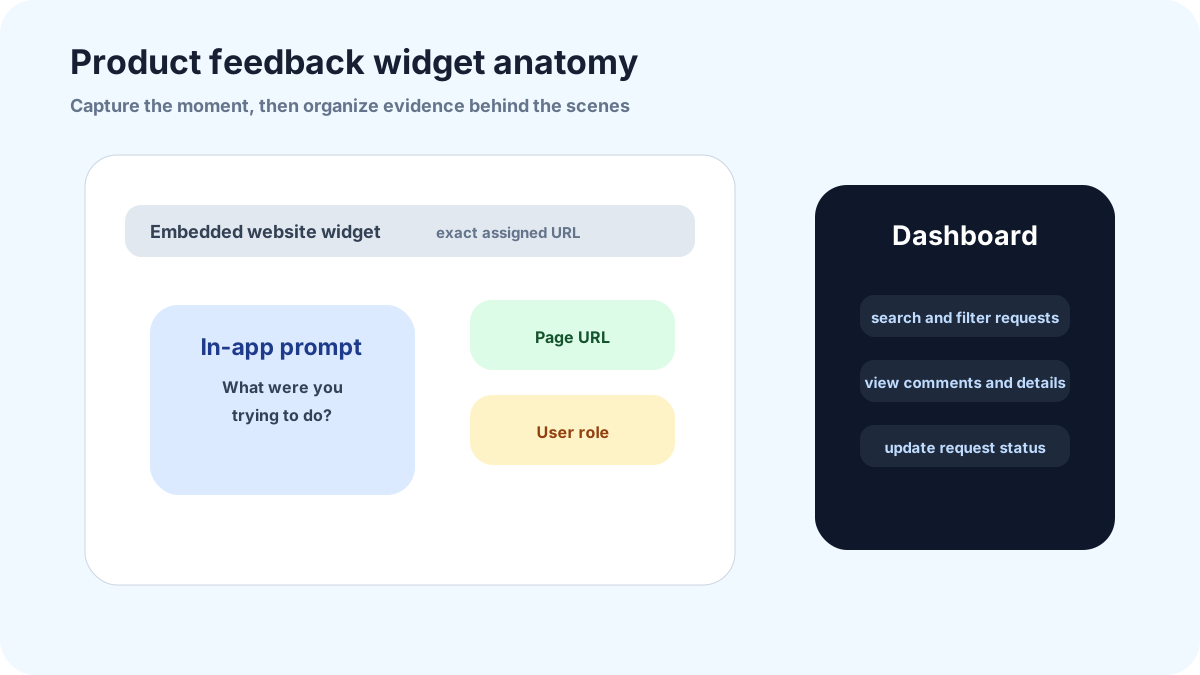
A product feedback widget should capture friction while the user is still inside the product. The widget is not a decorative tab; it is a small research instrument connected to a product review habit.
This guide is for micro-SaaS founders, plugin builders, and small product teams that need practical signal without enterprise feedback software. The emphasis is context, request clustering, and status updates that make users willing to contribute again.
For product teams, FeaturAsk gives the widget, request board, voting, comments, and review dashboard in one lightweight workflow. The trial runs for one month without a credit card, and the paid plan is $29.95/year.
What a product feedback widget should do
A product feedback widget should capture product friction while the user is close to the task. It is not only a comment form. It should help users explain what they were trying to do, collect enough context for the product team, and route the request into a reviewable place where duplicates, votes, and comments can be managed.
For a small team, the widget should be lighter than a full enterprise feedback suite. The point is to shorten the path from user frustration to product learning. If adding feedback takes longer than sending a support ticket, most users will not do it.
Where to place the widget inside a product
Place the widget where the user already looks for help or where product friction appears. Common placements include the help menu, account menu, empty states, reporting pages, integration setup pages, billing areas, and roadmap links. A global launcher is fine if it is not intrusive, but targeted entry points produce better context.
Avoid launching everywhere before you know which locations produce useful feedback. Start in one product area, review the quality of submissions, and expand from there. Placement is part of the research design. A request from an empty state says something different from a request submitted from the homepage.
What context to collect without overloading the form
Keep the visible form simple. Ask for the outcome and the current workaround, then use only the extra fields you truly need. In FeaturAsk, optional fields can collect text or an email address, can be required or optional, and are visible only to you in the dashboard. That supports context without turning the public widget into a long research survey.
If your product needs account type, role, plan, browser, or logged-in identity, do not imply the widget magically knows it unless your own implementation supplies that context. Ask for the one detail that changes review quality, or keep the extra context in your internal notes outside the public submission.
How to turn comments into request clusters
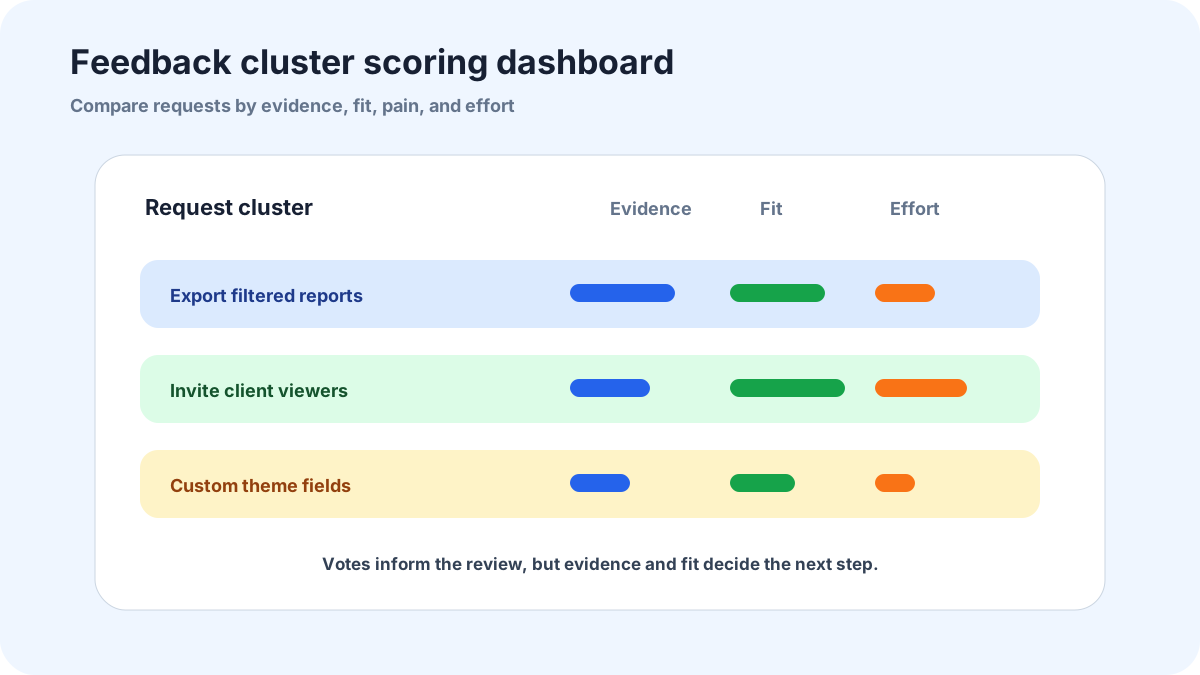
Raw comments are hard to plan from. Cluster them by outcome. “Export filtered invoices,” “invite clients to a project,” and “show approval history” are clusters. Each cluster can contain multiple comments, votes, account notes, and examples. That gives the product team a planning unit instead of a pile of sentences.
A cluster should include representative quotes, affected segment, frequency, current workaround, and a rough effort estimate. Do not bring every comment into a roadmap meeting. Bring the cluster, the evidence, and the decision you need.
How to report decisions back to users
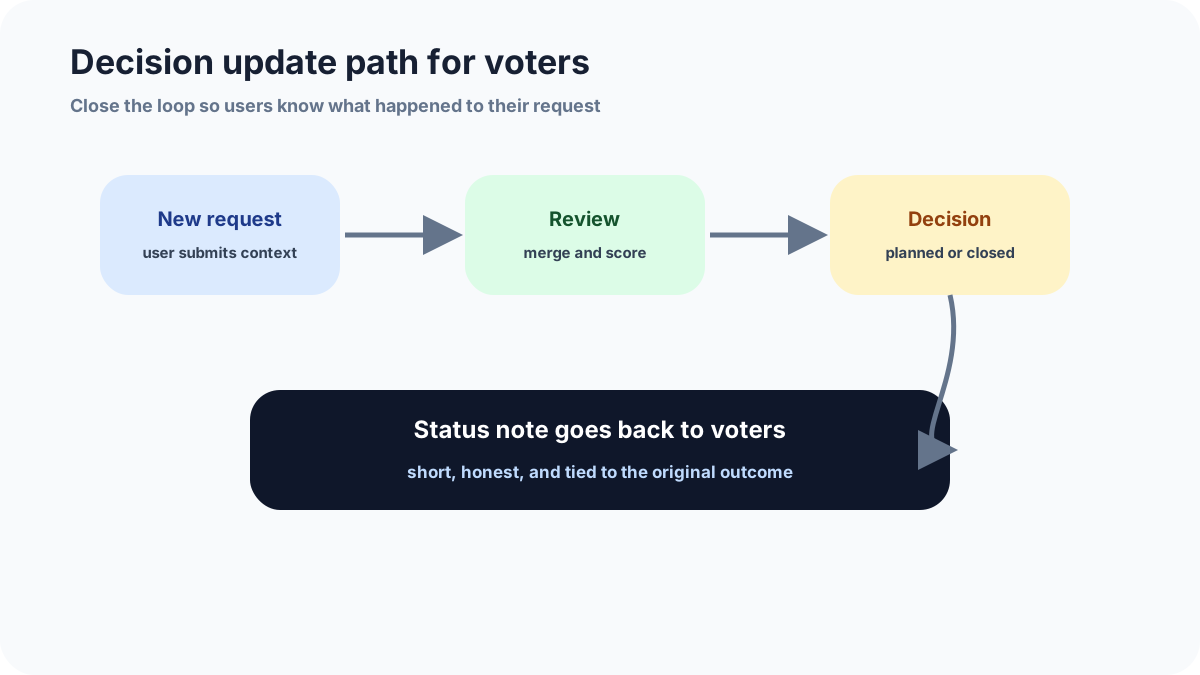
Feedback loops fail when users never hear what happened. Status notes do not need to be long. Say when an idea is under review, when it is planned, when a first version ships, or why it will not be built now. The tone should be honest and specific, not corporate.
Closing a request can build trust if the reason is clear. “Not now because it would make setup harder for most customers” is better than silence. Users can handle disagreement. They lose trust when the board looks ignored.
Common mistakes to avoid
Do not ask users to write your roadmap for you. They can explain the task, the failed workflow, and the workaround. Your team should translate that evidence into options, tradeoffs, and priorities.
Do not place the widget only in a global footer. Product feedback is stronger when it comes from the exact screen where the user ran into friction. Start with one or two high-context product areas and expand after reviewing submission quality.
Do not bring raw comments into planning. Group them into clusters first, with vote count, representative quotes, affected segment, and current workaround. Planning from clusters is calmer and more accurate than planning from a comment stream.
Related FeaturAsk guides
If you are still refining the feedback system, compare this with feature request widget, feature voting widget, and user feedback for SaaS. Those guides go deeper on voting, SaaS intake, and the weekly review loop.
For teams that want the workflow in one lightweight place, FeaturAsk gives you product feedback intake, voting, moderation, and public status updates. You can try it for a month without a credit card; after that, the plan is $29.95/year.
What the first dashboard should show
The dashboard behind the widget should not start as a giant backlog. Start with five views: new requests, needs clarification, public and open for votes, under review, and closed. That is enough for a founder or small product lead to see what requires action without pretending every submission is roadmap-ready.
Use request details, optional field data, comments, search, filters, and status changes to decide what needs action. If you need private segment or plan notes, keep them in your own review process rather than presenting them as public widget fields. If you want to test this without building a custom dashboard, FeaturAsk gives you a website widget, votes, comments, delete/moderation actions, status values, and a dashboard for a one-month no credit card trial, then $29.95/year.
How FeaturAsk works for product feedback
At FeaturAsk, we focus on a practical product-feedback loop: place the widget on the right webpage, collect a clear request, let users add votes or comments, and give the owner a dashboard for review. The setup starts with a 30-day trial that starts without a credit card. From there, you assign the exact webpage URL, customize the widget, save your settings, generate the code, and paste the widget container and script into the body of the page.
The exact URL rule is worth taking seriously. A product feedback widget on an integration setup page should collect different context from one on a public roadmap page. FeaturAsk only works on the webpage you assign, and you can change that assigned webpage during the subscription. That makes it better to start with one high-signal page than to scatter generic feedback prompts everywhere.
For the widget itself, we let you tune the main headline, supporting copy, description, form title, brand colors, font choices, comment settings, reCAPTCHA v2, status/date visibility, and as many as two optional fields. Those optional fields can be text or email, required or optional, and their entries stay visible to you in the dashboard rather than being shown publicly. If you need role or account context, ask for the one extra detail that genuinely helps review instead of pretending the form should capture everything.
The request page is where the product habit happens. You can mark requests as Pending, Under Consideration, In Progress, Completed, and Declined as the five available states. You can also delete board noise, filter the list, search titles or descriptions, read comments, and open the full request details. That is the FeaturAsk workflow this article should describe: collect product ideas, let users add votes or comments, and keep the review process visible enough that contributors know the channel is alive.
How I would use FeaturAsk inside a product workflow
For product feedback, the most important decision is placement. I would rather see one FeaturAsk widget on a high-context page than five generic “feedback” buttons scattered across the product. A reporting page, integration setup page, billing settings page, or roadmap page can each produce different feedback. Start where users already have enough context to explain what they need.
After launch, review submissions as product evidence, not as orders. A vote tells you that an idea has support. A comment can explain the workflow behind that support. A status update tells contributors that the idea has not disappeared. In FeaturAsk, the owner can search requests, filter by status, read comments, view request details, and keep the public board clean by deleting noise. That gives a founder or small product lead enough control to run a weekly review without buying a heavy enterprise tool. The strongest habit is simple: pick a few items to clarify, update statuses honestly, and close the loop when a decision is made.