Feature Request Form for Website: Route Messy Ideas Before They Rot
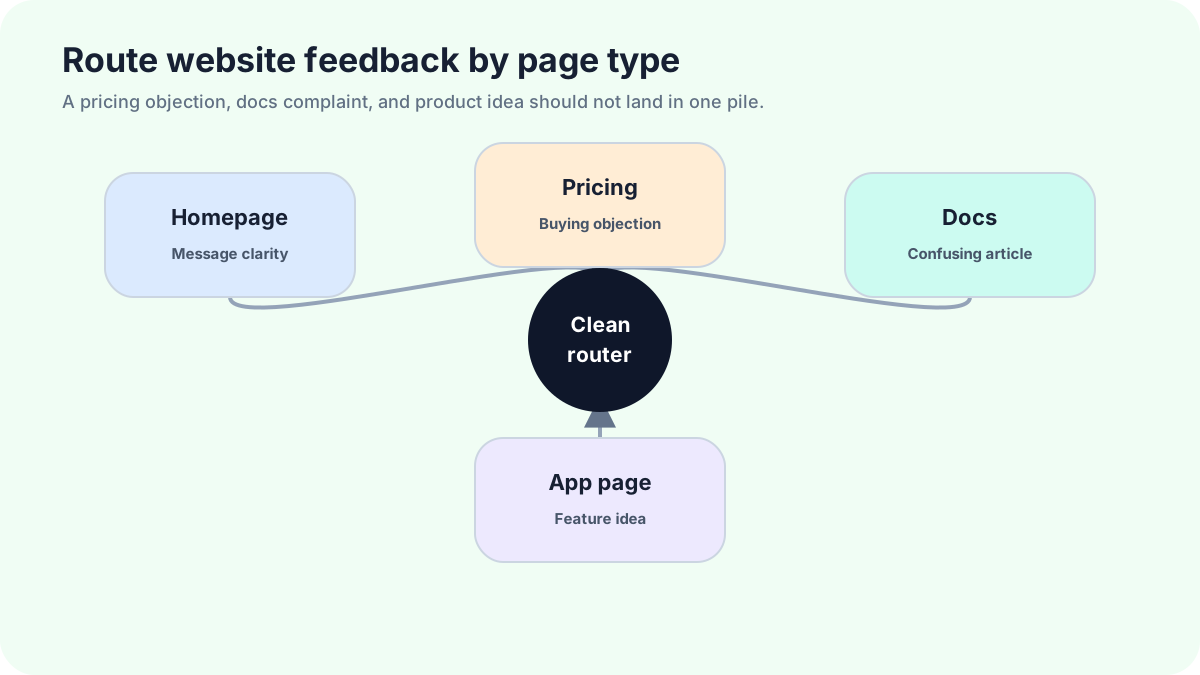
A feature request form for a website collects messier intent than an in-app widget. Public visitors are not all customers. Some want support, some found a bug, some are comparing prices, some are pitching services, and a few have excellent product ideas. The form has to separate those paths before the board turns into junk.
That separation is the whole game. A website form that accepts every message as a feature request will waste review time and make real ideas harder to see. A good form routes by page, wording, and user choice before anything becomes public.
FeaturAsk helps when you want website visitors or users to submit ideas into a managed request board with voting, comments, status values, optional fields, delete/moderation actions, search, filtering, and a dashboard. With FeaturAsk, you can run that website channel for a free month without entering a credit card; if it works, the annual plan is $29.95/year.
Website traffic is mixed by default
A homepage visitor may not know your product well enough to make a useful request. A pricing-page visitor may be asking for packaging, not a product feature. A docs reader may have a real workflow gap. A logged-in dashboard user may be reporting friction at the exact moment it happens.
Treat those contexts differently. The same form can appear in multiple places, but it should carry page context and route answers based on where the user came from. The source page often explains the message before the text does.
For a tighter in-product channel, read the feature request widget guide. If you only need the entry point, the feature request button guide covers labels, states, and destinations.
Homepage and product pages
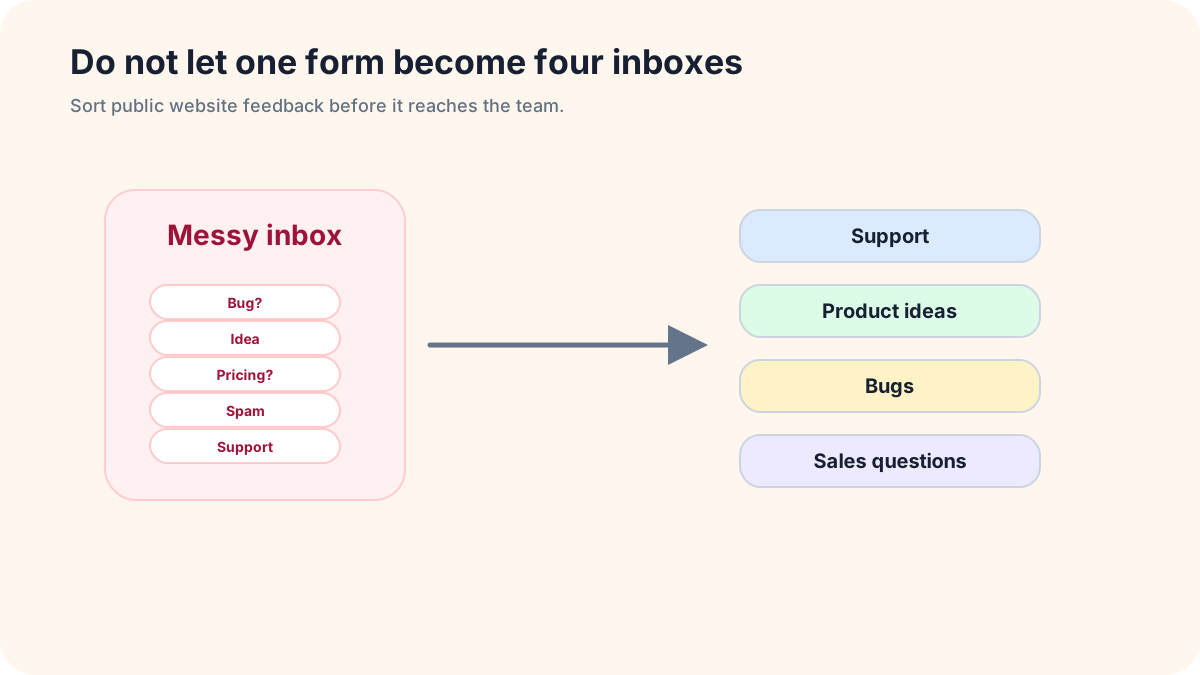
On the homepage, keep the request invitation modest. Most visitors are still learning what the product does. A footer link or product-section CTA is better than a loud modal. Ask, “What improvement would make this product more useful for you?” and include a route for sales or support so the form does not absorb everything.
On product pages, the request can be more specific. If the page describes analytics, ask what report or metric the visitor expected. If the page describes integrations, ask what tool they wanted to connect and why. Specific page context turns a public website form into a useful intake path.
Do not make homepage requests public automatically. Moderate first. Public pages attract competitors, bots, confused visitors, and people who have never used the product. Publish only ideas that other users can understand and vote on.
Pricing pages
Pricing-page requests often sound like features but really describe packaging. “Add team seats,” “annual billing,” “agency plan,” “more projects,” and “white label option” might belong in product, pricing, or sales depending on the business.
Use a short routing question: “Is this about plan limits, billing, or a product capability?” If the user chooses billing or plan limits, send it to the right inbox. If they describe a product capability, create a request. This prevents the feature board from becoming a pricing complaint log.
When a pricing-page idea is valid, tag it with pricing context. Later, the team can distinguish “many users want this capability” from “many visitors dislike the current plan boundary.” Those are different decisions.
Docs and help pages
Docs pages are excellent places to collect product gaps because the visitor was trying to accomplish something. Ask which instruction they expected to find, what they tried, and whether the missing capability blocks them or only slows them down.
Route documentation mistakes separately from feature ideas. “This page is wrong” is not a feature request. “I need an API endpoint for this workflow” might be. A checkbox or dropdown can separate docs feedback, bug reports, and product requests without adding much friction.
The feature request form template includes prompt wording that works well here because it asks about the task first. For broader feedback operations, the website feedback widget guide can help decide what belongs in a request board versus a general website feedback flow.
App dashboards, Shopify, and WordPress pages
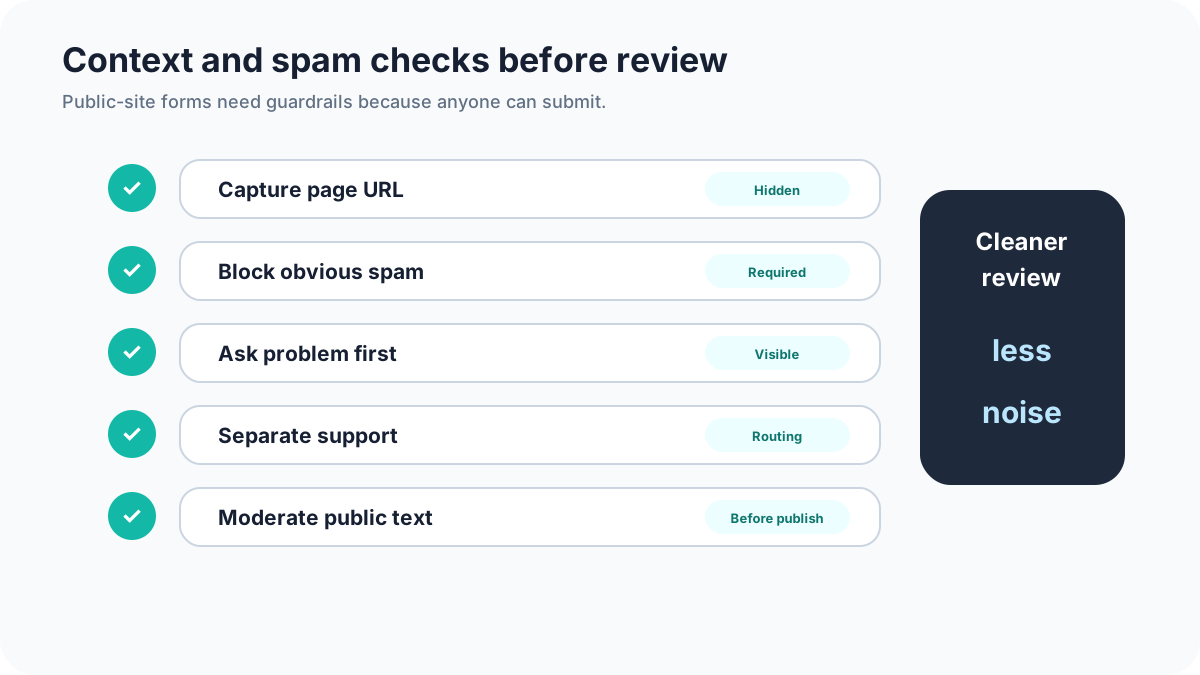
Logged-in dashboards produce the highest-context requests because the user is already inside the workflow. Capture account, plan, product area, and page URL automatically when possible. Keep the visible form short.
Shopify and WordPress businesses have a different problem: visitors may be store owners, buyers, editors, admins, or random traffic. Ask who they are before routing. A store buyer asking for a product size is not submitting a software feature request. A store owner asking for a subscription option might be.
For embedded widgets on CMS pages, test mobile carefully. Themes, sticky carts, chat widgets, cookie bars, and admin overlays can collide. If the request control blocks checkout or navigation, remove it from that page and use a footer or help-center link instead.
Anti-spam without punishing real users
Use layered protection. Honeypot fields, rate limits, moderation, domain blocking, and CAPTCHA alternatives can stop obvious junk. Avoid making every real user solve a puzzle before submitting one idea. Spam protection should be strongest before public posting, not necessarily before private intake.
Keep first-time website submissions private until reviewed. If the same user later participates constructively, their future requests can move faster. Moderation is not distrust; it is how you protect the public board from becoming unreadable.
Also filter agency pitches and link drops. A public feature board is not a guest-post inbox. If a message contains unrelated promotional links, keep it out of the product workflow.
Routing rules you can copy
If the message includes “broken,” “error,” “crash,” “not working,” “login,” or “charged,” route to support. If it includes “price,” “plan,” “seat,” “invoice,” or “billing,” route to sales or billing review. If it includes “can you add,” “I wish,” “integration,” “export,” “dashboard,” “setting,” or “workflow,” route to product requests.
Add human review before publishing. Keyword routing is a first pass, not a judge. A message can mention “export error” and still reveal a missing export feature. The review owner should correct the route, clean up the title, and merge duplicates.
For prioritizing routed ideas, use the feature voting widget guide so public support becomes evidence rather than a scoreboard.
Confirmation copy for each route
Product idea: “Thanks, we added this for review. If it is a fit for public voting, we may edit the title for clarity and merge it with related ideas.”
Support issue: “This looks like a support request, so we sent it to the support path instead of the feature board.”
Pricing question: “Thanks, we sent this to the team reviewing plans and packaging.”
Spam or promotional message: no public confirmation beyond a generic receipt. Do not teach spammers how your filters work.
When FeaturAsk fits a website form
FeaturAsk is a fit when your website needs a request path that does more than collect private form entries. Visitors can submit ideas, users can vote and comment, and the team can moderate requests before they become public.
Start with FeaturAsk on one or two high-context pages instead of the entire site. The first month is free with no credit card, so you can test whether the form attracts useful ideas before paying the $29.95/year plan.
Final take
A website feature request form has to be a traffic cop. It should welcome product ideas while moving support issues, bugs, pricing questions, and spam away from the request board. The cleaner the routing, the easier it is to see the ideas worth discussing.
If you want the form, moderation, voting, and dashboard in one lightweight workflow, FeaturAsk gives your website a feedback path that does not have to become a junk drawer.
How to keep public forms polite but firm
A website form needs boundaries. Tell visitors what belongs there before they submit. “Use this for product ideas. If something is broken or account-specific, contact support.” That line does not stop every wrong message, but it gives honest users a clear path.
The form should also explain moderation. Public-site requests should not appear instantly on a public board. Say that ideas may be edited for clarity, merged with related requests, or kept private if they contain sensitive details. This protects users and gives the team room to clean up noisy submissions.
Confirmation copy should match the route. A product idea can mention review. A support issue should point to support. A pricing question should mention plan review. A suspicious message should receive only a neutral receipt.
Signals that routing is broken
If support tickets appear on the feature board, the page label is too broad or the support path is too hard to find. If pricing questions dominate, the form is sitting too close to plan comparison without a pricing route. If spam appears publicly, moderation is too loose. If good ideas arrive with no context, the prompt is too generic.
Do a weekly routing audit for the first month. Take twenty submissions and label each as product idea, support, bug, pricing, spam, or unclear. If fewer than half are product ideas, change placement or copy. If many are unclear, add one context question instead of making all fields required.
What to publish and what to keep private
Publish ideas that describe a shared product outcome and can invite useful votes. Keep private anything involving personal data, account problems, security concerns, contract terms, or one-off implementation help. Rewrite public titles so they describe outcomes, not customer-specific wording.
For example, “ACME needs SSO before renewal” should not be public. A cleaned public version might be “Support single sign-on for team accounts,” with the account detail kept internal. That balance lets the community vote without exposing private context.
Page-specific hidden fields
Hidden fields make website requests easier to sort. Capture source page, referrer when allowed, device type, logged-in state, plan if known, and campaign source if it matters. Do not show these fields to the visitor. Use them to explain context during review.
A request from a docs page about exports carries different weight than the same sentence from a random landing page visit. A request from a logged-in paying account deserves different follow-up than a drive-by anonymous submission. Hidden context helps the reviewer make that distinction without adding friction.
A sane moderation queue
Keep the moderation queue small and decisive. Each item should become one of five outcomes: publish as a product idea, merge with an existing idea, route to support, route to pricing or sales review, or discard as spam. If “unclear” becomes the default outcome, the form is asking the wrong questions.
Set a service habit for moderation even if you do not promise a response time publicly. Twice a week is enough for many small sites. The danger is not slow review by a day or two. The danger is letting public submissions sit for months until nobody trusts the channel.
When to remove the form from a page
Sometimes the right fix is removal. If a page keeps generating spam, support confusion, or low-context wishes, take the request form off that page and use a support link or footer route instead. More entry points do not automatically mean better feedback.
A form belongs where visitors can make an informed suggestion. If they have not seen the product, docs, pricing, or dashboard yet, they probably are not ready to describe a useful product gap.
Keep the review path visible
Even when requests stay private at first, show visitors that a real review path exists. A short note near the form can say that product ideas are grouped, moderated, and reviewed regularly. That small promise encourages better submissions and discourages random comments. It also gives your team a standard to meet.