Website Feedback Widget: Definition, Examples, and Tools for 2026
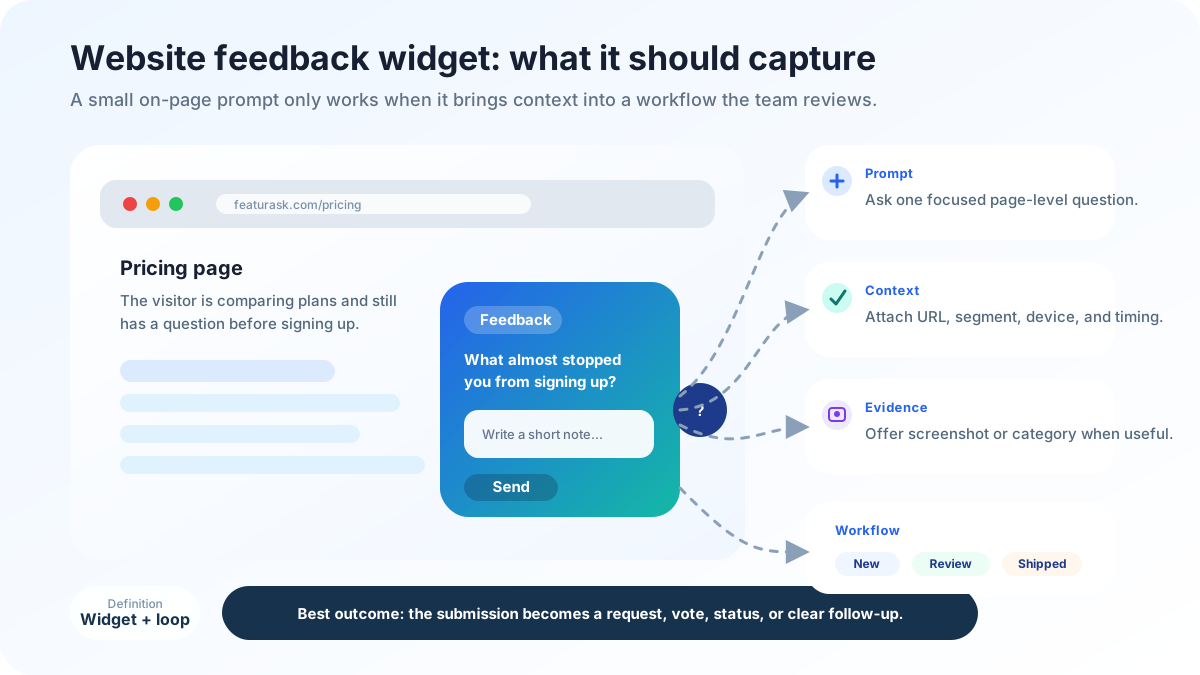
A website feedback widget is a small on-page entry point that lets visitors report friction, share ideas, rate an experience, or send context while the moment is still fresh. The format can be a floating tab, embedded prompt, screenshot button, micro-survey, or link to a public request board. What matters is not the shape of the button; it is whether the widget captures useful evidence without interrupting the task the visitor came to complete.
The category has become broader because websites now do more than explain a company. They onboard users, sell subscriptions, host documentation, let customers manage accounts, and expose product workflows in the browser. A single “contact us” form cannot handle all of that context. Nielsen Norman Group’s survey guidance emphasizes concise, unbiased questions and careful timing, which applies directly to widgets because every extra field changes who responds (NN/g). Hotjar describes feedback widgets as a way to collect page-level reactions and visual context while users browse (Hotjar). The practical lesson is simple: install a widget only after deciding what decision the feedback should improve.
For adjacent setup decisions, compare feedback board software, website feedback tools, feature request tracking, and product feedback tools.
What a website feedback widget should accomplish
A useful widget shortens the distance between a user’s experience and your team’s understanding of it. If a prospect cannot find pricing detail, a feedback tab on the pricing page can capture the objection before the prospect leaves. If a logged-in customer hits a workflow limit, an in-app prompt can capture the job they were trying to finish. If a documentation page is unclear, a one-question rating can identify articles that need attention.
The widget should also preserve context. A comment that says “confusing” is hard to use unless the system knows the page, account type, browser state, feature area, and exact prompt that triggered the response. You do not always need to show all of those fields to the user; many can be attached automatically. The goal is to make feedback easier for customers and more actionable for the team.
For product ideas in particular, a public request board is often stronger than a private text box. Visitors can see whether an idea already exists, add a vote, add a use case, and watch the status change. FeaturAsk gives small teams that public loop for $29.95/year, so product requests do not vanish into a generic inbox.
Common widget examples and when to use them
A simple satisfaction widget asks visitors to rate a page or answer “Was this helpful?” It works well for documentation, onboarding checklists, and knowledge-base articles because the team mainly needs a signal about clarity. Use it when you will review low scores and improve the page, not when you need rich product discovery.
An open comment widget asks “What stopped you today?” or “What would make this page more useful?” It is best for high-intent pages such as pricing, checkout, feature comparisons, and trial signup flows. The strength is language: people explain objections in their own words. The weakness is ambiguity: the team must tag and interpret comments consistently.
A bug-reporting widget captures a screenshot, page URL, technical details, and reproduction notes. It is valuable inside SaaS dashboards or complex web apps where a visual defect may not reproduce easily. Keep the form short, and avoid asking nontechnical users for information the browser can collect automatically.
A feature-request widget or board invites customers to propose improvements and vote on existing ideas. This is the right pattern when you expect repeat requests, want transparent prioritization, or need to reduce duplicate support conversations. It also helps customers feel heard because the request has a visible home.
Placement matters more than color
Widget placement changes the type of feedback you receive. A homepage widget tends to capture broad first impressions. A pricing-page widget captures objections about value, plan structure, missing guarantees, or competitor comparisons. A docs widget captures clarity gaps. A logged-in product widget captures workflow friction, missing functionality, and “I expected this to work differently” moments.
Before choosing placement, write the page-level question. On a pricing page, the question might be, “What information is missing before a buying decision?” In an onboarding flow, it might be, “Where do new users get stuck before activation?” In a product area, it might be, “Which workflow step creates repeated friction?” A widget without a question produces vague feedback; a widget with a focused question produces evidence.
Timing matters too. Persistent tabs are easy to find but may collect broad comments. Triggered prompts can be more relevant but risk annoying users if they appear too early. Exit prompts can capture objections but may overrepresent dissatisfied visitors. Start conservative: one or two high-signal placements, a short prompt, and a named owner who reviews responses.
How to compare website feedback tools
The best tool depends on the evidence you need. Survey-first tools are strong for structured questions, trends, and respondent segmentation. Behavior analytics tools pair comments with session recordings, heatmaps, and page behavior. Bug-reporting tools emphasize screenshots, console logs, and technical reproduction details. Public feedback board tools emphasize ideas, votes, comments, statuses, and customer-facing transparency.
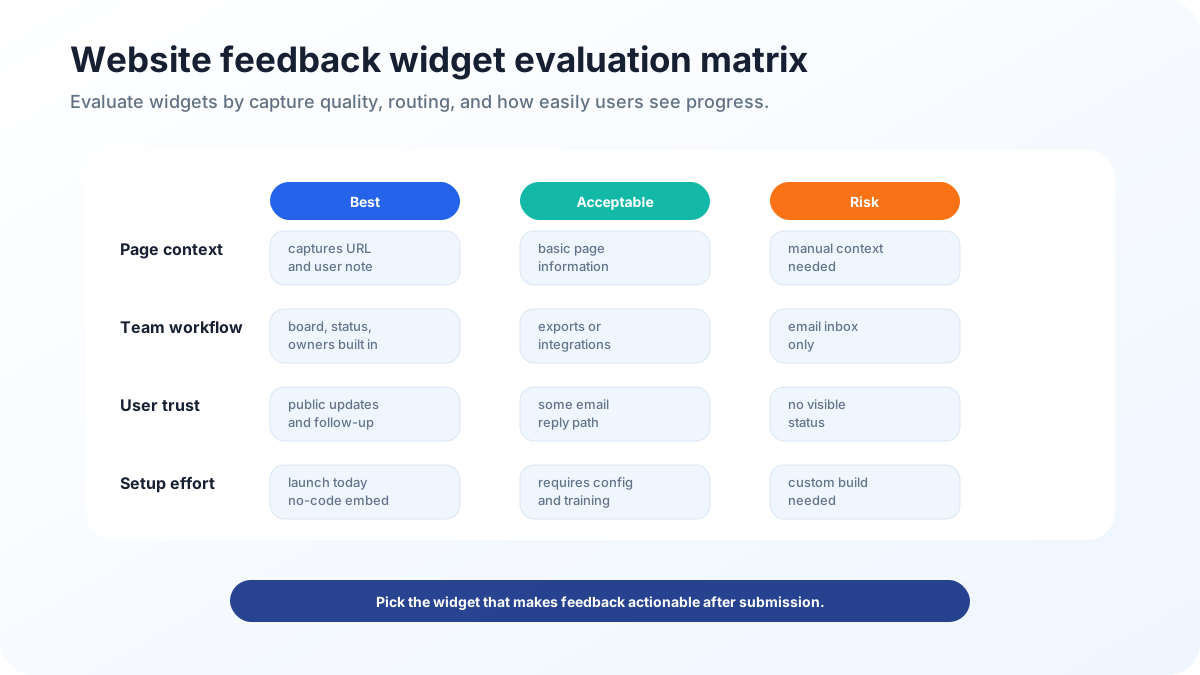
Compare tools across six practical criteria. First, setup effort: can a marketer or founder install it without a long implementation project? Second, targeting: can you show different prompts on different pages or user states? Third, context: does the submission include URL, account, segment, or screenshot details? Fourth, duplicate handling: can repeated ideas be merged instead of counted as separate noise? Fifth, workflow: who reviews, tags, and responds? Sixth, trust: can customers see what happened after they submitted feedback?
For small teams, the last two criteria often matter most. A large analytics suite can collect more data than the team can review. A lightweight board or focused widget can create more value if it fits a weekly habit. If you want to validate demand before buying heavier software, FeaturAsk includes a one month free trial with no credit card required.
Turning raw responses into product decisions
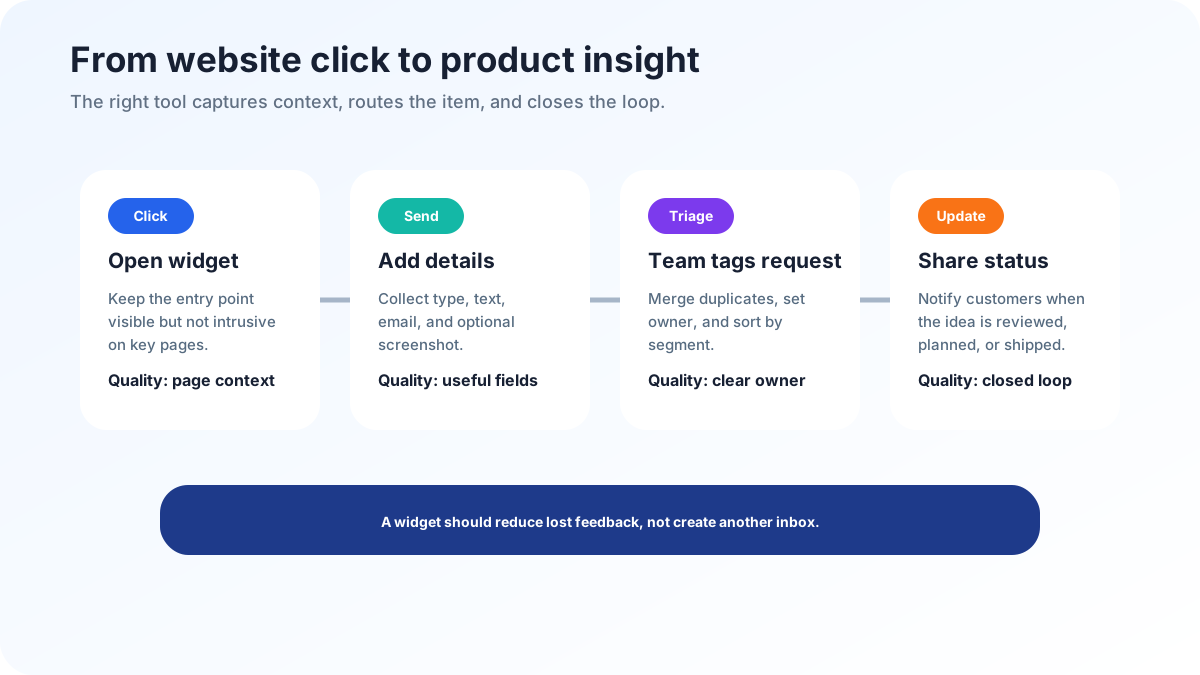
A widget is only the front door. The operating system behind it should classify each response as a bug, content issue, sales objection, support question, product idea, or research lead. Each category needs a different owner. Bugs may go to engineering or support. Pricing objections may go to marketing or sales. Feature ideas may go to product review. Documentation gaps may go to customer education.
Use a small status vocabulary: new, reviewing, planned, shipped, answered, and not now. Keep decision notes short but specific. “Merged into the reporting export request” is better than silence. “Not now because this would pull the product away from our core workflow” is better than leaving customers to guess. Salesforce’s customer research repeatedly highlights that customers expect companies to understand and respond to their needs across touchpoints (Salesforce); a feedback widget can support that expectation only if the follow-up is real.
The review cadence should be visible internally. A founder-led team might review widget feedback every Friday. A larger team might route bugs daily and product ideas weekly. The exact cadence matters less than consistency. If the widget creates a new inbox nobody checks, it will damage trust.
Metrics to watch after launch
Do not judge a widget by submission count alone. A high volume of vague comments may be less useful than a small number of clear, contextual reports. Track actionable rate, duplicate rate, response time, theme recurrence, support deflection, conversion-page objections, and shipped improvements tied to submissions. If a widget on a pricing page reveals the same confusion for two weeks, update the page and watch whether that theme declines.
For product requests, count votes carefully. Votes show demand, but they are not strategy by themselves. Segment matters: one vote from a high-fit customer may be more informative than several votes from accounts that do not match the product direction. Comments matter too because they explain the underlying job. Treat votes as a signal to investigate, not an automatic roadmap order.
A practical 2026 rollout plan
Start with a two-week pilot. Choose one marketing page where objections matter and one product or help area where friction is common. Write one question for each placement. Decide the owner, review day, and status vocabulary before the widget goes live. During the pilot, resist the urge to add many fields. You are testing whether the placement and prompt produce usable evidence.
At the end of the pilot, review every response. Mark what was actionable, what was vague, what repeated, what belonged to another team, and what should become a public request. Improve the prompt before adding more placements. If comments are too broad, ask a narrower question. If bugs lack context, add screenshot capture. If requests repeat, move them to a board so customers can vote instead of submitting duplicates.
A strong widget program also includes privacy and expectation-setting. Tell users what kind of feedback you want and whether you respond individually. Avoid collecting sensitive personal data unless necessary. If feedback may appear publicly as an idea or vote, make that clear. Trust grows when the experience feels transparent.
Examples by team and use case
Marketing teams usually care about message clarity and conversion blockers. Their widget questions should be specific: “What information is missing from this page?” is better than “Any feedback?” A short page-level prompt can reveal pricing uncertainty, unclear differentiation, missing proof, or copy that attracts the wrong audience. When those comments repeat, the fix may be a headline, comparison table, testimonial, guarantee, or clearer call to action rather than a product change.
Product teams use widgets differently. In logged-in areas, they are looking for workflow friction and unmet jobs. A useful prompt might ask, “What were you trying to do here?” That phrasing encourages users to describe the goal instead of prescribing a feature. The response can then be linked to a product area, customer segment, and related ideas.
Support and success teams need routing. If a widget collects urgent issues, it must not wait for a product review meeting. Use categories or behind-the-scenes triage to separate “I need help now” from “I have an improvement idea.” The customer experience suffers when urgent support questions disappear into a research queue.
Privacy, consent, and accessibility basics
A responsible widget collects only what the team needs. Avoid requesting sensitive personal information in a public prompt, and be careful with screenshots that may include private data. If the widget attaches browser, account, or page context automatically, explain that in plain language near the submission flow or privacy policy. For public boards, make it obvious when a comment or vote may be visible to other customers.
Accessibility matters too. The widget should be keyboard reachable, screen-reader friendly, and easy to dismiss. It should not cover critical page controls or trap focus. Colors should meet contrast requirements, and mobile placement should leave enough space for navigation and forms. A widget intended to improve experience should not create a new experience problem.
How to write better widget questions
Good questions are short, neutral, and tied to a decision. “What almost stopped you from signing up?” is more useful on a signup page than “Do you like our website?” “What should this report help you decide?” is more useful inside an analytics feature than “Any feature requests?” Avoid leading questions such as “How much do you love this new page?” because they bias responses and reduce trust.
Create a question library for common placements. Pricing pages need objection questions, docs need clarity questions, product areas need workflow questions, and public boards need problem-first idea prompts. Review the wording monthly. If responses are vague, the question is probably vague. If responses are useful, keep the prompt stable long enough to compare trends.
When not to use a widget
A widget is not the right tool for every research need. If you need deep understanding of a complex buying process, run interviews. If you need statistically reliable preference data, design a survey with sampling discipline. If you need to observe behavior, use analytics or usability testing. A website feedback widget is best for lightweight, contextual, continuous listening. It should complement research, support, and analytics rather than replace them.
FAQ
What is a website feedback widget?
A website feedback widget is an on-page mechanism that lets visitors submit comments, ratings, screenshots, bug reports, or product ideas without leaving the experience they are reacting to.
Should every page use the same feedback prompt?
No. Pricing pages, documentation, checkout flows, and product dashboards produce different evidence. Match the prompt to the decision you want to improve.
When is a feedback board better than a survey widget?
Use a feedback board when submissions are product ideas that benefit from votes, comments, duplicate merging, and public statuses. Use a survey widget when you need structured answers to a research question.
What is the simplest next step?
Pick one high-signal page, ask one clear question, review responses for two weeks, and decide whether feedback belongs in support, content, product discovery, or a public request board.
When website comments should become trackable product evidence rather than another inbox, FeaturAsk keeps requests, votes, and statuses in one lightweight workflow.