9-Step User Acceptance Testing: Practical Guide and Tools for Success
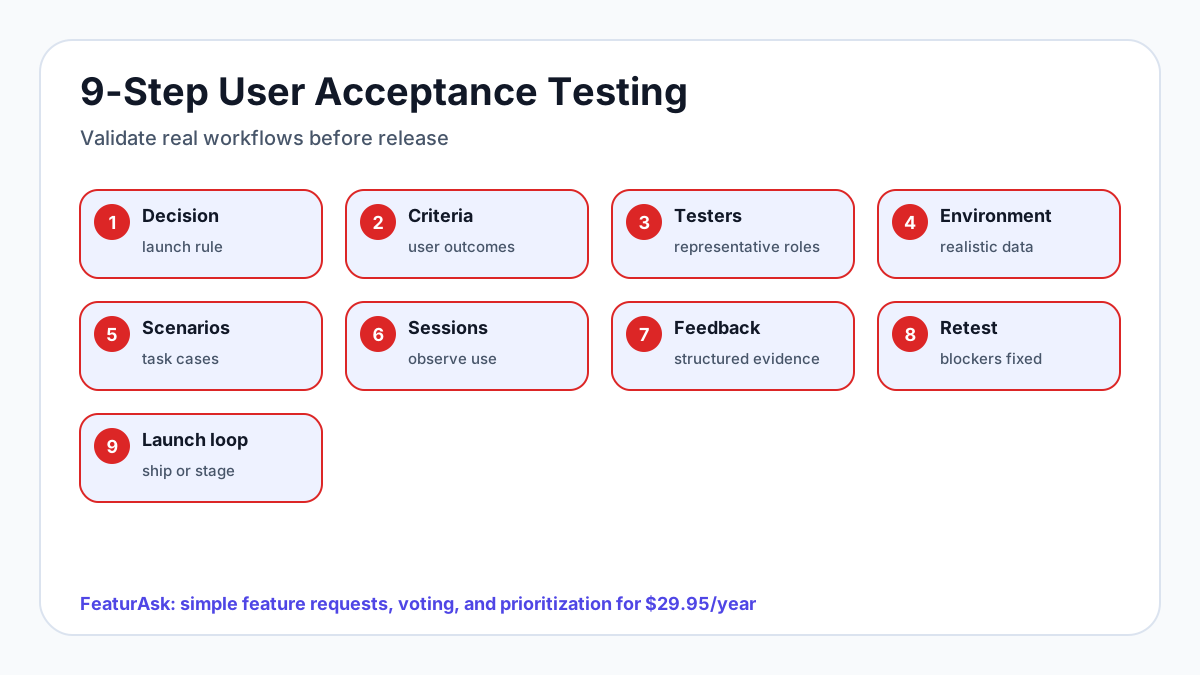
User acceptance testing, or UAT, is the release checkpoint where real users prove whether a product change works in real life. QA can confirm that the software meets requirements. Automated tests can catch regressions. UAT answers the question that matters before launch: can the right people complete the right workflow without coaching, confusion, or unacceptable risk?
That checkpoint is more important as teams ship faster. Stack Overflow's 2024 Developer Survey reported that 76% of developers were using or planning to use AI tools in their development process, which means more teams can produce changes quickly, but still need human validation before customers depend on them. Google's 2024 DORA report also warned that higher AI adoption did not automatically improve delivery performance; in its survey, each 25% increase in AI adoption was associated with lower delivery throughput and stability. UAT is one of the practical ways to keep speed from turning into avoidable release risk.
This guide is written for small SaaS teams, creators, solo developers, agencies, and product operators who need a lightweight UAT process. It covers where UAT fits, how to run a one-week test cycle, how to recruit testers, which scenarios reveal adoption risk, and how to turn findings into launch, fix, or roadmap decisions.
Where UAT fits in a lean launch process
UAT should happen after a build is stable enough for realistic use and before the release reaches everyone. It is not a replacement for QA, code review, accessibility checks, security review, or analytics. It is the bridge between internal confidence and customer acceptance.
A lean release flow often looks like this:
- Define the product goal and acceptance criteria.
- Build and review the change internally.
- Run functional QA and regression checks.
- Invite representative users into UAT.
- Fix blockers and retest the critical workflows.
- Decide whether to launch, delay, stage the rollout, or ship with known limitations.
- Update release notes, help docs, onboarding, and support replies.
The distinction matters. QA asks, "Does the export button create the right file?" UAT asks, "Can an account admin find the right filtered requests, trust the data, export it, and share it before a planning meeting?" Both questions are useful, but only the second validates the workflow customers actually care about.
For launch messaging after UAT, pair your findings with a simple product launch communication plan. Testers often expose the exact wording, tooltip, or help article customers will need on release day.
Collecting feedback during UAT should be easy for testers and organized for your team. FeaturAsk gives you an embeddable feedback widget, a clean dashboard, and request prioritization for $29.95/year after a free first month. You can start the 30-day trial with no credit card required.
The 9-step UAT workflow for modern SaaS teams
Use this 9-step workflow to add a step many teams skip: turning accepted feedback into launch communication and future request management.
-
Define the release decision. Write the goal, affected users, must-pass workflows, known risks, and the rule for launch, delay, staged rollout, or no-go.
-
Write acceptance criteria in user language. Criteria should describe the real outcome, not only the technical requirement. “Admin can export filtered requests for a planning meeting” is stronger than “export endpoint returns CSV.”
-
Recruit representative testers. Invite the roles most affected by the change: admins, new users, power users, billing owners, mobile users, agency clients, or integration-heavy customers.
-
Prepare realistic data and environments. Use staging, preview, or limited production with believable accounts, empty states, permissions, old data, mobile screens, and integration edge cases.
-
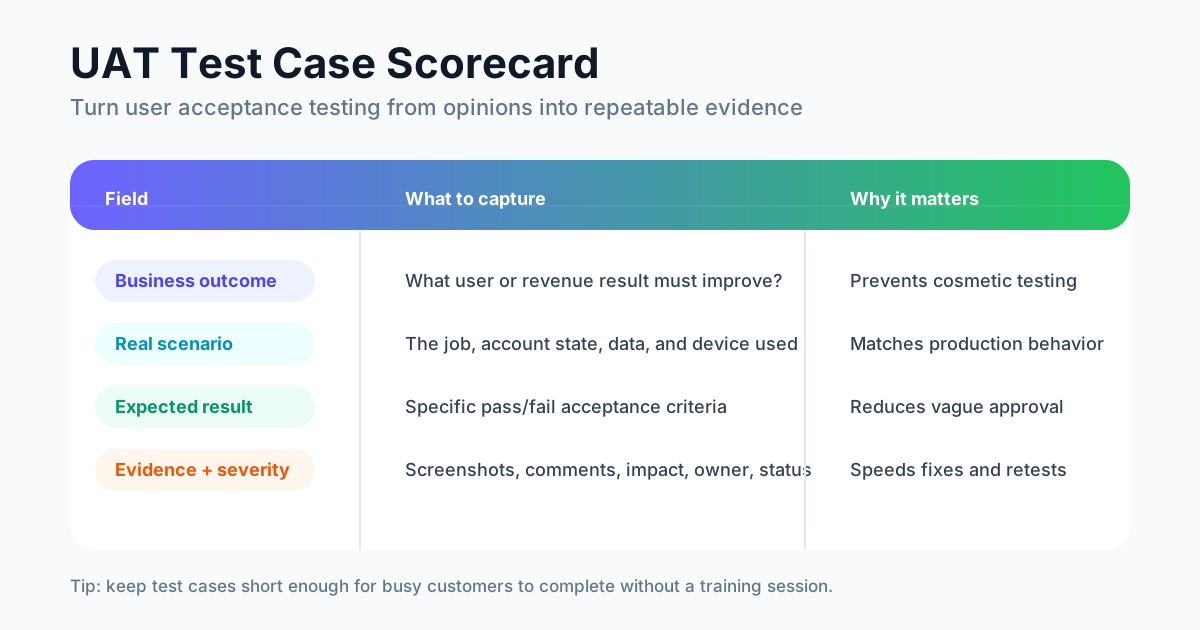
Create scenario-based test cases. Each scenario should include the participant role, preconditions, task, expected result, evidence requested, severity, owner, and status.
-
Run moderated or unmoderated sessions. Watch where users pause, misunderstand labels, miss the next step, or invent workarounds. Avoid coaching too much; confusion is data.
-
Collect structured feedback in one place. Ask for pass/fail, severity, screenshots, comments, recordings, and suggested improvements. A tool such as FeaturAsk can keep UAT ideas from disappearing into chat threads.
-
Prioritize fixes and retest critical workflows. Separate blockers, major issues, minor usability improvements, documentation needs, and enhancement ideas. Retest every blocker before launch.
-
Make the launch and feedback-loop decision. Decide what ships, what gets documented, what becomes a staged rollout, and what moves into the ongoing feature request backlog. Then update release notes, support replies, onboarding, and your product launch communication plan.
For most small product changes, this can still fit into one focused week: plan on day one, prepare and recruit on day two, run sessions on days three and four, triage on day five, fix and retest on day six, and make the launch decision on day seven.
How to recruit representative testers without slowing release
Good UAT depends more on tester fit than tester volume. Five to eight thoughtful participants can reveal serious workflow issues if they represent the people affected by the release.
Start with the roles most exposed to the change: new users, account admins, power users, billing owners, store managers, support agents, agency clients, mobile users, or integration-heavy customers. If the feature changes permissions, invite at least one admin and one non-admin. If it changes onboarding, include people who have not already learned your product language.
Use customer segments instead of whoever replies first. For example, a feedback dashboard update might need one founder, one product manager, one customer success lead, one agency operator, and one high-volume workspace admin. A billing change might need paid customers on different plans, not free users who will never see the checkout flow.
Baymard Institute's ongoing checkout research shows why representative testing matters outside pure SaaS too: its 2025 benchmark places average documented cart abandonment around 70%, and many abandonment causes are usability or trust issues that internal teams can miss. The lesson applies broadly: users abandon flows that seem obvious to the builders.
Make participation easy. Offer a 20- to 30-minute task list, clear deadline, one feedback channel, and a thank-you. If testers can vote on each other's suggestions after the session, you can connect UAT with broader discovery methods such as feature voting without confusing votes with acceptance criteria.
UAT scenarios that reveal adoption risk
A strong UAT scenario describes the job the user is trying to complete, not the implementation steps. "Click Export" is weak. "Prepare a filtered list of approved requests for tomorrow's roadmap meeting and send it to a teammate" is much better.
Use this compact scenario format:
- Objective: what user outcome must be proven.
- Participant role: who should run the test.
- Preconditions: plan, permissions, data, device, browser, or integration state.
- Scenario: the real-world situation.
- Task: what the tester must accomplish.
- Expected result: what must happen for acceptance.
- Evidence: screenshots, comments, recordings, analytics events, or logs.
- Severity: blocker, major, minor, documentation need, or enhancement.
- Owner and status: who reviews, fixes, retests, or approves.
Example:
Objective: Confirm that an account admin can review high-demand requests before planning.
Preconditions: The workspace has 20 requests, multiple statuses, comments, and voted items.
Scenario: You are preparing for a monthly roadmap review and need to identify requested ideas that are not already shipped.
Task: Filter requests by open status, sort by votes, open the top request, read comments, and export the filtered list.
Expected result: The admin completes the workflow without help, exported data matches the visible filter, and comments are easy to find.
Include uncomfortable cases, not only happy paths. Test expired invitations, partial permissions, missing data, duplicate names, failed payments, slow connections, mobile screens, empty states, imports, exports, notifications, and recovery from mistakes. Adoption risk usually hides in the gaps between polished demo data and messy customer reality.
How to turn UAT feedback into launch/fix/roadmap decisions
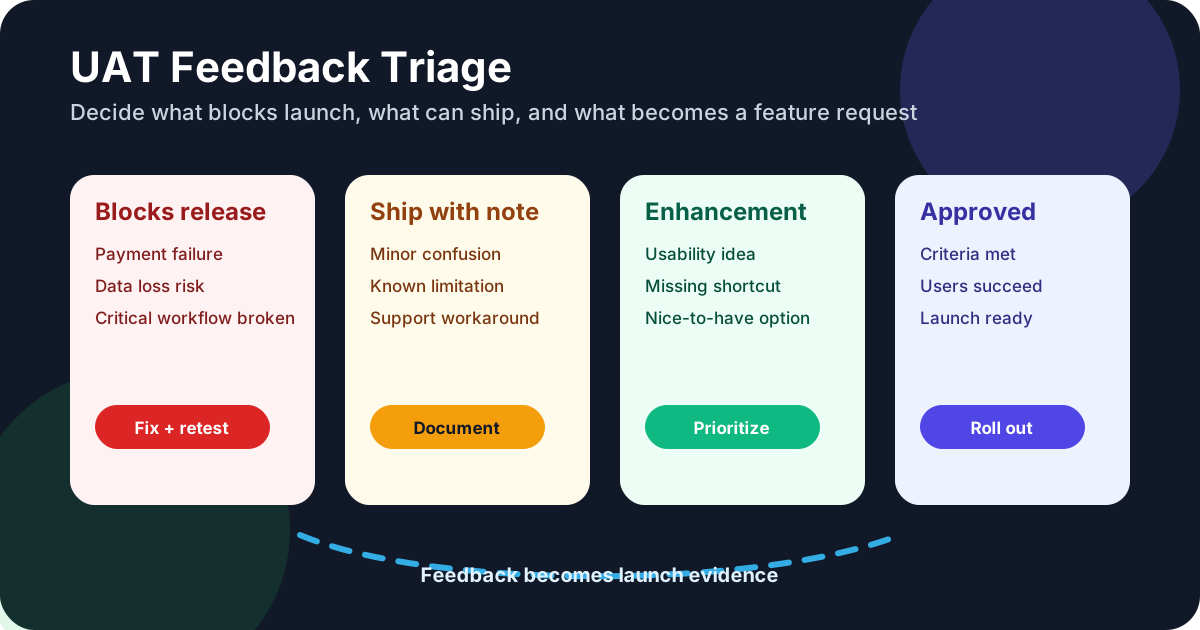
Raw UAT comments are not decisions. A tester saying "this is confusing" might mean a launch blocker, a copy fix, a support note, or a future enhancement. Your triage system should make the difference visible.
Use five buckets:
- Blocker: prevents a critical user from completing the workflow or creates unacceptable data, payment, security, permission, or trust risk.
- Major issue: hurts an important workflow but has a workaround or affects a narrower segment.
- Minor issue: creates friction but does not prevent successful use.
- Documentation or communication need: the product works, but users need better guidance, release notes, onboarding, or support copy.
- Enhancement idea: useful input that belongs in the product feedback backlog, not the launch gate.
Every blocker needs an owner, a fix, and a retest. Major issues need an explicit decision: fix now, stage rollout, document limitation, or delay. Enhancement ideas should not disappear in a spreadsheet. Move them into a trackable feedback process and compare them with ongoing customer requests. If you are building that system, this guide to feature request templates can help standardize the intake.
Turn scattered UAT comments into clear product evidence. FeaturAsk lets testers submit suggestions, vote, and comment from a simple widget while your team moderates and organizes requests in one dashboard. The first month is free, and no credit card is required.
Tools/templates for lightweight UAT in 2026
The best UAT stack is the one your team will actually maintain. For a small team, that usually means a short plan, realistic test data, one feedback channel, issue tracking, analytics, and a decision summary.
A practical toolkit includes:
- UAT plan: scope, affected roles, goals, dates, environment, risks, and decision rule.
- Scenario checklist: three to eight role-based tasks tied to acceptance criteria.
- Feedback form or widget: result, expectation, severity, screenshot, recording, and comments.
- Issue tracker: confirmed defects with owners, status, and retest notes.
- Analytics/events: evidence that testers reached the intended states.
- Decision summary: what passed, what failed, what changed, and why the team chose the release path.
FeaturAsk fits the feedback side of this workflow. During UAT, testers can submit product ideas or friction points through an embedded widget, vote on suggestions, and add comments. Your team can keep defects in an issue tracker while using FeaturAsk for enhancement requests and recurring product themes. That separation keeps launch blockers urgent without losing useful roadmap evidence.
If you are comparing tooling options, use this feature request tools guide to evaluate whether a system reduces friction for users and sorting work for your team.
Final UAT readiness checklist
Before you approve the next release, confirm that:
- Acceptance criteria are written in plain language.
- Testers represent the roles affected by the release.
- Scenarios use realistic data, permissions, devices, and edge cases.
- The environment is stable enough for meaningful validation.
- Sessions are short enough for busy customers to complete.
- Feedback is captured in one consistent format.
- Findings are grouped as blockers, major issues, minor issues, documentation needs, and enhancements.
- Critical fixes are retested by the affected role.
- Support docs, release notes, onboarding, and launch messages reflect what testers misunderstood.
- Enhancement ideas are moved into a trackable feedback workflow.
- The team has made an explicit launch, delay, staged rollout, beta extension, or no-go decision.
Frequently asked questions about user acceptance testing
What is the difference between UAT and QA?
QA checks whether software works according to requirements and quality standards. UAT checks whether target users can complete real workflows and accept the release as useful, understandable, and ready for use.
Who should perform UAT?
The best UAT participants are representative users or close proxies: customers, admins, beta testers, support specialists, internal operators, or partners. Avoid relying only on people who designed or built the feature.
When should UAT happen?
Run UAT after the feature is stable enough for realistic use and before full rollout. For high-risk features, validate previews earlier, then run a formal UAT pass before launch.
How many UAT test cases do you need?
Use enough scenarios to cover the critical workflows and roles affected by the release. For a small feature, three to six scenarios may be enough. For a risky billing, permission, or integration release, add cases for each important role and failure path.
What should happen to UAT feedback after launch?
Fix launch blockers before release, document known limitations, and move improvement ideas into your feedback process. After launch, compare UAT predictions with real usage, support tickets, votes, and customer comments.
User acceptance testing is not bureaucracy. Done well, it protects users, reduces launch risk, and teaches your team what customers need before a release reaches everyone. Keep it simple: test real scenarios with representative users, make clear decisions, and turn every finding into a fix, a communication improvement, or a trackable product idea.
Ready to make UAT feedback easier to collect and prioritize? FeaturAsk helps small teams gather feature requests, comments, and votes in one place for $29.95/year after a free 30-day trial. No credit card required.
Sources: Stack Overflow Developer Survey 2024, DORA 2024 Accelerate State of DevOps Report, Baymard Institute cart abandonment research.