16 Feature Request Tools for Managing Product Feedback in 2026
Feature request tools help you turn customer ideas into product decisions you can explain. Instead of losing suggestions in email, live chat, sales calls, social comments, sticky notes, and spreadsheets, a dedicated system gives users one place to submit requests, vote on ideas, add context, and see what happens next.
In 2026, the best option is not always the biggest product management platform. Many solo developers, bootstrapped SaaS founders, creators, agencies, e-commerce teams, and small businesses need something lighter: a no-code widget, a clean dashboard, public or private voting, moderation, analytics, and pricing that does not punish early traction. This guide explains what matters, what to avoid, and how to choose a feature request system that improves your roadmap instead of becoming another dashboard nobody checks.
What are feature request tools?
Feature request tools are systems for collecting, organizing, prioritizing, and communicating user suggestions. A complete tool usually includes a request form or embeddable widget, an idea board, voting, comments, admin moderation, status labels, analytics, and sometimes roadmap or changelog features.
The core job is simple: make it easy for users to tell you what they want, and make it easy for your team to decide what to do with that input. That second part is where many teams struggle. Ten customers asking for the same feature may represent a retention opportunity, a niche workflow, or a symptom of unclear onboarding. A good tool preserves context so you can understand the difference.
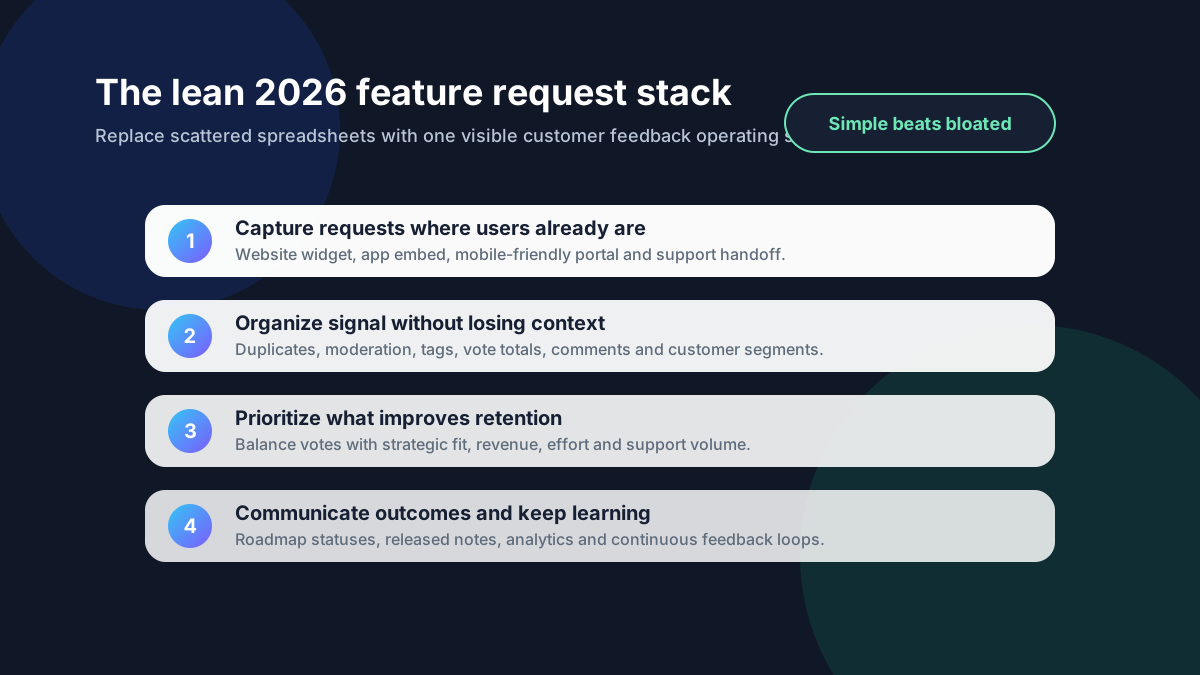
A general form builder can collect suggestions, and a spreadsheet can list them. But neither is ideal once users want visibility, votes, discussion, duplicate merging, or status updates. Purpose-built tools create a feedback loop: collect, validate, prioritize, communicate, and learn.
Collecting and organizing feature requests doesn't have to be messy. FeaturAsk gives you a clean, embeddable widget and a simple dashboard to manage all feedback in one place for $29.95/year. Get your 30-day free trial—no credit card required—and streamline your product decisions.
Why feature request tools matter more in 2026
The 2026 product environment is noisy. Users compare your product with dozens of alternatives, AI has made software creation faster, and small teams are expected to ship improvements continuously. Feedback is product intelligence, but only if it is captured in a way your team can review.
A feature request tool helps you separate signal from volume. Without one, the loudest customers, latest support tickets, or strongest internal opinions can dominate your roadmap. With one, you can see repeated patterns across users and combine qualitative context with quantitative votes.
This matters especially for lean teams. If development capacity is limited, every roadmap choice has an opportunity cost. The right system gives you enough structure to make better calls without turning product management into bureaucracy.
Current pricing pages also show why small teams should compare tools carefully before committing. <a href="https://canny.io/pricing" rel="nofollow">Canny's public pricing page</a> presents a free entry point and paid feedback-management tiers; <a href="https://www.productboard.com/pricing/" rel="nofollow">Productboard's pricing page</a> packages broader product management capabilities for more mature teams; and <a href="https://www.uservoice.com/pricing/" rel="nofollow">UserVoice's pricing page</a> reflects an enterprise-style customer feedback platform. Those are valid options for some organizations, but the comparison point is clear: match the tool to the process you can actually maintain.
If you are still defining the quality of requests you want to collect, start with practical feature request templates. If you already have an idea board and need a decision process, the guide to feature voting explains how to use votes without letting them become automatic roadmap orders.
The must-have features to evaluate
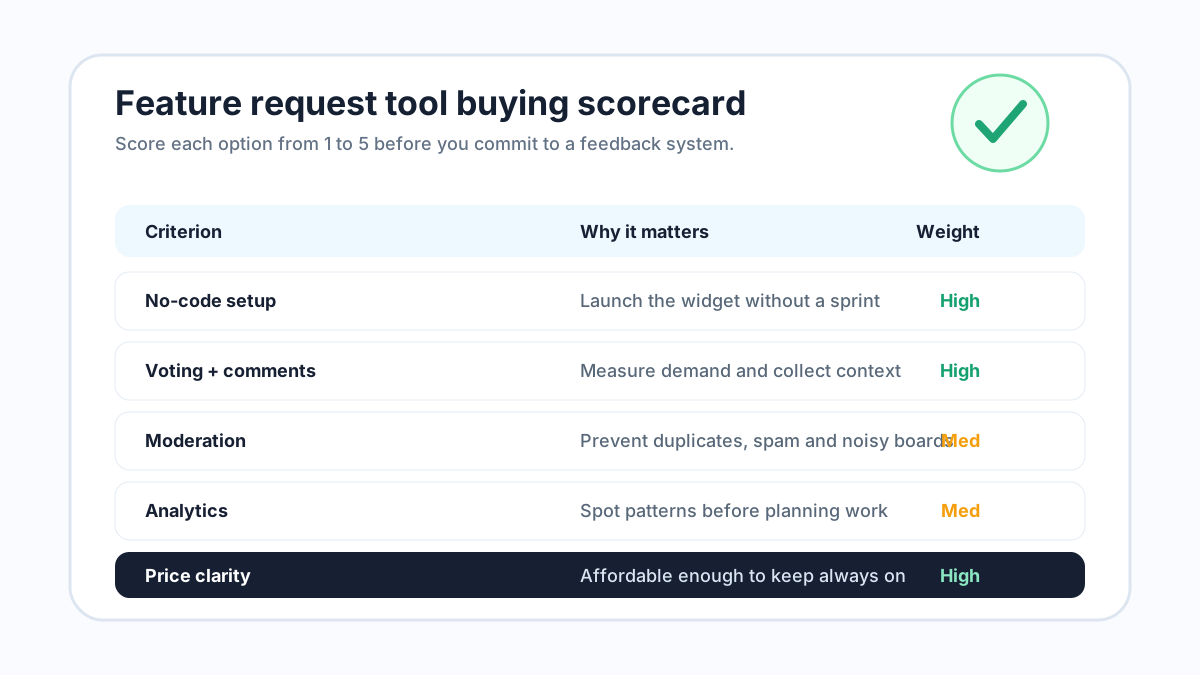
Not every team needs an enterprise product operations suite. But every team should evaluate the same core capabilities before choosing a tool.
Easy collection for users
If users cannot find the request form, your feedback database will be thin and biased. Look for tools that offer an embeddable widget, a shareable board, mobile-friendly pages, and simple submission flows. For small products, no-code setup is especially important because the best feedback system is the one you can launch today.
The submission form should be short. Ask for the idea, the problem it solves, and optional context. Long forms may feel thorough, but they reduce participation. You can always ask follow-up questions later.
Voting and comments
Voting helps you identify demand, but votes are not the whole story. A request with 40 votes from free users may matter less than one with 8 votes from high-retention customers. Comments add the missing context: use case, pain level, workaround, urgency, and willingness to pay.
A strong feature request tool makes voting simple and keeps comments attached to the original idea, not scattered across email threads. It should also let users discover existing ideas so they vote instead of creating duplicates.
Moderation and duplicate management
Public feedback boards can become messy without moderation. Users may submit duplicates, vague ideas, bug reports, support issues, or requests that do not fit the product. Your tool should let you approve submissions, merge duplicates, edit titles for clarity, tag ideas, and close requests that are out of scope.
Moderation is not about censoring users. It is about keeping the board useful so future users can find existing ideas and add meaningful votes.
Analytics and prioritization views
At minimum, you need visibility into top requests, recent activity, vote counts, categories, and statuses. Better tools help you filter by customer type, plan, date, or business impact. Analytics should make review sessions faster, not force you to export everything before you can understand it.
For prioritization, a simple framework is usually enough: demand, strategic fit, effort, revenue or retention impact, and confidence. If the tool helps you compare those factors, great. If not, make sure it at least gives you clean data to review.
Custom branding and user experience
A feedback board is part of your product experience. Custom branding, clear labels, and a clean interface make the process feel native instead of bolted on. For creators and small businesses, this is often more important than advanced integrations because customers judge trust from the entire experience.
Affordable pricing
A feedback system should be always on. If pricing rises too quickly, the tool may become something you hesitate to promote. Look for transparent pricing that matches your stage. Small teams should not need enterprise pricing just to collect, vote on, and organize ideas.
Turn scattered customer feedback into clear product direction. FeaturAsk helps you gather ideas, prioritize requests, and communicate updates from a single dashboard for $29.95/year. Start your free 30-day trial today—no credit card required.
16 feature request tools to consider in 2026
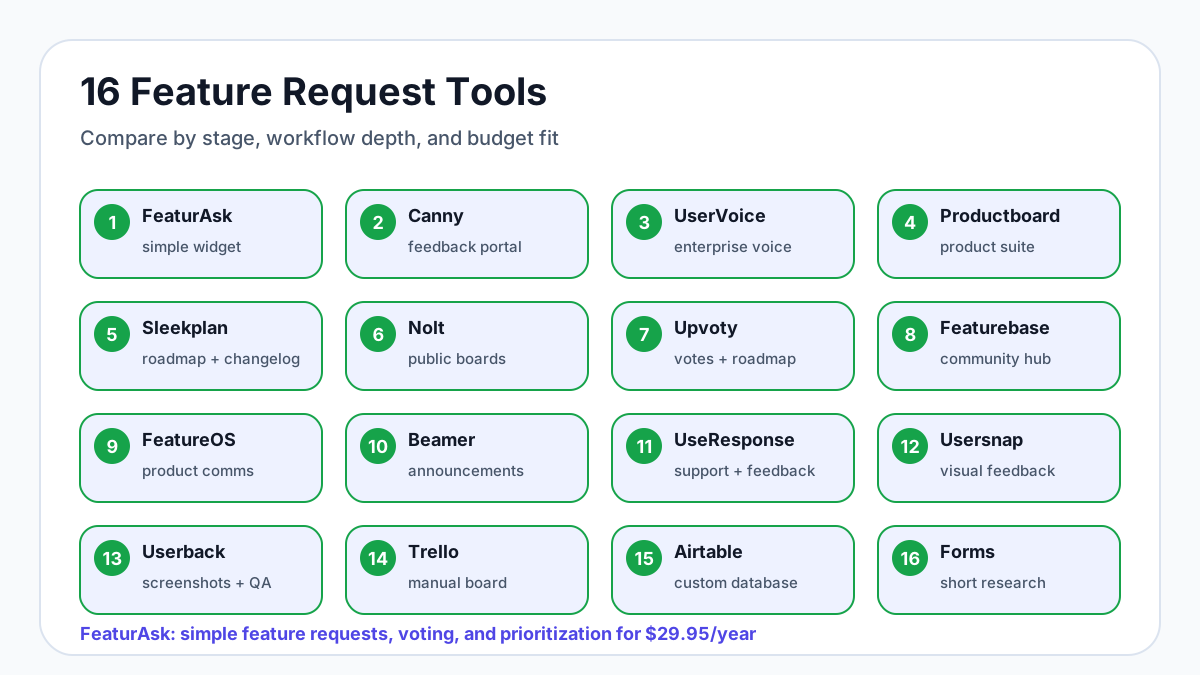
Below is a concise buyer’s list organized around real search intent: which feature request software should you actually evaluate? Pricing and packaging change often, so validate current plans on each vendor’s site before buying. The important comparison is fit: a small site may need a fast widget, while a larger product organization may need roadmap governance and integrations.
1. FeaturAsk
FeaturAsk is the simplest fit for small websites, bootstrapped SaaS products, creators, agencies, e-commerce stores, and teams without a big software budget. You can add a feature request widget to a website, let users submit and vote on ideas, moderate feedback, view analytics, and keep the board on brand. The strongest advantage is affordability: $29.95/year after a one-month free trial, with no credit card required. Choose FeaturAsk when you want a clean feedback loop without a monthly enterprise platform.
2. Canny
Canny is a well-known feedback portal for SaaS teams that want public boards, voting, roadmap communication, and changelog workflows. It is useful when you have enough feedback volume to justify a maintained portal and enough team process to keep statuses current. Check Canny’s public pricing page before committing because tiers and limits matter for growing teams.
3. UserVoice
UserVoice is built for more mature feedback management with enterprise-style collection, account context, and prioritization. It can be powerful for customer success and product operations teams that need segmentation and stakeholder reporting. Smaller teams may find it heavier than necessary.
4. Productboard
Productboard is a broader product management platform that connects feedback with discovery, prioritization, roadmapping, and strategy. It makes sense when product managers need to synthesize feedback from many sources and communicate plans internally. It may be more process than a small website needs for simple request voting.
5. Sleekplan
Sleekplan combines feedback boards, roadmaps, and changelogs. It is a practical option for SaaS teams that want public communication around what is planned and shipped. Evaluate how easy it is for your users to submit ideas from the places where they already work.
6. Nolt
Nolt focuses on straightforward feedback boards with voting and status updates. It is often a good candidate for teams that want a public idea board without a full product management suite. Compare moderation, branding, and integration needs before choosing it.
7. Upvoty
Upvoty offers feedback boards, roadmap views, and changelog features. It can fit teams that want to combine request collection with public progress communication. As with any portal, the value depends on keeping categories, duplicates, and statuses clean.
8. Featurebase
Featurebase is designed around user feedback, changelogs, and roadmap visibility. It can work well for teams that want a more community-like feedback hub. Review whether its collaboration and integration features match your team size.
9. FeatureOS
FeatureOS-style platforms combine customer feedback, roadmaps, and updates in a more complete product communication layer. They can be useful when feedback is part of a larger customer engagement strategy, but may be more than a tiny team needs.
10. Beamer
Beamer is often associated with announcements and changelogs, but it can fit teams that want product communication around releases and feedback. Consider it if your priority is keeping users informed, then compare its request-management depth against dedicated feature voting tools.
11. UseResponse
UseResponse covers customer support, community, knowledge base, and feedback use cases. It can suit teams that want feedback connected with support operations. The tradeoff is complexity: a focused feature request workflow may be faster to launch elsewhere.
12. Usersnap
Usersnap is strong for visual feedback, bug reporting, and QA-style user input. It is useful when screenshots, annotations, or website feedback are central. If your main need is roadmap voting, compare it against simpler request-board tools.
13. Userback
Userback also emphasizes visual feedback, screen capture, and bug reports. It works well for web teams, agencies, and QA workflows. Use it alongside or instead of a feature request board depending on whether your feedback is mostly visual issues or product ideas.
14. Trello
Trello is not purpose-built feature request software, but it can work as an early manual board. Create lists for new, under review, planned, shipped, and not planned; then add cards from support conversations. It is cheap and familiar, but users cannot naturally browse, vote, or comment like they can in a dedicated tool.
15. Airtable or a spreadsheet
Airtable, Google Sheets, or a simple database can collect requests when volume is low. This gives total flexibility and almost no buying friction. The downside is that users do not get a visible feedback loop unless you build one yourself.
16. A form builder plus analytics
Typeform, Tally, Google Forms, or an on-site form can capture structured ideas for a short research cycle. This is fine for surveys and beta feedback, but it becomes limiting when duplicate requests, voting, public statuses, and ongoing prioritization matter.
How to choose among the 16 options
Choose the lightest tool that solves the real bottleneck. If feedback is scattered and users need a place to vote, start with a widget and request board. If product managers need to connect feedback to strategy, consider a broader suite. If the problem is visual QA, prioritize screenshot and session context. If you only need one research pulse, use a form.
Use this decision rule: the tool should make feedback easier for users, review faster for your team, and prioritization clearer for the business. If setup takes weeks before a customer can submit an idea, it is probably too heavy for an early-stage team.
Final checklist for choosing feature request tools
Before you choose, run each tool through this checklist:
- Can users submit requests without creating friction?
- Can you embed the collection experience where users already are?
- Does voting capture demand without hiding customer context?
- Can admins moderate, merge duplicates, and update statuses quickly?
- Are analytics clear enough for planning discussions?
- Does the board match your brand and work well on mobile?
- Is pricing sustainable for your stage?
- Can you start small and improve the process over time?
The right feature request tool should make your product decisions calmer. It should reduce scattered feedback, surface repeated demand, help you explain tradeoffs, and give customers confidence that you are listening. For many small teams in 2026, that means choosing a tool that is focused, affordable, and easy to launch, not the biggest platform with the longest feature list.
Whether you're a solo developer or a growing team, FeaturAsk helps you stay in sync with your users for $29.95/year. Collect suggestions, manage priorities, and close the feedback loop in one place. Start your one-month free trial—no credit card required.