Successfully Announce Product Updates and New Features
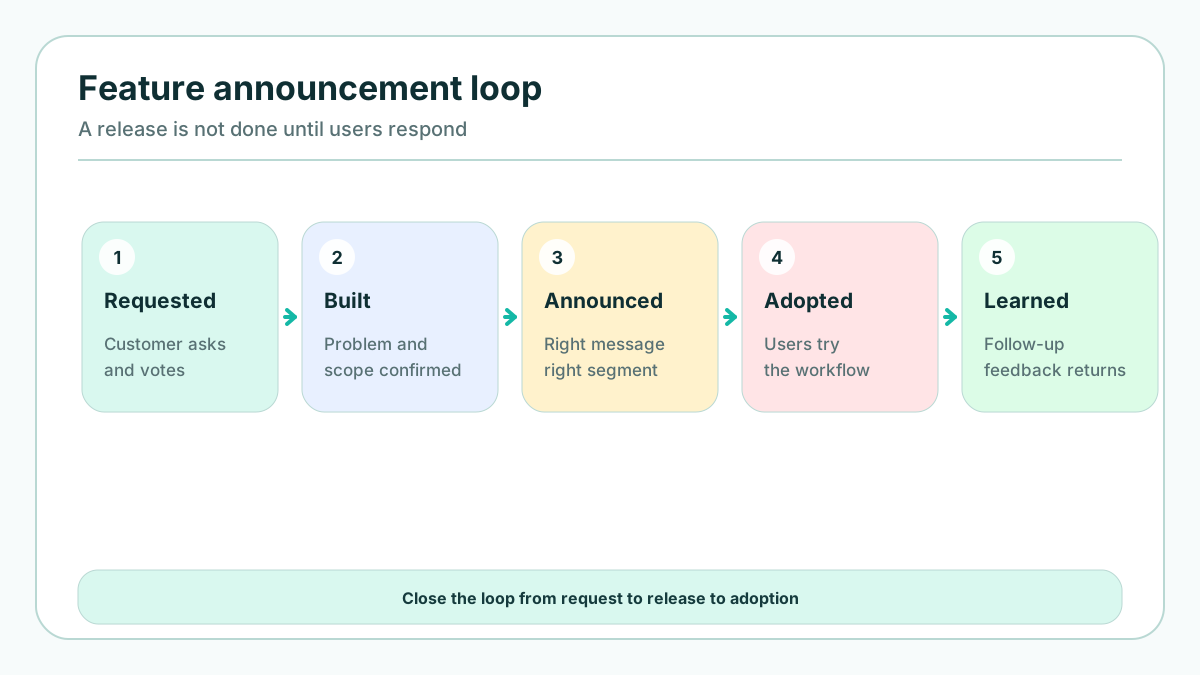
A product update announcement is not a victory lap for the team that shipped the work. It is a translation layer between what changed in the product and what users can now do better, faster, or with less risk. When that translation is vague, even valuable features look like noise. When it is specific, users understand why the change matters and what to try next.
The frill article on this topic points to the right broad search intent: use in-app communication, visuals, audience targeting, feedback, multiple channels, and careful handling of removed features. Small SaaS teams need a more operational version of that advice. You usually do not have a full product marketing department, a lifecycle team, and a launch comms specialist. You need a repeatable system that works for a bug-fix week, a major workflow release, and the awkward moment when a customer-requested feature changes direction.
If you want a lightweight place to connect customer requests with shipped updates, FeaturAsk includes a 1 month free trial, no credit card required, then stays affordable at $29.95/year for small SaaS teams.
Start by classifying the update
Before writing subject lines or designing banners, decide what kind of product change you are announcing. The category determines the audience, urgency, channel mix, and level of detail.
Most SaaS updates fall into one of these groups:
- Major new capability: a feature that creates a new workflow, product tier, or clear competitive advantage.
- Improvement to an existing workflow: a faster path, better filtering, clearer navigation, new fields, or automation inside a familiar area.
- Integration or platform update: a change that affects setup, permissions, data flow, or third-party configuration.
- Reliability, performance, or security update: a change users may not see directly but should trust or understand.
- Beta or early-access release: a feature that needs the right expectations, feedback, and possibly limited availability.
- Deprecation or removal: a change that can create anxiety unless you explain timing, alternatives, and migration steps.
This classification prevents two common mistakes. The first is over-announcing every small improvement until users stop paying attention. The second is under-announcing changes that affect user behavior, permissions, data, or billing. A small visual tweak might only need a changelog note. A new permission model may need admin email, in-app education, documentation, and support scripts.
A useful rule: the more the update changes a user's next action, the more context the announcement needs. If the update only makes something faster, tell users where to find it. If it changes what is possible, show the before-and-after. If it changes what users can no longer do, give them a migration path before the removal becomes urgent.
Define the audience before the message
The right announcement is often not the one sent to everyone. Relevance is the difference between a helpful product message and another ignored notification.
Segment by role, plan, behavior, lifecycle stage, and expressed demand. Admins may need setup details. Individual contributors may need a short in-app prompt. Trial users may need a use-case example that helps them reach activation. Enterprise customers may need an account-team note before public release. Users who requested the feature deserve a different message than users who have never touched that part of the product.
For small teams, segmentation does not need to be complex. Start with four questions:
- Who can use this update today?
- Who asked for it or struggled with the related workflow?
- Who must change behavior because of it?
- Who would be annoyed if they received this message?
That fourth question is underrated. Every unnecessary announcement trains users to ignore the next one. If a feature affects only managers on paid plans, do not send the same email to every free user. If an update only improves an advanced reporting screen, notify the people who open reports regularly and mention it briefly in the public release notes.
This is where feedback history becomes launch infrastructure. A feature request board, support tags, CRM notes, and onboarding responses can identify the users most likely to care. For more on turning requests into a manageable workflow, see 7 ways to handle feature requests.
Write the announcement around the user problem
Users do not care that your team shipped a refactor, rebuilt an endpoint, or closed an internal ticket. They care about the new outcome. Good launch copy starts with the friction the user already recognizes.
Weak announcement: "Advanced filters are now available."
Better announcement: "Find overdue renewals in seconds by filtering accounts by owner, renewal date, plan, and health score."
The second version gives a user problem, a capability, and a reason to try it. That structure works across channels:
- Problem: what used to be slow, confusing, risky, or manual?
- Change: what can users do now?
- First action: where should they click, enable, test, or read more?
- Scope: who gets access, what plan is included, and what limitations remain?
- Feedback path: where can users ask questions or suggest improvements?
Plain language matters more than cleverness. The Nielsen Norman Group has repeatedly shown that clear language improves user comprehension. Product announcements should follow the same principle: short sentences, concrete nouns, visible benefits, and no internal project names.
For example, avoid phrases like "leveraging an enhanced orchestration layer" unless your buyers are specifically evaluating infrastructure. Say what changed in the user's work: "Imports now finish faster and show clearer error messages when a row needs attention." The closer the copy is to the user's task, the easier it is for them to act.
Choose channels based on behavior, not habit
Email is not dead, but it is not enough. In-app announcements are powerful, but they only reach people who log in. Social posts can build public momentum, but they rarely explain setup. Release notes are valuable for history, but many casual users will never read them. A strong announcement plan assigns each channel a job.
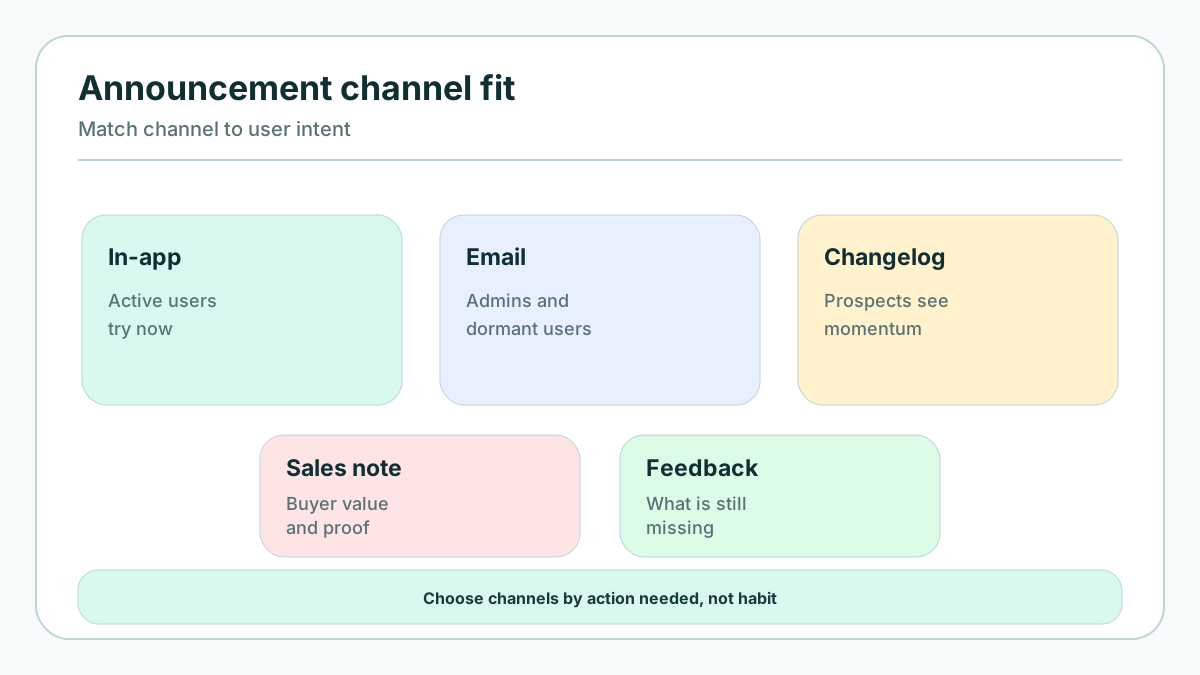
- In-app message: best for contextual nudges near the feature, short tooltips, banners, and "try it now" prompts.
- Email: best for launches with business impact, plan eligibility, admin setup, webinars, or summaries users may forward.
- Changelog or release notes: best for complete product history, technical details, and users who actively track progress.
- Help documentation: best for configuration, edge cases, screenshots, permissions, and troubleshooting.
- Customer-facing team enablement: best for account-specific implications, objections, renewals, and demos.
- Social and community posts: best for public proof, momentum, and positioning.
Do not paste the same paragraph everywhere. Adapt the message to the context. The in-app message should be short and action-focused. The email should explain why the update matters. The release note should be complete and searchable. The help doc should answer setup questions. The customer success note should connect the feature to account goals.
If your release-note process is still ad hoc, review release notes best practices and examples before building a launch calendar.
Make the update easy to try
The best product announcement reduces the distance between attention and action. If a user reads the message and then has to search the interface, remember a setting name, or ask support for access, adoption drops.
For in-app announcements, place the message near the relevant workflow. A banner on the dashboard is useful for a company-wide launch, but a tooltip beside the new filter, import button, or editor panel can be more effective for a narrow feature. If the update requires setup, link directly to the settings page. If it has eligibility rules, state them before users click.
For email, include a single primary CTA. Secondary links are fine for documentation or release notes, but the main action should be obvious. "Try the new renewal filters" is stronger than "Learn more" because it tells the user what to do.
For major updates, consider a short guided path:
- Show the before-and-after in the announcement.
- Link to the exact product location.
- Add an in-app checklist or empty-state example.
- Ask for quick feedback after first use.
- Follow up with non-adopters in the target segment.
The goal is not just awareness. The goal is successful first use. A user who tries a feature once and understands its value is more likely to remember it when the related problem returns.
Use visuals to explain, not decorate
Visuals can make product updates easier to understand, but only when they reduce cognitive load. Screenshots, annotated GIFs, short videos, comparison tables, and diagrams should answer a real question: where is it, what changed, how does it work, or why is this better?
A screenshot with a red box around the new control can be more useful than a polished illustration. A 20-second GIF can explain a workflow faster than three paragraphs. A comparison table can show plan availability or old-versus-new behavior without forcing users to parse a long sentence.
Keep visuals focused. If the feature is complex, do not try to show the entire product. Crop to the relevant area and add labels. If the update affects a sequence, show the steps. If the change is strategic rather than visual, use a simple diagram that connects the update to an outcome.
Accessibility also matters. Use descriptive alt text, avoid relying on color alone, and make sure important instructions appear in text as well as images. Product announcements should help every user, not just the ones who can view a perfect screenshot on a large monitor.
Build feedback into the launch
A launch is a learning moment. Users are paying attention, comparing the update with their expectations, and discovering edge cases your team may not have predicted. Treat that attention as input, not just applause.
Ask for feedback at the point of experience. A long survey two weeks later may collect general sentiment, but a small prompt after a user tries the new workflow can capture precise reactions. Ask questions such as:
- Did this help you complete the task faster?
- What was unclear?
- What is still missing?
- Should we notify you about future improvements to this area?
Keep the request lightweight. A thumbs-up/thumbs-down option, a short comment box, or a link to a feature request thread can be enough. The important part is connecting feedback to the feature, the user segment, and the next product decision.
With FeaturAsk, teams can show which customer request was shipped, invite users to comment on the result, and capture follow-up demand during a 30-day free trial with no credit card; after that it is $29.95/year.
Handle removals and deprecations with extra care
Announcing a removed feature is harder than announcing a new one because the user may experience loss before they see the improvement. Do not hide removals inside cheerful launch copy. Respect users enough to explain what is changing, why it is changing, when it happens, and what they should do next.
A deprecation announcement should include:
- the feature, API, workflow, or setting being removed;
- the reason, stated in user-centered terms;
- the timeline and any grace period;
- the replacement or workaround;
- who is affected;
- where to get help;
- what happens if no action is taken.
If the removal is paired with a better capability, explain the tradeoff honestly. "We are replacing the old export builder with scheduled reports so teams can automate weekly delivery" is clearer than "We are improving exports." Avoid pretending that no one will be inconvenienced. Users trust teams that name the disruption and provide a path through it.
For roadmap-level communication around big changes, the guide to public product roadmap benefits shows how visibility can reduce surprise and make tradeoffs easier to understand.
Measure announcement success after the send
Open rates and page views are useful, but they do not prove that a product announcement worked. A successful announcement changes user behavior in the intended audience.
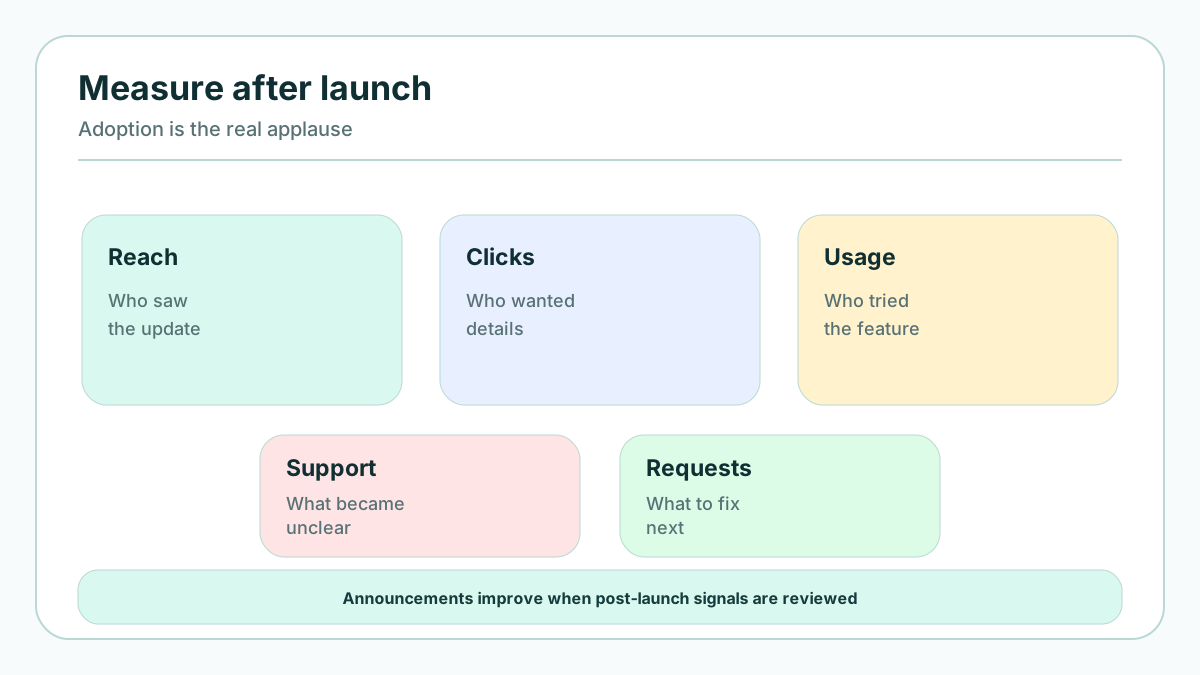
Measure the launch in layers:
- Reach: who received, saw, or opened the message?
- Engagement: who clicked, watched, replied, or opened the release note?
- Activation: who used the feature for the first time?
- Depth: who repeated the behavior or completed the full workflow?
- Sentiment: what did users say in replies, comments, support tickets, or feedback prompts?
- Support load: did the announcement reduce confusion or create new questions?
- Business impact: did the update influence trial conversion, expansion, retention, or account health?
Define the primary activation event before launch. For a filter feature, it might be "created and saved a filtered view." For an integration, it might be "connected account and completed first sync." For a reporting update, it might be "shared report with another teammate." If you only measure email clicks, you may optimize for curiosity instead of value.
It is also worth checking whether the wrong audience responded. If many unqualified users click a paid-plan feature, the message may need clearer eligibility. If admins understand the change but end users do not adopt it, you may need an in-product nudge. If support receives the same question repeatedly, update the announcement, documentation, and onboarding copy.
Atlassian's guidance on release notes emphasizes clarity and context, while Intercom's advice on product announcements highlights matching announcements to the customer journey. Together, those ideas point to the same operating principle: communicate where the user is, in language that helps them move forward.
Preflight checklist for small SaaS teams
Before publishing, run through this checklist:
- The update category is clear.
- The target audience is defined.
- The message leads with the user problem.
- The first action is obvious.
- Plan availability and limitations are stated.
- Visuals explain the change rather than decorate it.
- Help docs and support answers are ready.
- Customer-facing teams know what to say.
- The activation event is instrumented.
- A feedback path is visible.
- A follow-up owner is assigned.
This checklist is intentionally simple. A small SaaS team should be able to use it without turning every release into a ceremony. The point is to prevent avoidable confusion and make product updates feel connected to customer needs.
Conclusion
To successfully announce product updates and new features, stop treating communication as a final launch task. It is part of the product experience. Classify the update, segment the audience, write from the user's problem, choose channels by behavior, make the feature easy to try, and measure adoption after the message goes out.
The best announcements do more than inform users. They prove that the team understands customer pain, ships with purpose, and keeps listening after release. That is how a product update becomes trust, retention, and momentum.
Turn your next release into a visible feedback loop with FeaturAsk: 1 month free, no credit card required, then only $29.95/year.