Mastering Release Notes: Best Practices and Examples
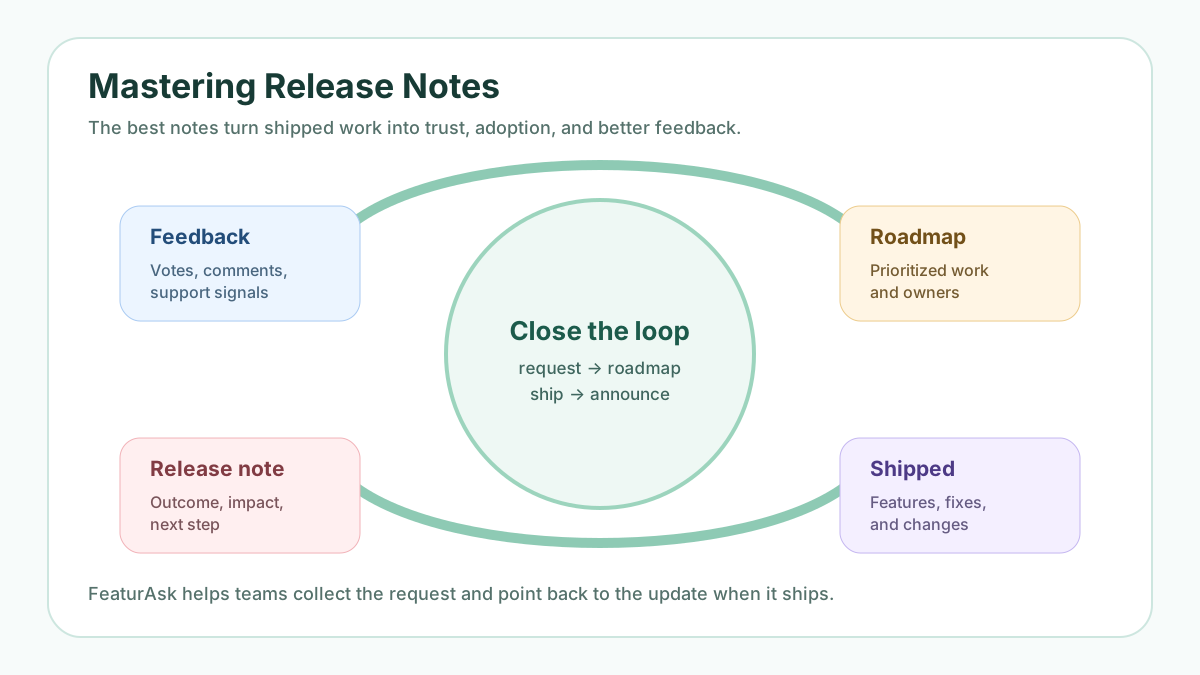
Release notes are not a formality after engineering ships. They are the public memory of your product. A good note explains what changed, why it matters, who is affected, and what users should do next. It reduces support tickets, helps customers discover new value, gives sales a proof point, and shows prospects that the product is alive.
The difference between good and weak release notes is translation. Weak notes repeat internal ticket language: “miscellaneous fixes,” “performance improvements,” or “updated dependencies.” Strong notes translate work into outcomes: “Exports now continue in the background, so you can keep working while large files are prepared.” Users do not need your sprint history. They need to understand impact.
For SaaS teams, release notes work best when they connect to a broader feedback loop. Users request features, product teams prioritize the work, engineers ship, and the company tells the right people what changed. That final step matters. If users asked for something and never hear when it ships, the team loses a chance to build trust. For related workflows, see FeaturAsk guides on how to write release notes, changelog format, and how to manage product announcements as a SaaS company.
Quick answer: how do you master release notes?
Master release notes by writing for the user’s outcome, grouping changes clearly, keeping a predictable cadence, labeling the affected audience, explaining action steps, linking to docs or feedback requests, and sharing notes through the channels where users will actually see them. The best release notes are specific, brief, consistent, and connected to the customer feedback or roadmap decision that led to the update.
Two external standards are especially helpful. Keep a Changelog explains why teams should maintain a human-readable change history and offers categories like Added, Changed, Deprecated, Removed, Fixed, and Security in its changelog guidance. Semantic Versioning’s SemVer specification is useful for distinguishing major, minor, and patch-level changes, especially when your release affects developers, APIs, or integrations.
If your release notes should point back to customer requests, try FeaturAsk free for one month with no credit card required. It helps small teams collect requests, gather votes, prioritize demand, and close the loop when an update ships; the paid plan is $29.95/year after the trial.
What are release notes?
Release notes are customer-facing explanations of product changes. They may cover new features, improvements, bug fixes, security updates, mobile app versions, API changes, pricing changes, deprecations, or operational updates. They can live in a changelog, blog post, help center, app store listing, in-app message, email, or public roadmap update.
A release note is different from an internal engineering ticket. Internal tickets describe work for the team. Release notes explain impact for users. The audience might include everyday users, admins, developers, buyers, support teams, customer success, or sales. Each audience needs a different level of detail, but every audience needs clarity.
A release note is also different from a launch campaign. A launch campaign may persuade and create excitement. A release note should clarify first. It can still be polished, but it should avoid exaggeration. Trust grows when release notes are accurate, consistent, and easy to scan.
Who should write release notes?
Release notes usually need input from product, engineering, support, customer success, and marketing. Product understands the customer problem and priority. Engineering confirms exactly what changed. Support knows the questions users will ask. Customer success knows which accounts should be notified. Marketing helps make the message clear without turning every note into hype.
One person should own the final published note, but that person should not guess. A simple workflow works well: product adds context during planning, engineering confirms technical details before launch, support adds likely questions, and the owner edits the note into customer language. For regulated or security-sensitive changes, legal or compliance review may also be needed.
Why release notes matter
Release notes reduce uncertainty. When a user notices a changed workflow, a note explains it before confusion becomes a ticket. When a bug is fixed, affected customers know they can try again. When an API changes, developers can plan migration. When a feature launches, users can adopt it faster.
They also prove momentum. A product can improve every week, but customers will not feel progress if updates are invisible. Regular notes create a visible record of shipping. They help buyers see that the team listens, invests, and maintains the product. For early-stage SaaS, that trust can matter as much as a long feature list.
Release notes also support internal alignment. Support can link to a source of truth. Sales can share relevant improvements with prospects. Customer success can mention updates in account reviews. Product can look back and see what actually shipped, not just what was planned.
Finally, release notes close the feedback loop. When a feature request becomes a shipped update, the release note should mention the problem it solves and notify the people who asked. That simple connection encourages users to keep giving thoughtful feedback.
Is writing release notes a marketing activity?
Release notes overlap with marketing, but they are not only marketing. They are product communication. Their first job is to help users understand a change. Their second job is to increase adoption. Their third job is to show product momentum. Those outcomes help marketing, but they require operational accuracy.
The marketing risk is overstatement. If every small fix is framed as a revolutionary launch, users stop trusting the channel. The product risk is understatement. If major improvements are buried under “general updates,” users miss value and prospects assume the product is stagnant. Balance matters.
A useful rule is to match the message to the change. A small bug fix may need one sentence in a weekly changelog. A workflow change may need screenshots and a help article. A breaking API change may need email, docs, migration examples, and advance notice. A major feature may deserve a launch post plus a concise release note.
What should release notes include?
Every useful release note answers five questions: what changed, who is affected, why it matters, whether action is required, and where to learn more. The answer can be short, but it should be present. A reader should not have to decode internal labels or search documentation to understand basic impact.
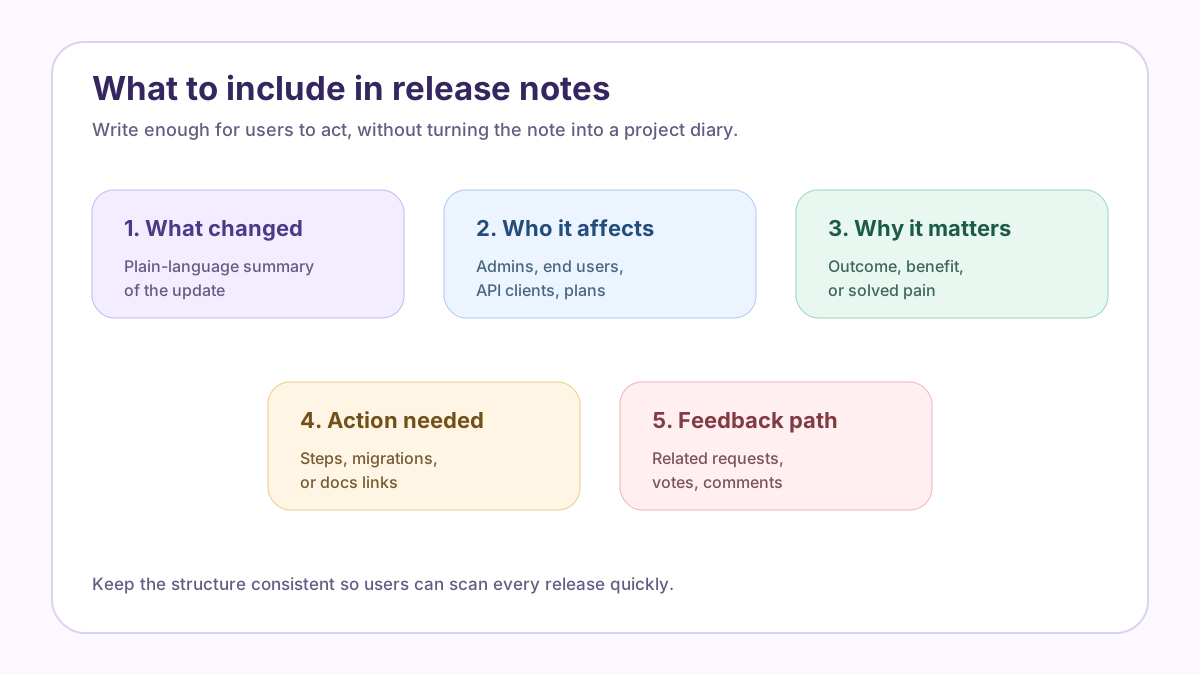
Start with a plain-language headline. “Background exports for large reports” is clearer than “Export pipeline v2.” Then add a short summary focused on outcome. Next, describe the change in enough detail for the affected user. If a setting moved, say where. If a feature is limited to a plan, say which plan. If a migration is needed, make the action obvious.
Include links when they reduce confusion. Link to documentation, a help article, a migration guide, a related feedback request, or a roadmap card. Avoid link dumping. One or two relevant links beat a long list. If users requested the change, mention that feedback helped shape the update without exposing private details.
Screenshots or GIFs can help when the change is visual, but they should not replace text. Users with accessibility needs, slow connections, or developer workflows still need written detail. Keep release notes scannable with headings, bullets, labels, and consistent categories.
How often should you publish release notes?
Cadence depends on product velocity and user risk. A fast-moving SaaS product may publish weekly or biweekly notes. A slower B2B product may publish monthly summaries. Developer tools, security products, and apps with frequent versioned releases may publish notes for every release. The right cadence is the one users can trust.
Do not publish so often that every note feels trivial. Do not wait so long that users miss important changes. Group small fixes into a digest. Publish urgent fixes, breaking changes, security updates, or high-impact launches separately. If users must act, notify them directly instead of hoping they read a monthly roundup.
Set expectations. If you publish every Friday, keep the schedule. If a release has no customer-facing changes, it is fine to skip a note or say nothing. Consistency does not mean noise. It means users know where to look when they need product change history.
Release notes best practices
Lead with the outcome. Users care more about what they can now do than which team completed the work. Replace “implemented new filter logic” with “You can now filter feedback by customer segment.” Replace “fixed export issue” with “CSV exports now include all selected rows.”
Name the affected audience. Say whether the change affects all users, admins, workspace owners, API clients, mobile users, or a specific plan. This prevents irrelevant readers from wasting time and helps affected users pay attention.
Be specific about action. If no action is needed, say so for major changes. If action is required, put it near the top. For API changes, include dates, version numbers, examples, and migration links. For UI changes, include screenshots and new navigation paths.
Use consistent categories. Added, Improved, Fixed, Deprecated, Removed, and Security work well for many products. You can adapt the labels, but keep them stable. Consistent categories make release notes easier to scan and easier to maintain.
Connect notes to feedback. If a release came from a request with many votes, link the note to that request and update the request status. If the work solves a repeated support issue, mention the solved problem. This shows users that feedback influences the roadmap.
Keep the tone human and restrained. Celebrate important launches, but do not oversell small changes. Avoid internal jargon, ticket IDs, unexplained acronyms, and phrases like “various improvements” unless they are followed by specifics.
Review before publishing. Confirm details with the team, test links, check screenshots, verify dates, and make sure the note does not reveal sensitive customer information. A release note is public documentation; accuracy matters.
Examples of strong release notes
A feature launch note might say: “Saved views for feedback filters are now available to workspace admins. Create a view once, then share it with your team so everyone can review requests by segment, status, or product area. No setup is required; open Feedback, choose filters, and select Save view.” This note tells what changed, who benefits, why it matters, and what to do.
A bug fix note might say: “Fixed an issue where long comments on mobile could overlap the vote button. The feedback widget now keeps comment text inside the card, so mobile visitors can read and vote without layout problems.” This is better than “fixed mobile UI bug” because users understand the real effect.
A breaking change note might say: “The v1 export endpoint will be retired on July 31, 2026. API clients should move to v2, which supports background exports and status checks. See the migration guide for request examples.” This gives date, affected audience, reason, and next step.
A feedback-loop note might say: “You asked for roadmap status notifications. They are now live. Voters will receive an update when a request moves to planned, in progress, or shipped.” That kind of note validates the people who contributed and invites future participation.
How to share release notes
Publishing a note is not the same as getting it read. Use a public changelog as the durable home. Then choose channels based on impact. Email is appropriate for important changes, admin action, pricing changes, security updates, and major launches. In-app messages work well for contextual education near the changed feature. Support and customer success need links they can reuse. Sales needs concise proof points for prospects who asked about the feature.
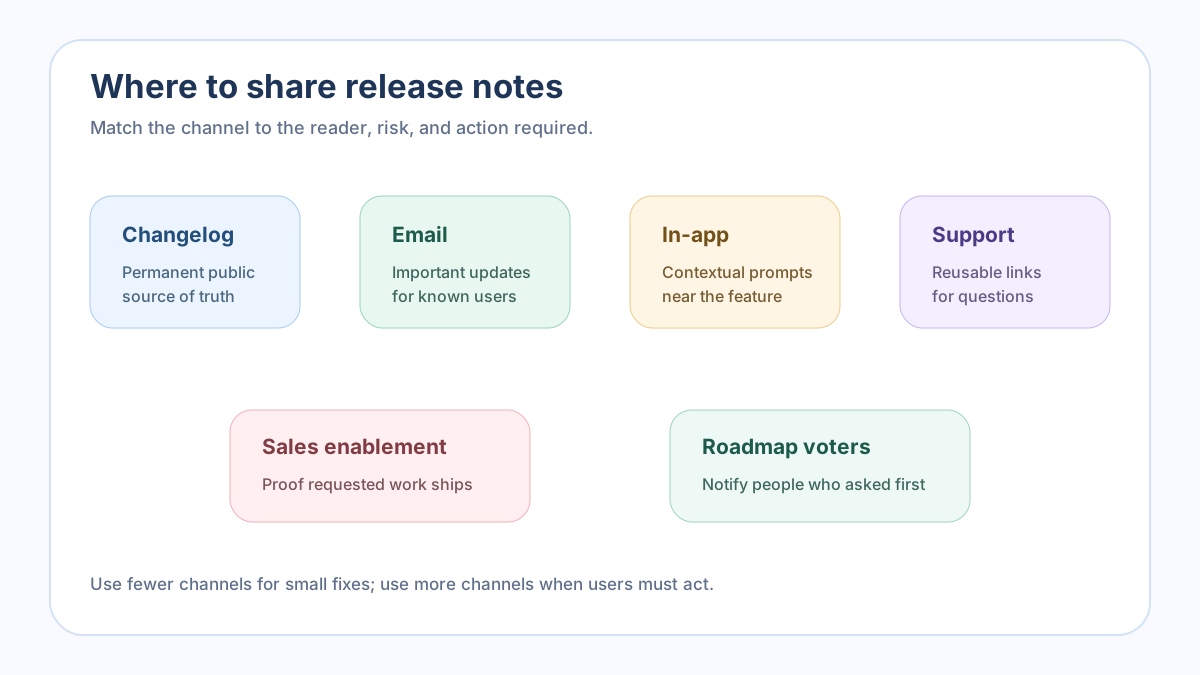
Public roadmap voters deserve special attention. If users voted or commented on a request, notify them when it ships. That message can be short: “This request is now shipped; here is the release note and how to try it.” It closes the loop and encourages better requests later.
If you need a simple feedback-to-release workflow, FeaturAsk gives small teams a public request board and voting system for $29.95/year after a one-month free trial with no credit card required. Use it to collect demand before the release and to tell interested users when the update is live.
Common release note mistakes
The most common mistake is publishing vague notes. “Bug fixes and improvements” helps almost nobody. If a fix matters enough to mention, explain the user-facing result. If it does not matter, group it under a concise maintenance note.
Another mistake is writing only for power users. Admins and developers may need detail, but everyday users need outcomes and steps. Segment the note or use labels so each reader can find the relevant information.
A third mistake is letting release notes become disconnected from the roadmap. If a popular request ships, the request status, changelog, help docs, and announcement should agree. Mixed messages create confusion: one page says planned, another says released, and support has to explain the gap.
Finally, teams often forget distribution. A perfect note hidden in a changelog is not enough for a risky migration or a long-awaited feature. Choose the channel intentionally.
Release notes template for SaaS teams
Use a repeatable format:
Title: describe the change in user language.
Summary: one or two sentences explaining the outcome.
Who is affected: all users, admins, developers, plan, region, or segment.
What changed: specific details, screenshots, or examples.
Action required: none, optional, or required by a clear date.
Related links: docs, roadmap request, migration guide, or help article.
Feedback prompt: ask users to comment, vote, or report issues in the right place.
This template is intentionally simple. Add detail for complex releases and shorten it for small updates. The value comes from consistency: users learn where to find the information they need.
Wrap-up: start writing better release notes
Release notes are one of the highest-leverage communication habits a product team can build. They explain change, reduce uncertainty, support adoption, help internal teams, and prove that customer feedback leads to shipped work. Mastering them does not require a large team. It requires clear ownership, accurate details, a predictable structure, and a habit of closing the loop.
Start with the next customer-facing change. Write what changed, who it affects, why it matters, and what users should do. Link to the request or roadmap item when relevant. Share the note through the right channels. Then use the response to improve the next one.
To connect feature requests with the notes that announce them, start with FeaturAsk. It is built for small teams that want simple feedback collection, voting, moderation, and prioritization without enterprise complexity, and it costs $29.95/year after a one-month free trial with no credit card required.