Must-Have Features of Customer Support Software
Customer feedback, support conversations, and product data now move too quickly for teams to rely on guesswork. This guide gives you a practical FeaturAsk-style approach to must have features of customer support software: clear enough for small teams, current enough for modern product work, and focused on actions rather than bloated process.
Relevant sources for the current landscape include Zendesk CX Trends 2025, Salesforce State of Service, NIST Cybersecurity Framework 2.0.
What customer support software should do now
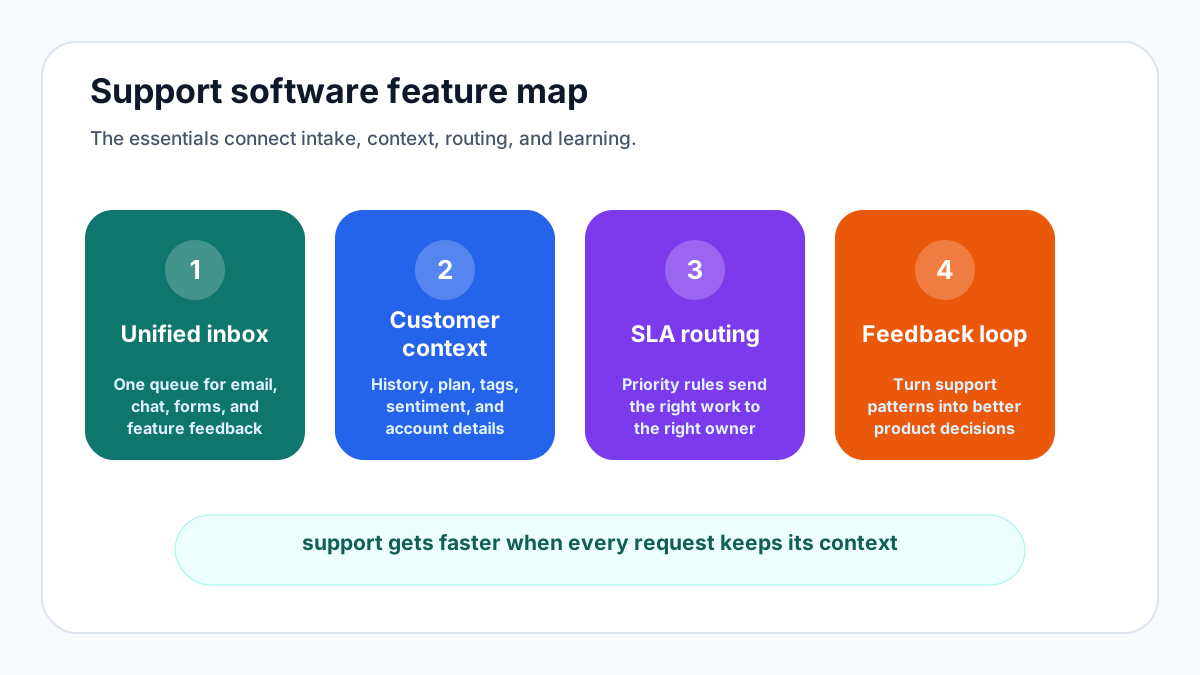
Customer support software is not simply an inbox with prettier colors. It is the operating layer that captures customer questions, routes work to the right person, stores context, measures service quality, and shows where the product or process is creating avoidable friction. For a small company, the right tool should make a two-person team look organized without forcing them to run an enterprise help desk.
The core job is consistency. Customers should be able to ask for help from the channel they already use, see that their message was received, and get a useful answer without repeating the same details. Internally, the team needs enough structure to avoid dropped conversations, duplicate replies, and guesswork about what should be fixed next.
11 must-have features to evaluate
Start with a shared ticketing system. Every support request needs an owner, a status, a priority, timestamps, and a full conversation history. Shared ownership prevents the classic support failure where everyone saw the message but nobody answered it. A good ticket view also makes handoffs safer because the next teammate can see what has already been tried.
Omnichannel intake matters when it reduces fragmentation. Email, web forms, chat, product widgets, and social messages are useful only if they land in one queue with customer identity and product context attached. If the tool creates five disconnected inboxes, it has added channels but not a support system.
Self-service knowledge is the next must-have. A concise help center, searchable FAQ, or contextual article suggestion can deflect repetitive questions while giving customers immediate help. The goal is not to hide from users; it is to reserve human time for issues that actually need judgment.
Automation should remove clerical work, not empathy. Useful automations tag common topics, route billing questions to the right person, remind the team about stale tickets, and send a follow-up when a case closes. Risky automations pretend to understand nuance and frustrate customers with loops. Keep humans in charge of the moments that define trust.
Reporting is essential because support is a learning system. Track first response time, resolution time, backlog age, reopened tickets, common topics, and customer sentiment. Then connect those patterns to product decisions. If one feature creates a constant stream of questions, the fix may be better onboarding, clearer copy, or a product change rather than more support staff.
Security, compliance, and reliability
Support conversations often contain account details, billing concerns, screenshots, and sensitive operational information. At minimum, look for role-based access, secure authentication, audit trails, export controls, retention settings, and a clear incident process. The NIST Cybersecurity Framework 2.0 is a useful reminder that security is a lifecycle of identify, protect, detect, respond, and recover rather than a one-time checkbox.
Reliability also belongs in the feature list. Your support tool should be available when customers are upset, searchable when a teammate needs context, and exportable if you decide to change systems. A vendor that makes it difficult to access your own data creates operational risk.
Customer feedback belongs beside support
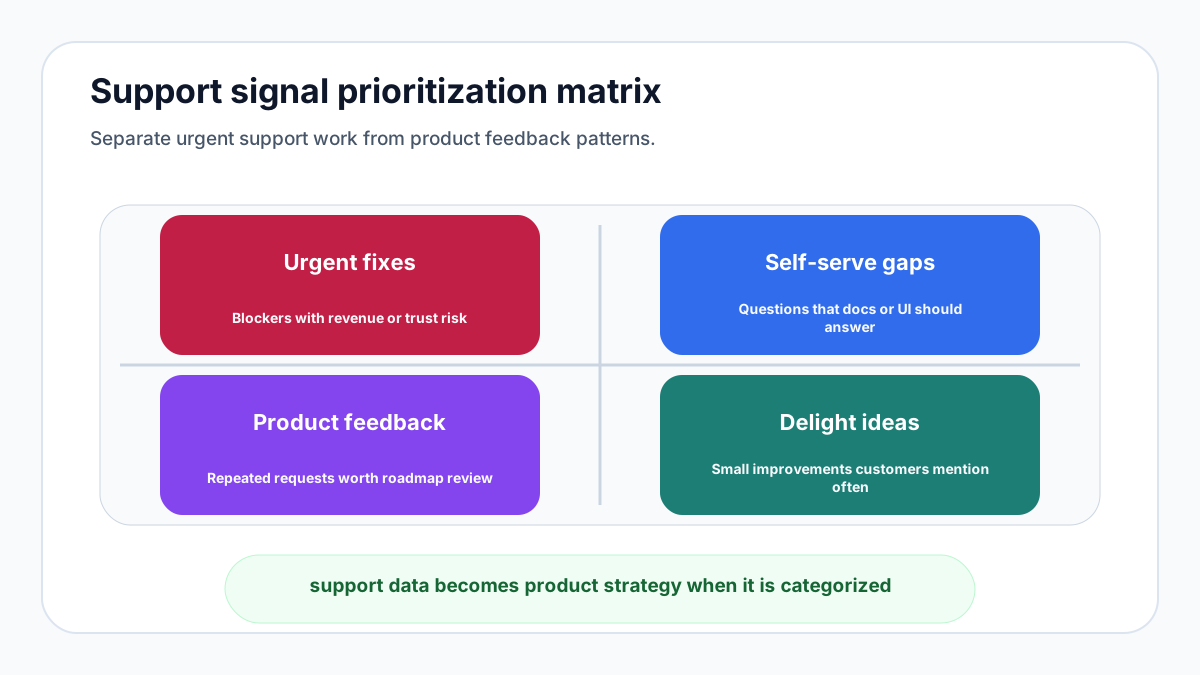
Traditional support software is strong at resolving known problems. It is weaker at capturing demand for improvements. That is why customer feedback should sit close to the support workflow. When ten customers ask for the same capability, the team needs a way to group, quantify, and prioritize that signal instead of letting it disappear inside closed tickets.
FeaturAsk fills that gap for teams that want a simple public or embedded feature request board. Customers can submit ideas, vote, and discuss what matters most, while the team sees popularity in a dashboard. If your support stack already handles tickets but not product demand, you can add FeaturAsk for one month free with no credit card and keep the product feedback loop affordable at $29.95/year.
How to choose without overbuying
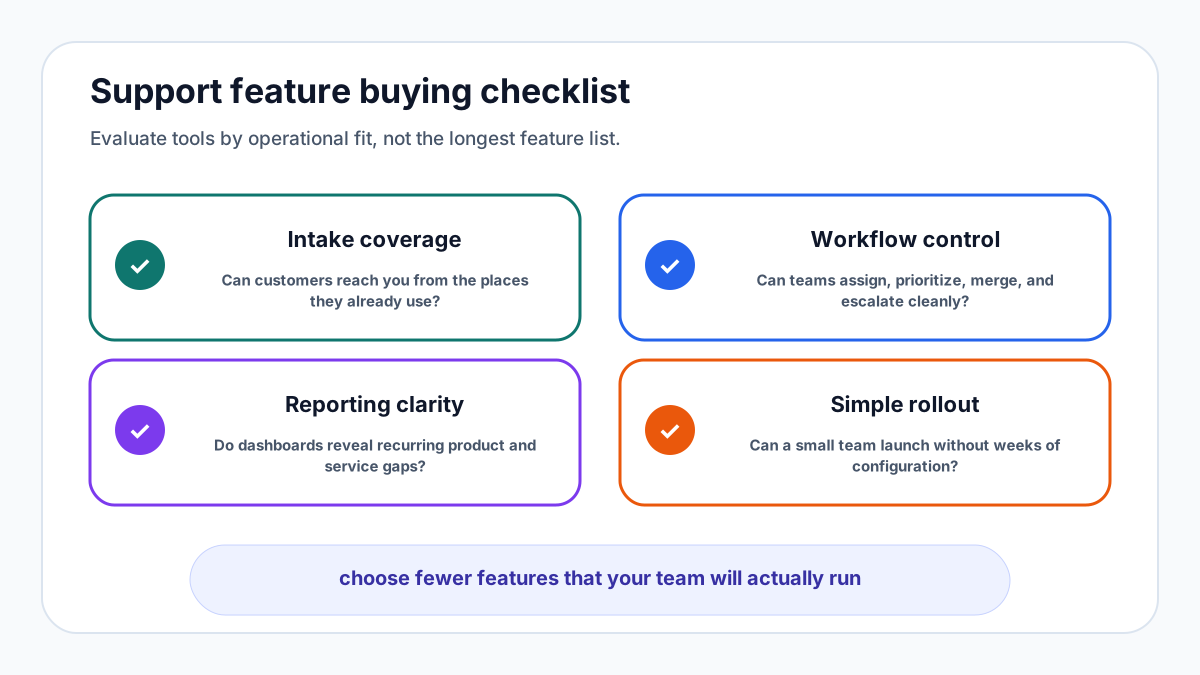
Do not buy customer support software by feature count alone. Write down your most common support paths: a pre-sale question, a bug report, a billing issue, a product suggestion, and an angry customer escalation. Then test each tool against those paths. The best choice is the one that makes the real workflow obvious.
Small teams should be cautious about platforms that require long configuration projects. A lightweight tool that covers 80 percent of the workflow today may beat a larger suite that nobody finishes implementing. If feature demand is a major reason customers contact support, pair your help desk with a feedback workflow and connect the output to your roadmap. Related guides on the FeaturAsk blog explain SaaS growth levers, release note habits, and roadmap planning.
A practical evaluation scorecard
Give each tool a score from one to five for intake, ticket ownership, self-service, automation, analytics, integrations, security, mobile usability, feedback capture, setup effort, and cost. Weight the categories by your current pain. A company drowning in repeated questions should weight knowledge base and automation higher. A product-led startup should weight feedback capture and roadmap signal higher.
Finally, run a two-week pilot with real conversations. Measure whether the team replies faster, loses fewer requests, and learns more about what customers want. If the tool only creates admin work, keep looking. If it shortens the path from customer pain to product decision, you have found a support system rather than another inbox. For a low-friction product feedback layer alongside your help desk, start FeaturAsk with no credit card and test it for a month before spending the $29.95/year.
Practical next steps
A final buying test is whether the software makes the customer feel known. The screen should show history, plan, last activity, prior bugs, and any open product ideas without making the agent hunt. Context reduces handle time, but more importantly it prevents robotic answers.
For very small teams, cost discipline is a feature too. Expensive suites can be justified when they replace several tools and serve a large support org. For founders, agencies, creators, or lean SaaS teams, a focused stack usually wins: one place for support conversations, one place for product feedback, and a simple habit of reviewing the data every week.
If you want the feedback side of this workflow to stay simple, launch FeaturAsk with a one-month free trial and no credit card. It is built for feature requests, voting, and lightweight prioritization at $29.95/year, so you can learn from customers without buying an enterprise platform.
Implementation checklist for lean support teams
Begin with the queue. Decide which channels should create tickets and which should not. A shared inbox, contact form, product widget, and chat tool can all be useful, but only if ownership is obvious. Define default priorities, escalation rules, and response targets before volume grows. Even a simple agreement such as “new paid-customer blockers are reviewed twice daily” removes confusion.
Next, create a topic taxonomy. Start with ten tags: billing, login, onboarding, bug, performance, feature request, integration, cancellation, documentation, and account change. Review the tags after two weeks and merge anything that is too narrow. The taxonomy is not for neat reporting alone; it shows where the business is leaking time. If “documentation” appears every day, the fix may be clearer help content rather than another agent.
Then write five reusable replies for the questions you answer most often. Keep them editable and human. A saved reply should provide structure, not sound like a wall of canned text. Include links to help articles, expected next steps, and a clear owner when the answer requires follow-up.
Set a weekly support review. Look at backlog age, reopened tickets, unresolved bugs, top request themes, and the number of customers waiting on product changes. Invite product and marketing occasionally. Support data can sharpen onboarding copy, pricing pages, release notes, and roadmap decisions.
Finally, define what happens to product requests. A closed ticket should not mean the idea disappears. Move repeated requests to a feedback board, group duplicates, and notify customers when an idea is accepted, declined, or shipped. This habit turns support from a cost center into a customer intelligence system.
What to measure after rollout
After you choose support software, measure whether the system is changing customer experience and team behavior. Track first response time, median resolution time, backlog age, reopened tickets, and the percentage of conversations solved by self-service. These numbers do not need to be perfect on day one. They need to be visible enough that the team can improve them.
Also measure topic concentration. If a small number of issues create a large share of tickets, support volume is telling you where the product, onboarding, or documentation needs work. Fixing root causes is usually cheaper than answering the same question forever. Put the top three themes into a monthly product review and decide what will be clarified, automated, redesigned, or intentionally left alone.
Customer sentiment should be interpreted with context. A fast response that fails to solve the problem is not a success. A slow response with a thoughtful fix may still frustrate a customer who was blocked. Combine metrics with conversation review so the team understands the story behind the dashboard.
Adoption matters inside the team too. If agents avoid the tool, the configuration is probably too heavy or the workflow does not match reality. Watch whether teammates use tags, update statuses, assign ownership, and search past conversations before replying. The best support system becomes a habit, not an extra reporting chore.
Finally, measure the loop from support to product. Count how many repeated issues become help articles, roadmap candidates, onboarding improvements, or release note updates. This is where support software creates leverage. The team is no longer merely answering individual customers; it is converting patterns into better product decisions.
Decision checklist before you commit
Before you commit, ask whether the workflow is understandable without a consultant. Can a new teammate open the tool, find the next conversation, see the customer context, and know what to do? If the answer is no, the tool may be powerful but wrong for your current stage.
Ask whether the data is portable. You should be able to export conversations, tags, customers, and reports. Portability protects you from lock-in and makes analysis easier when you want to combine support data with product analytics or revenue data.
Ask whether the customer experience is calm. Confirmation messages, status updates, and follow-up emails should sound clear and respectful. Customers notice when a tool makes a company feel organized, and they notice when automation creates confusion.
Ask whether the system improves prioritization. The best support stack does more than reduce response time. It helps the business understand which problems deserve prevention, which requests deserve roadmap space, and which customers need direct attention.
FAQs
How often should this process be reviewed?
Review the operating metrics monthly and review strategic assumptions quarterly. Fast-moving teams can review high-signal feedback weekly, but the cadence should be predictable enough that customers and teammates see follow-through.
What is the biggest mistake to avoid?
The biggest mistake is collecting feedback without assigning ownership for the next action. Every survey, request board, support trend, or product brief should have a person responsible for interpreting the signal and deciding what happens next.
Can a small team use this without extra process?
Yes. Keep the workflow lightweight: capture the signal, group similar items, choose the next best action, ship or explain the decision, and close the loop. The habit matters more than complex tooling.