Embeddable Feedback Widget: Collect Ideas Where Customers Already Are
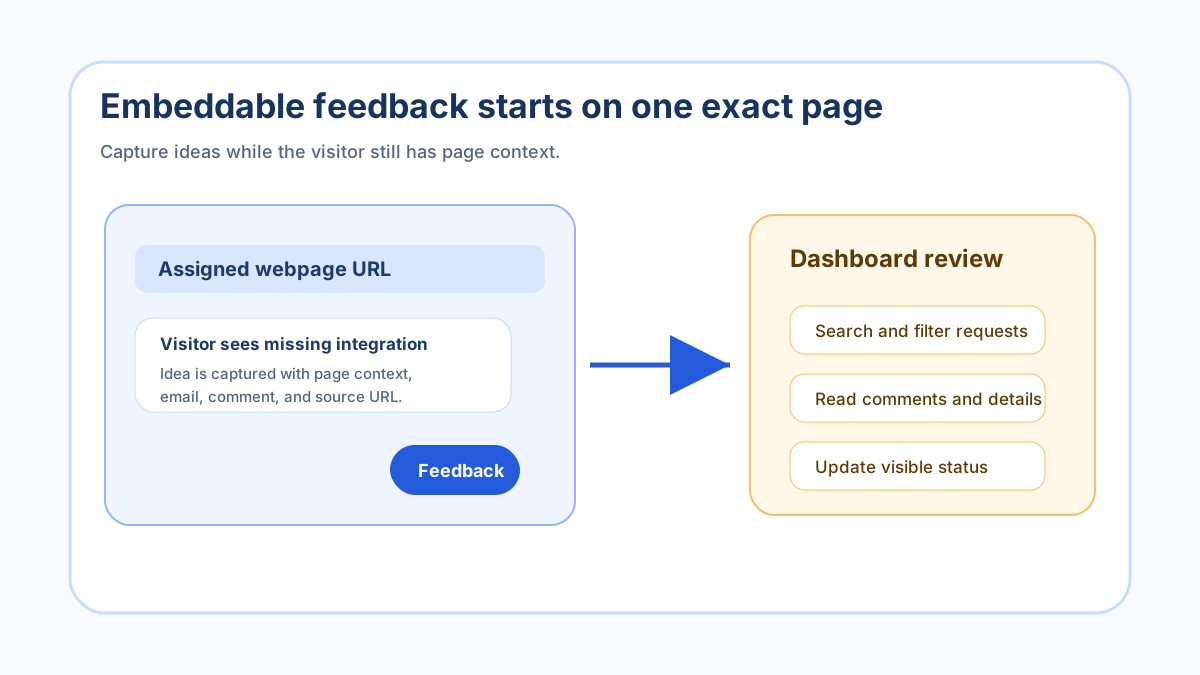
An embeddable feedback widget is the simplest way to ask for ideas without sending customers away from the page that created the idea. Instead of hoping people find a contact form, remember the context, and write a useful message later, the widget gives them a small, clear place to say what they expected, what is missing, or what would make the page more useful.
At FeaturAsk, we built our widget around that exact moment. A visitor is already on a pricing page, help page, product page, dashboard, course page, marketplace listing, or customer portal. If the page raises a question or sparks a feature idea, the widget can collect it while the context is fresh. That is the real value of embedding feedback: less friction for the person submitting and less guessing for the owner reviewing.
If you want to test that loop without a long procurement process, FeaturAsk gives you a 30-day no credit card trial and stays simple at $29.95/year when you keep it. Start with one exact webpage URL, place the generated code in that page body, and see whether visitors give you useful requests before you expand the habit.
What an embeddable feedback widget should do
A good embeddable feedback widget should do three jobs. First, it should make feedback easy to submit from the page where the idea appears. Second, it should let the owner shape the prompt so people know what kind of feedback belongs there. Third, it should create a review workflow after the submission, because collecting feedback is only useful if you can find, filter, moderate, and update it.
The widget does not need to be complicated. In many cases, the best first version is a short heading, a clear description, one comment box, and one optional detail that helps the owner follow up. When teams add too many fields, visitors either abandon the form or write less thoughtful feedback. When teams ask a focused question, visitors usually provide better context.
That is why an embeddable widget is different from a general survey. A survey asks everyone the same sequence of questions. A widget sits beside a real experience and invites a short, timely response. It can become a product feedback channel, a website suggestion box, or a lightweight feature request path depending on the page and wording.
Choose the exact page before you customize the widget
The most important decision is not the button color. It is the page. FeaturAsk subscriptions are tied to one exact assigned webpage URL, and the generated widget code needs to be pasted into the body of that page. The exact URL must match, so the best setup starts with a specific page where feedback would actually change decisions.
For example, a SaaS owner might begin with a settings page where customers often expect more controls. A documentation site might begin with the article that receives the most confused emails. A creator might begin with a course overview page where students ask for extra lessons. A local service business might begin with a quote-request page where visitors are unsure what to include.
This exact-page habit helps keep feedback actionable. If every page sends ideas to one generic box, the owner has to infer context later. If one page has one widget with a clear prompt, the submission already carries more meaning. The page itself becomes part of the request.
Write widget copy that narrows the request
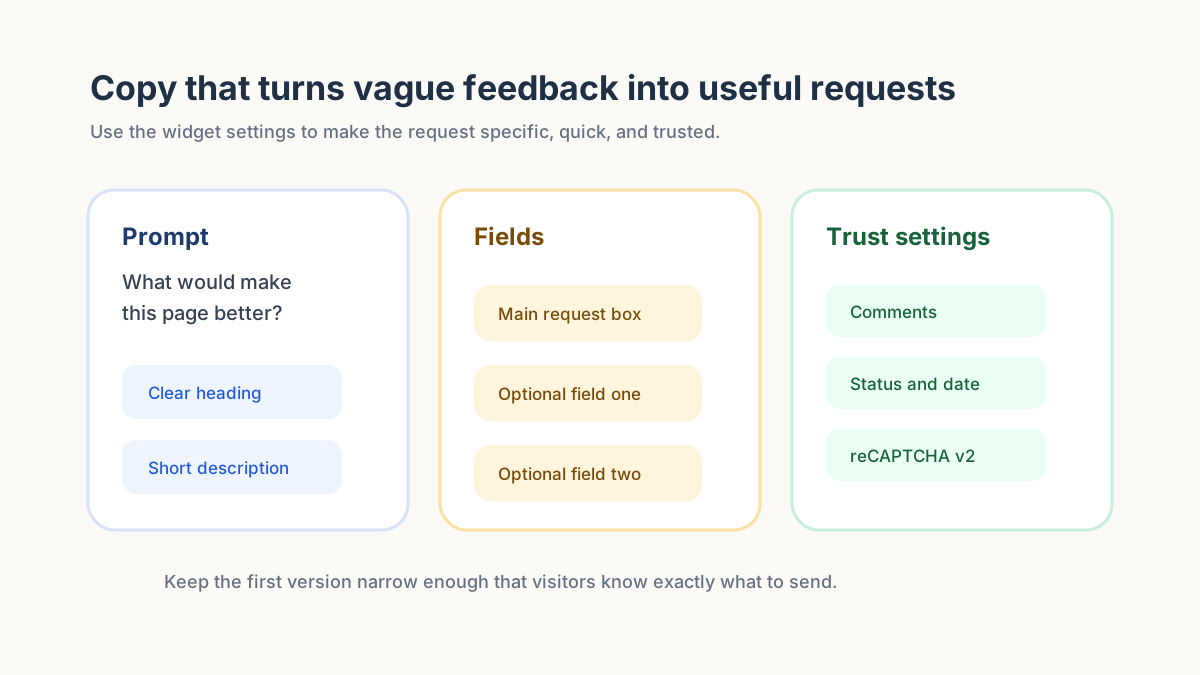
The default temptation is to write “Send us feedback.” That is friendly, but it is broad. Broad prompts create broad answers. A better embeddable feedback widget tells the visitor what kind of input is welcome and why it matters.
For a product page, the heading might ask, “What would make this feature more useful?” For a help page, it might ask, “What is still unclear after reading this?” For a public roadmap, it might say, “Share the improvement you would vote for next.” For a pricing page, it might ask, “What information would help you decide?” Each version is short, but each points the person toward a more useful answer.
In FeaturAsk, we let you adjust the widget heading, description, colors, fonts, comments, reCAPTCHA v2, status display, date display, and up to two optional fields. Those controls matter because the best widget feels native to the page without becoming hard to maintain. The goal is not to design a complex form builder. The goal is to make the request clear, trusted, and easy to answer.
Use optional fields carefully. If you need one extra detail, add it. If you need two, make sure both are genuinely helpful. An optional email, customer type, page section, plan name, or use case can improve follow-up. But if the main text box already gives enough context, keep the widget light.
Keep the embedded experience visible but not pushy
An embeddable feedback widget should be available when someone has something to say. It should not block checkout, cover important content, or make the page feel like a pop-up maze. The best placement depends on the page. A feedback tab can live near the edge of a product page. A small button can sit near a documentation article. A request prompt can appear after a user completes a task.
Think about the user’s intent. If someone is trying to buy, do not interrupt them with a long feedback prompt. If someone is reading a help article and still feels confused, a visible widget can be useful. If someone is exploring a product roadmap, the widget can invite a feature idea or comment. Placement should match the moment.
This is also why quick preview and the Test Widget page are important. Before you invite visitors to use the widget, preview the copy, submit a test request, and check how the request appears in the dashboard. The owner should know what customers will see and what the team will see afterward.
Manage requests after they arrive
The embedded form is only the front door. The dashboard is where the owner turns raw submissions into decisions. In FeaturAsk, incoming requests can be reviewed with statuses: Pending, Under Consideration, In Progress, Completed, and Declined. That gives the owner a simple language for what is new, what is being evaluated, what is actively moving, what shipped, and what will not be pursued.
Status discipline matters because public feedback loses trust when every item looks abandoned. A visitor who submits an idea does not need a guaranteed yes. They need a visible sign that the request entered a real review process. Even a Declined status can build trust when it is used honestly and the owner keeps the board tidy.
The request management workflow also needs practical controls. FeaturAsk lets you delete or moderate requests, filter by status, search for specific ideas, open request details, view comments, and inspect optional field data. Those small owner controls are what keep an embedded widget from turning into an unmanageable inbox.
Use statuses as a public feedback loop
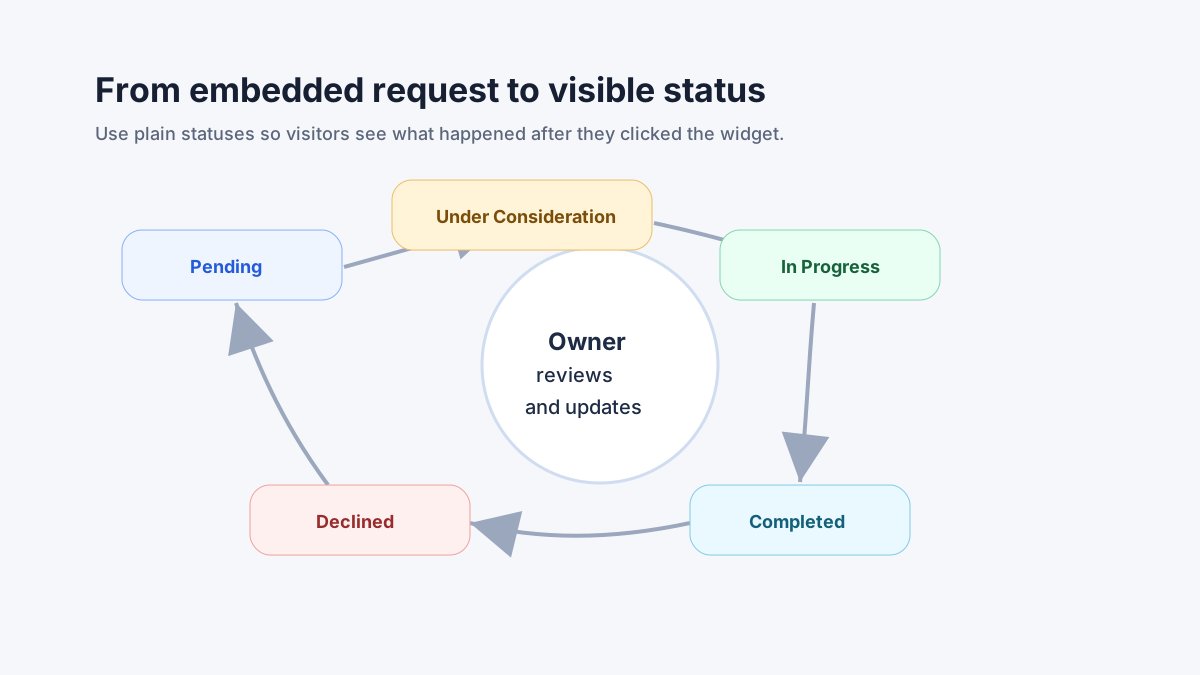
Statuses should be plain and consistent. Pending is for new items that still need review. Under Consideration is for requests that may be valuable but need more thought. In Progress is for items you are actively working on. Completed is for shipped or resolved requests. Declined is for ideas you do not plan to pursue.
Do not move every request to In Progress just to look responsive. That creates false expectations. Do not leave everything Pending forever either. That makes the widget feel performative. A small team can build more trust with fewer, clearer updates than with a giant board full of vague promises.
Comments are useful when a request needs clarification or when the owner wants visitors to add context. Date display can help people understand recency. Status display helps them see progress without asking. These are simple settings, but they change how the widget feels. It stops looking like a private inbox and starts looking like a visible feedback loop.
What to embed first: ideas, confusion, or requests?
Before you install the widget, decide what problem you are solving. If you want feature ideas, ask for improvements and use language similar to a feature request widget. If you want general product reactions, study how a product feedback widget differs from a broad contact form. If you want customers to vote and discuss, the feature voting widget approach may be closer to your goal.
For many owners, the best first use is a focused suggestion box on a page that already creates questions. That is why we often recommend starting with one page, one prompt, and one review habit. Once the workflow is working, you can decide whether another page needs its own subscription and exact URL.
If your team already collects feedback through email, the widget does not have to replace it on day one. It can catch the ideas that never become emails because the visitor is busy, unsure who to contact, or unwilling to open a separate channel. Short, embedded feedback can reveal patterns that private email threads hide.
A practical setup checklist
Start by choosing the page where feedback is most likely to change what you do next. Then write one sentence that explains what belongs in the widget. After that, decide whether comments, status display, date display, reCAPTCHA v2, or optional fields should be enabled. Keep the first setup narrow enough that you can judge quality after a week.
Next, use the quick preview and Test Widget page. Submit a sample request. Add an optional field value if you enabled one. Check the dashboard. Confirm that the page URL matches the subscribed URL and that the generated widget code is pasted in the page body. If the widget does not appear where expected, the URL and placement are the first things to check.
Then set a review rhythm. A small team can begin by checking new requests a few times per week. Search for repeated themes, moderate anything that does not belong, and use statuses only when they tell the truth. If a request is promising but not scheduled, Under Consideration is enough. If a request is out of scope, Declined is better than silence.
How FeaturAsk fits this use case
At FeaturAsk, we built the embeddable feedback widget for owners who want a direct feedback loop without buying a heavy enterprise platform. The account area keeps website subscriptions and purchase history in one dashboard, so you can see what page is assigned and what you have paid for. Each subscription is for one exact webpage URL, which keeps the setup clear and prevents one vague widget from drifting across unrelated contexts.
We let you customize the visible widget so it matches the page: headings, descriptions, colors, fonts, comments, reCAPTCHA v2, status/date display, and up to two optional fields. Then we give you generated widget code to paste into the assigned page body. You can use quick preview and the Test Widget page before relying on it with visitors.
When feedback arrives, the request list becomes the operating surface. You can search, filter by status, review details, read comments, inspect optional field data, moderate, delete, and move requests through Pending, Under Consideration, In Progress, Completed, and Declined. That is the full loop we care about: embed where the idea appears, collect clean context, review it, and show a simple status.
If that is the kind of lightweight system you want, FeaturAsk starts with a 30-day no credit card trial and continues at $29.95/year. Try it on one meaningful page first, then decide whether the quality of feedback justifies making it part of your regular workflow.
Common mistakes to avoid
The first mistake is embedding the widget on a page no one visits. Feedback systems need moments of real intent. If a page has little traffic or weak context, the widget will not teach you much. Start where visitors already have questions, requests, or decisions to make.
The second mistake is asking for everything. A page-level widget should not try to collect support issues, product ideas, testimonials, bug reports, and pricing objections in one sentence. Choose the main category and write the prompt for that category. If support requests arrive anyway, adjust the wording or point people to the right place.
The third mistake is ignoring the review habit. A beautiful widget cannot compensate for an abandoned dashboard. Use search, filters, moderation, comments, and statuses to keep the board useful. The owner’s response loop is what makes visitors willing to contribute again.
The bottom line
An embeddable feedback widget works best when it is specific. Pick the page, write a focused prompt, keep fields light, test the widget, and manage requests visibly. The widget should not feel like a generic suggestion bucket. It should feel like an invitation tied to the page the visitor is already using.
For small teams, that focus is the difference between collecting noise and collecting product direction. If you want a simple way to test it, FeaturAsk gives you the widget, dashboard, request statuses, comments, moderation, quick preview, and Test Widget page with a 30-day no credit card trial and $29.95/year pricing after that.