Active vs Passive Customer Feedback: The Best SaaS Strategy Is Both
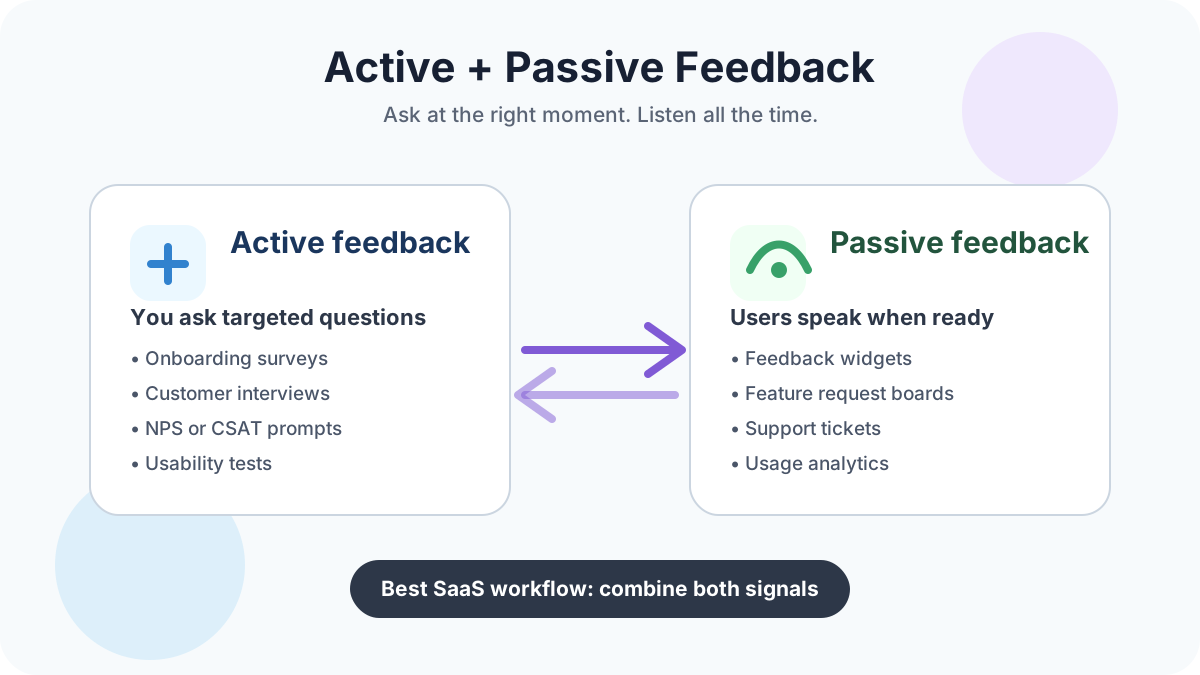
Quick answer: active customer feedback is feedback you ask for through surveys, interviews, usability tests, and direct outreach. Passive customer feedback is feedback customers leave on their own through widgets, feature request boards, support conversations, reviews, behavioral data, and social mentions. For SaaS teams, the best choice is rarely one or the other. Use active feedback when you need a targeted answer, and use passive feedback to catch real problems, feature requests, and sentiment continuously.
What active and passive feedback mean in SaaS
Customer feedback is any signal that helps you understand what users want, where they struggle, why they stay, and why they leave. In SaaS, those signals usually arrive in two ways.
Active feedback is prompted. Your team decides who to ask, when to ask, and what question needs an answer. Examples include onboarding surveys, churn interviews, customer advisory calls, in-app NPS prompts, usability tests, beta research, and targeted email questionnaires. Active feedback is useful when the team has a defined decision to make: which onboarding step is confusing, why a persona is not converting, whether a planned integration solves a real workflow, or why a segment is cancelling.
Passive feedback is user-initiated or behavior-based. Customers tell you something without being asked at that exact moment, or their actions reveal a pattern you need to investigate. Examples include feedback widgets, public or private feature request boards, support tickets, live chat transcripts, cancellation notes, app store reviews, product analytics, session recordings, community posts, and social media comments. Passive feedback is useful because it captures what customers care about enough to report in the flow of work.
The mistake is treating the two approaches as competitors. Active feedback gives you sharper answers to known questions. Passive feedback gives you broader visibility into unknown issues. A small SaaS team needs both, but it does not need a complex enterprise voice-of-customer stack. A lightweight loop is usually enough: collect ideas continuously, ask focused questions when a pattern appears, prioritize with evidence, and close the loop with users.
If you want that always-on loop without expensive software, FeaturAsk gives you a copy-paste feedback widget, voting board, moderation, analytics, and request management for $29.95/year after a 30-day free trial with no credit card required.
Active customer feedback: when asking directly is best
Active feedback works best when you know the question but do not know the answer. It is the right tool for reducing uncertainty before a product, marketing, onboarding, or retention decision.
Use active feedback when you need context that analytics cannot explain. A dashboard can show that users abandon a setup step. It cannot reliably tell you whether the copy is unclear, the import takes too long, the user lacks permissions, or the promised outcome is not worth the effort. A five-question survey or a 20-minute interview can reveal that missing context quickly.
Common active feedback methods include:
- Customer interviews for deep discovery, churn analysis, and high-value account research.
- In-app surveys after a meaningful event, such as completing onboarding, using a new feature, or hitting a usage limit.
- Email surveys for customers who are not currently active in the product.
- Usability tests for observing how people actually move through a task.
- Beta feedback forms for validating a new workflow before release.
- NPS, CSAT, or CES prompts when you need a simple sentiment or effort benchmark.
The biggest advantage of active feedback is focus. You can ask a precise question at the moment when the answer is fresh. The biggest risk is bias. If you ask leading questions, survey too often, or only contact your happiest customers, the results will look cleaner than reality. Nielsen Norman Group’s <a href="https://www.nngroup.com/articles/survey-best-practices/" rel="nofollow">survey question guidance</a> is a good reminder to use neutral wording, avoid double-barreled questions, and test comprehension before sending a survey broadly.
For SaaS teams, the practical rule is simple: do not launch an active survey because you feel like “collecting feedback.” Launch it because one decision needs better evidence.
Passive customer feedback: why always-on listening matters
Passive feedback works best when users are experiencing the product in real life and something is important enough for them to speak up. The most useful passive channels are closest to the moment of friction: a widget submission inside the app, a support ticket with workflow context, a vote on an existing request, or analytics that show whether a complaint matches actual behavior.
Passive feedback methods include:
- In-app feedback widgets where users submit ideas, complaints, and requests without leaving the product.
- Feature request boards where users vote, comment, and see what other customers are asking for.
- Support tickets and chat transcripts that expose recurring confusion.
- Review sites, social media, communities, and public comments.
- Product analytics that show adoption, drop-off, retention, and underused features.
- Cancellation forms and downgrade notes.
Passive feedback has three major advantages. First, it is continuous. You do not have to wait for the next survey cycle to learn that something is broken, confusing, or highly requested. Second, it is often more authentic because users speak in their own words. Third, it can uncover problems you did not think to ask about.
The risk is that passive feedback can be noisy. One angry user can sound like a trend. One enterprise prospect can request a heavy feature that distracts a product built for small teams. A popular vote total can hide the fact that many voters are free users outside your ideal customer profile. Passive feedback should start the investigation, not automatically dictate the roadmap.
A good passive system needs structure: tags, duplicate merging, vote counts, customer segments, status labels, and a clear review cadence. Otherwise, feedback becomes another inbox that nobody trusts.
For deeper examples of feedback categories, read FeaturAsk’s guide to 4 types of feedback from customers and how to address them.
Active vs passive feedback: key differences
The easiest way to compare active and passive feedback is to ask what each method is best at.
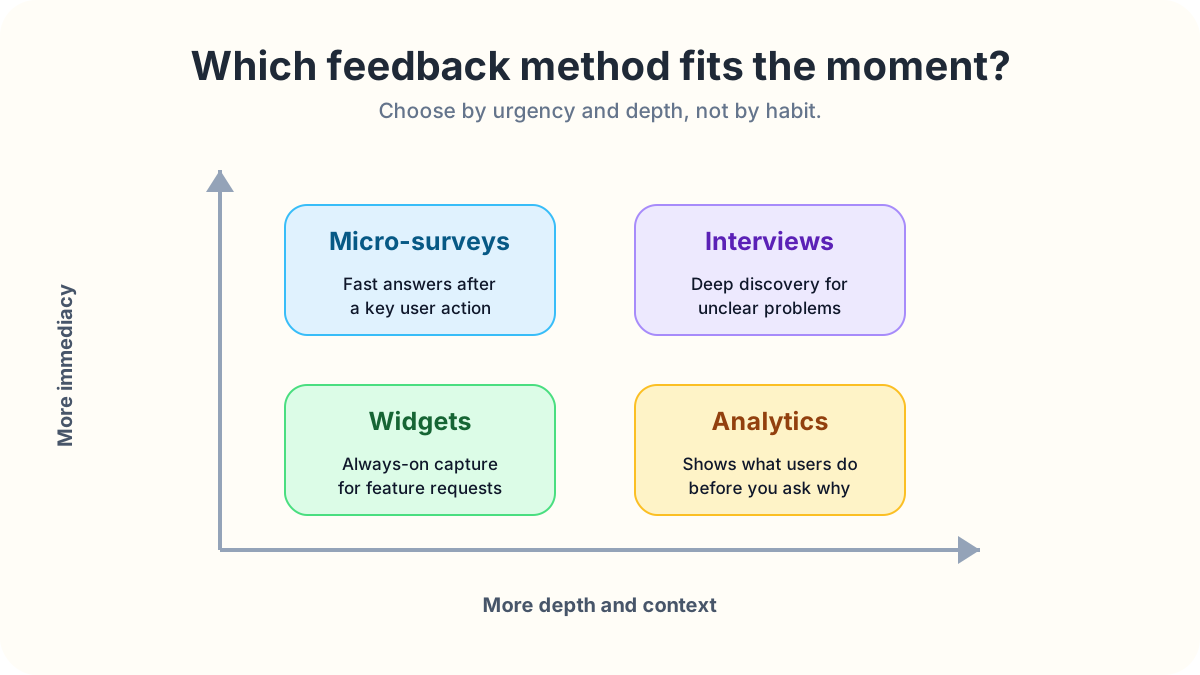
Active feedback is best for specific questions. Passive feedback is best for continuous discovery.
Active feedback gives you control over audience, timing, and format. Passive feedback gives users control over what they raise and when they raise it.
Active feedback can produce cleaner data because everyone answers the same prompt. Passive feedback can produce richer language because people describe the issue in their own context.
Active feedback is usually better for strategic decisions: positioning, pricing research, onboarding redesign, churn diagnosis, usability testing, and beta validation. Passive feedback is usually better for operational discovery: bugs, missing features, UX friction, recurring confusion, and unmet workflow needs.
Active feedback can suffer from survey fatigue. Passive feedback can suffer from survivorship bias because only motivated users submit requests. Active feedback may overrepresent the people you choose to ask. Passive feedback may overrepresent the loudest voices.
Neither is “more true.” They answer different questions. If 40 users vote for a feature, that passive signal tells you the request matters. If interviews reveal that the real problem is reporting to a manager every Friday, active research tells you what solution might actually help. If analytics show that only 3% of accounts use the current reporting feature, behavioral data tells you to investigate adoption before building another report.
Zendesk’s <a href="https://www.zendesk.com/customer-experience-trends/" rel="nofollow">CX Trends 2026 report</a> highlights how customer experience teams are moving toward more contextual intelligence. That is the point: the best feedback systems connect what users say, what they do, and what the business is trying to improve.
When to use active feedback
Use active feedback when you need an answer from a defined group of people. It is especially useful for onboarding research, churn interviews, high-effort feature validation, usability testing, and messaging research. Ask about the user’s recent situation, current workaround, urgency, and expected outcome. Keep the campaign short: a micro-survey with one strong open-ended question often beats a long form.
When to use passive feedback
Use passive feedback when you want to catch problems and ideas continuously. It is strongest for feature requests, UX friction, support mining, behavioral analytics, cancellation notes, and public reputation monitoring. Tools like Pendo describe product benchmarks and behavior metrics as decision support, not as replacements for research; Pendo’s <a href="https://www.pendo.io/product-benchmarks/" rel="nofollow">product benchmark resources</a> are a useful example of how teams compare adoption and engagement signals. Analytics tells you where to look. Customer words tell you why it matters.
If you are comparing ways to collect always-on ideas, see FeaturAsk’s guide to website feedback widgets and the roundup of 19 user feedback tools you need to try.
How to combine active and passive feedback in one workflow
The strongest SaaS feedback workflow starts passive, adds active research, and ends with a decision customers can see.
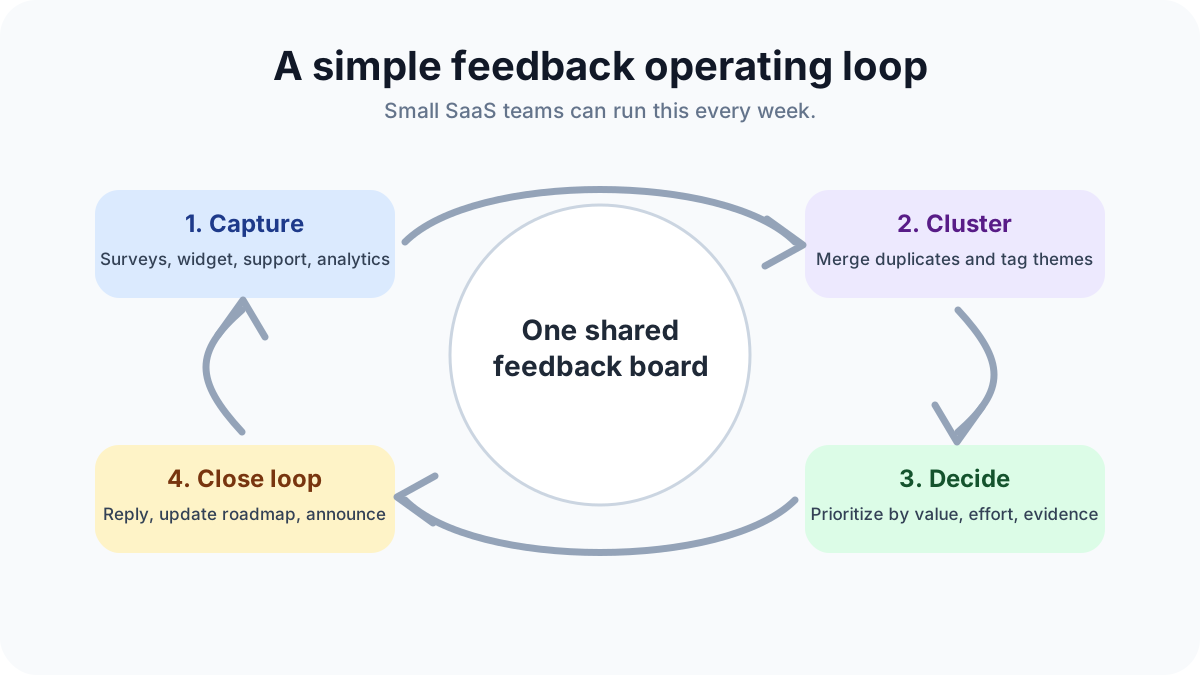
Step one: capture everything in one place. Send widget submissions, support themes, sales objections, cancellation reasons, and survey responses into a shared feedback board or tracker. Do not leave requests scattered across Slack, email, spreadsheets, and chat transcripts.
Step two: cluster related signals. Merge duplicates, tag themes, and separate the underlying problem from the suggested solution. “Add folders,” “let me group projects,” and “I cannot organize clients” may be one information architecture problem.
Step three: add evidence. Look at votes, account value, customer segment, frequency, support volume, product analytics, and strategic fit. A request from ten ideal customers may matter more than a request from fifty non-fit visitors.
Step four: ask active follow-up questions. When a passive pattern emerges, interview a few users or send a targeted micro-survey. Ask about the situation, current workaround, urgency, and cost of inaction. This prevents the team from building the first solution users mention.
Step five: prioritize transparently. Use a simple scoring model that includes customer value, business value, effort, confidence, and urgency. The model does not need to be perfect. It just needs to make tradeoffs visible.
Step six: close the loop. Reply to users when a request is planned, shipped, declined, or needs more research. Closing the loop is not just polite. It teaches users that feedback is worth giving again.
FeaturAsk is built for this combined approach: collect passive widget feedback all the time, invite users to vote and comment, then use the organized request list to decide where active research is needed next. Small SaaS teams can start in minutes with a 30-day free trial and no credit card.
A simple feedback cadence for small SaaS teams
You do not need a large research operation to run a useful feedback system. You need a cadence. Daily, skim new passive submissions and merge duplicates. Weekly, review top themes and pick one or two for deeper investigation. Monthly, run one active campaign tied to a real decision. Quarterly, review bigger patterns: valuable segments, support-heavy features, roadmap assumptions, and shipped improvements that need follow-up.
For survey examples that fit into this cadence, see FeaturAsk’s guide to 3 types of customer feedback.
Mistakes to avoid
Do not ask for feedback if you cannot act on it. Customers do not expect every request to be built, but they do expect the team to listen, respond, and make reasonable decisions.
Do not treat votes as the only priority metric. Votes are useful, but they need context. Segment, revenue, retention risk, strategic fit, and implementation effort all matter.
Do not survey every user after every action. Over-prompting creates fatigue and lowers answer quality. Intercom’s <a href="https://www.intercom.com/blog/customer-service-trends/" rel="nofollow">customer service trend analysis</a> points toward faster, more contextual support experiences; feedback prompts should follow the same principle by appearing only when they are relevant.
Do not let passive feedback pile up without ownership. If nobody reviews, tags, and responds, users will stop submitting useful ideas.
Do not confuse a requested feature with the real problem. A customer may ask for an export button when the deeper need is stakeholder reporting. Ask follow-up questions before building.
Do not ignore quiet customers. Passive feedback often comes from motivated users. Active outreach helps you learn from customers who are too busy, too new, or too disengaged to submit ideas on their own.
So which is best for SaaS?
Active feedback is best when you need focused answers. Passive feedback is best when you need continuous awareness. The best SaaS feedback strategy combines both.
Start with passive collection so users always have a place to share ideas and frustrations. Then use active feedback to investigate the patterns that matter. Validate the problem, understand the segment, estimate the value, and decide what belongs on the roadmap. After you ship, close the loop so customers know their input mattered.
For small SaaS companies, creators, ecommerce sites, and service businesses, the right tool should not require a large budget or a heavy setup project. FeaturAsk gives you the essentials: a website feedback widget, voting board, request management, moderation, analytics, mobile-friendly collection, and custom branding for $29.95/year after a 30-day free trial with no credit card required.
Use active feedback to ask better questions. Use passive feedback to keep listening. Use both to build a product customers can feel getting better.