5 Types of Feedback from Customers and How to Address Them
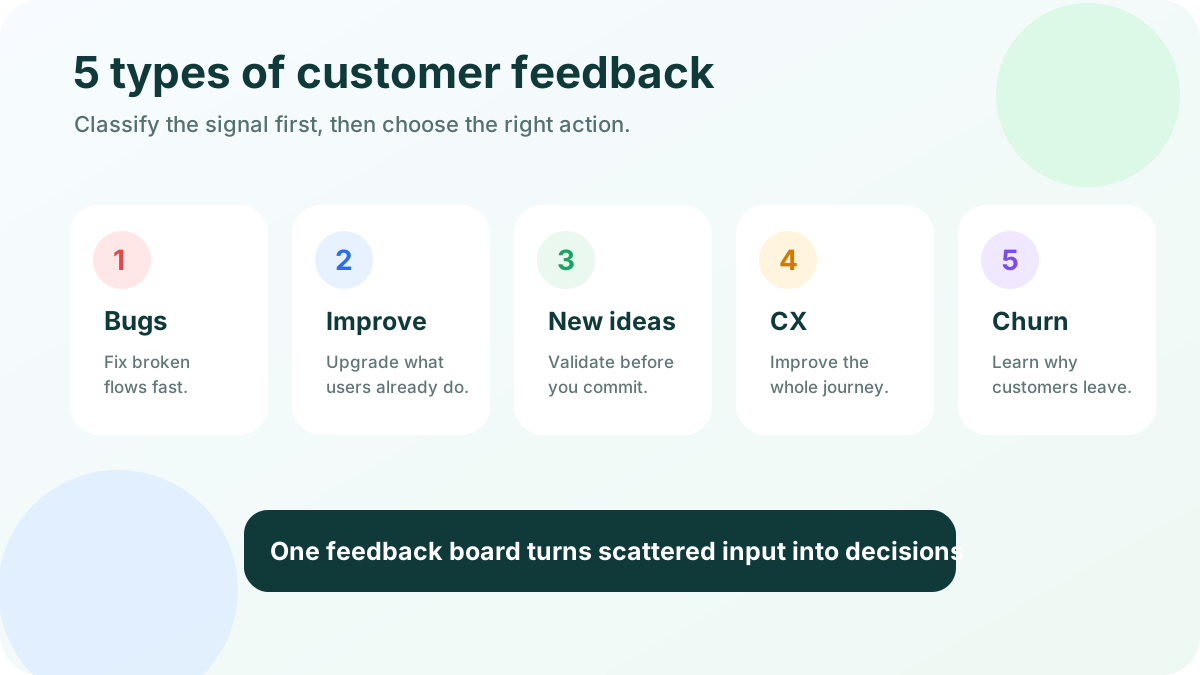
Quick answer: the 5 useful types of customer feedback are bugs, product improvements, new feature ideas, customer experience feedback, and churn or retention signals. Classify each message first, then choose the right action: fix, clarify, improve, validate, or decline. For small SaaS teams, the goal is a lightweight system that prevents the loudest comment from becoming the roadmap.
Types of feedback
These five feedback types work well for lean teams because they map to clear owners and actions.
1. Product or website bugs
Bug feedback describes something broken: a button fails, a page loads incorrectly, a workflow errors out, a data field does not save, a notification never arrives, or a checkout step blocks payment. Customers may not call it a bug. They might say “this is confusing,” “I cannot finish,” or “your app lost my work.”
How to address it:
- Acknowledge quickly and thank the customer for reporting it.
- Reproduce the issue or ask for the missing details: browser, device, account state, screenshot, screen recording, and steps taken.
- Separate severity from volume. One payment bug from one user can be more urgent than twenty votes for a nice-to-have feature.
- Add the bug to your engineering tracker, but keep the customer-facing status in plain language.
- Close the loop after the fix ships.
Bug reports should not compete with feature ideas in the same list. They need triage by impact, affected users, revenue risk, and workaround availability. A public feedback board can still help if you label reports clearly and move confirmed defects into a private engineering process.
For small teams, make bug reporting easy without inviting vague complaints. Use a short form with “what happened,” “what did you expect,” and “how can we reproduce it?”
2. Product or feature improvements
Improvement feedback asks you to make something existing better. Examples include “sort this table by date,” “include custom fields in exports,” “add keyboard shortcuts,” “let admins change this setting,” or “show a clearer empty state.”
These requests are valuable because they usually come from real usage. The customer has adopted the product enough to notice friction, but the requested solution still needs context.
How to address it:
- Ask what job the customer is trying to complete.
- Capture the current workaround and how often it happens.
- Group similar requests under one theme instead of creating duplicate tickets.
- Add voting only after you understand the problem.
- Look for improvements that reduce support load, increase activation, or help high-fit customers succeed.
This is where a lightweight board matters. Instead of losing product suggestions across Slack, email, and support chats, you can consolidate them into one place, merge duplicates, and let customers vote. If you are comparing tools, this guide to feature request tools explains what to look for beyond a basic form.
3. New products or features
New feature feedback asks for something your product does not do today. It may be an integration, workflow, reporting view, mobile app, API endpoint, AI assistant, template library, or adjacent product line.
This feedback is exciting, but it is also where product teams drift. Customers often request the solution they can imagine, not the smallest change that solves the problem. “Build a full CRM” might really mean “help me see which accounts asked for this feature.”
How to address it:
- Validate the underlying pain before estimating the feature.
- Check whether the request fits your product vision and ideal customer profile.
- Ask whether the customer would pay, switch plans, or change behavior if the feature existed.
- Estimate maintenance cost, not just build cost.
- Communicate “not now” clearly when the idea is outside your strategy.
A dedicated idea board separates raw demand from roadmap commitment. Customers can suggest ideas and vote, while your team keeps statuses such as under review, planned, in progress, released, or not planned. If voting is part of your workflow, read the practical guide to feature voting so popularity does not become your only prioritization method.
4. Customer experience feedback
Customer experience feedback is about the journey around the product: onboarding, support quality, documentation, sales handoff, billing clarity, account setup, perceived value, communication, and trust.
Examples include “I did not understand what to do after signup,” “the help article is outdated,” “support was fast but the answer was unclear,” “I never knew the feature shipped,” or “your pricing page made the limits hard to compare.”
How to address it:
- Map the comment to a journey stage: evaluation, signup, onboarding, activation, regular use, renewal, expansion, or cancellation.
- Identify whether the root cause is product design, messaging, documentation, expectation-setting, or support process.
- Track repeated friction as themes, not isolated complaints.
- Give ownership to the team that can fix the experience, not only the product team.
- Measure whether the change reduces tickets, increases activation, or improves satisfaction.
CX feedback often hides in support chats and onboarding metrics. A confusing feature may look like a training problem until the same question appears every week.
Zendesk’s current <a href="https://cxtrends.zendesk.com/" rel="nofollow">CX trends</a> reinforce why fast, context-aware responses matter: customers expect support interactions to feel connected. Qualtrics also emphasizes that <a href="https://www.qualtrics.com/experience-management/customer/customer-feedback/" rel="nofollow">customer feedback programs</a> need both collection and action; gathering comments alone does not improve the experience.
5. Churn, retention, and expansion feedback
The fifth type is feedback tied to customer value over time. It includes cancellation reasons, downgrade comments, renewal objections, NPS follow-ups, expansion requests, account health notes, and “we almost left because...” messages.
This category deserves its own place because it connects feedback to retention risk and revenue. The same request from a healthy power user and from three accounts about to churn should not be weighed identically.
How to address it:
- Ask churned users for the main reason and one open-ended explanation.
- Tag cancellation reasons consistently: missing feature, too expensive, poor fit, switched competitor, low usage, support issue, business closed, or temporary need.
- Review downgrade and churn themes monthly, not only when a big customer leaves.
- Compare churn feedback with product usage. Sometimes people say “too expensive” when the real issue is low activation.
- Feed validated retention themes into your roadmap and customer success playbooks.
NPS can be useful here, but the follow-up question matters more: “What is the main reason for your score?” That answer tells you whether the issue is capability, reliability, onboarding, support, or value perception.
How to collect feedback from users
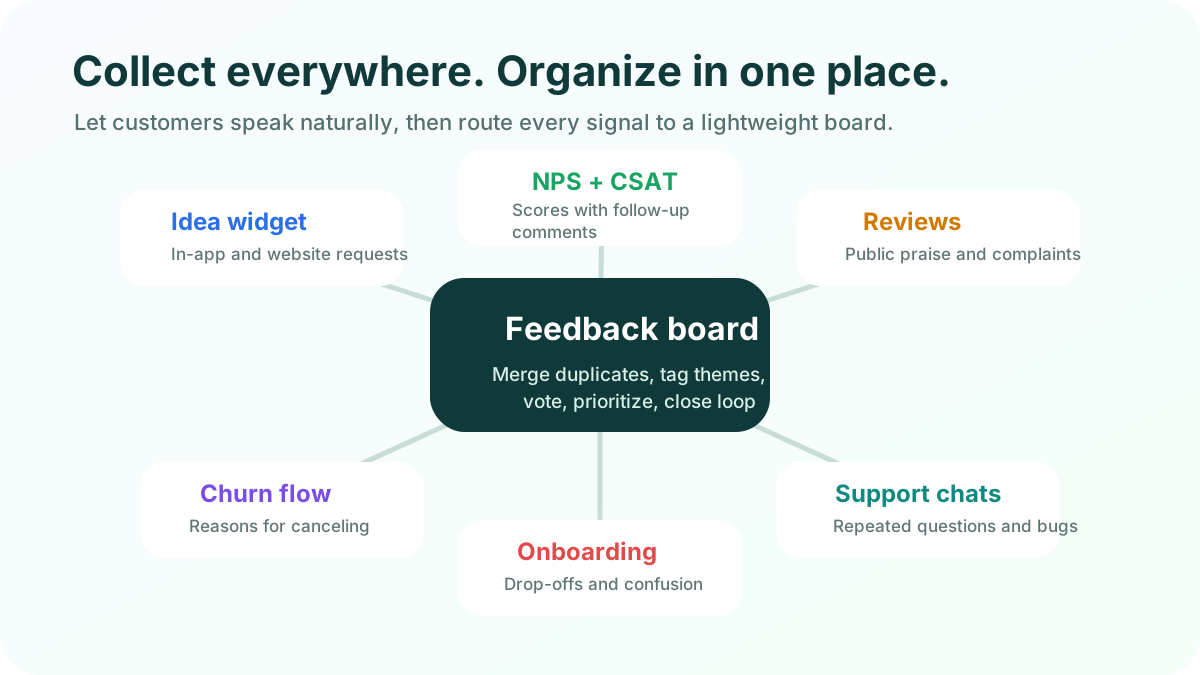
A good customer feedback system has multiple inputs and one organized home. Customers can share ideas wherever it is natural, while your team avoids ten disconnected backlogs.
Use an idea board as the central home
An idea board gives customers a dedicated place to submit requests, vote on existing ideas, and see progress. It reduces duplicate messages because people can find similar requests before posting. It also helps your team avoid the “one loud customer equals roadmap priority” trap.
For a small SaaS team, keep the board simple: categories, customer-friendly statuses, weekly duplicate merging, replies for context, and release updates when ideas ship.
If you need examples before creating your own, feature request templates can help you structure prompts, statuses, and follow-up questions.
Create a customer feedback board with FeaturAsk and try it free for one month with no card.
Monitor NPS and satisfaction comments
NPS, CSAT, and customer satisfaction surveys help you spot sentiment trends. They are most useful when paired with qualitative follow-up. A score tells you that something changed; the comment tells you what to investigate.
Send these surveys at meaningful moments: after onboarding, after support resolution, after a major release, before renewal, or after a few weeks of active usage. Avoid survey fatigue.
Read reviews and public mentions
Customers do not always tell you directly when something is wrong. Review sites, social media, communities, and marketplaces often reveal positioning gaps, missing features, support expectations, and switching triggers. Add useful snippets to your board, then compare them with direct feedback and usage data.
Ask during churn and downgrade flows
Cancellation is a high-signal moment. Ask for one primary reason, then offer an optional text box. If the user selects “missing feature,” route that comment to your board. If the user selects “too expensive,” check whether pricing, value communication, or product adoption is the deeper issue.
Use short surveys for focused questions
Surveys work best when you have a specific decision to make. For example, ask active users which reporting fields matter before redesigning exports. Ask new users where onboarding became unclear. Ask lost trials what they expected to happen before they abandoned setup.
Keep surveys short. The <a href="https://www.intercom.com/blog/customer-feedback/" rel="nofollow">Intercom guide to customer feedback</a> makes a useful point for product teams: combine in-product moments, conversations, and surveys so you get feedback in context rather than relying on one channel.
Learn from onboarding and product analytics
Not all feedback is written. If trial users stop before inviting a teammate, a feature has many tickets and low adoption, or users export data before canceling, behavior is giving feedback. Numbers show where to look; comments explain why.
Capture support chat themes
Support conversations happen when the customer is actively trying to do something. Review tickets weekly for repeated confusion, broken expectations, missing docs, and requests that signal demand. When support sees a repeated request, add or upvote the related board item with a short note.
Add external feedback to the same board
Some ideas arrive in sales calls, account reviews, communities, email replies, and founder conversations. Add them to the same feedback home. If the public board should not show every source, keep internal notes private but connected to the same theme.
For a deeper look at board structure, compare approaches in this guide to feedback board software.
How to prioritize feedback
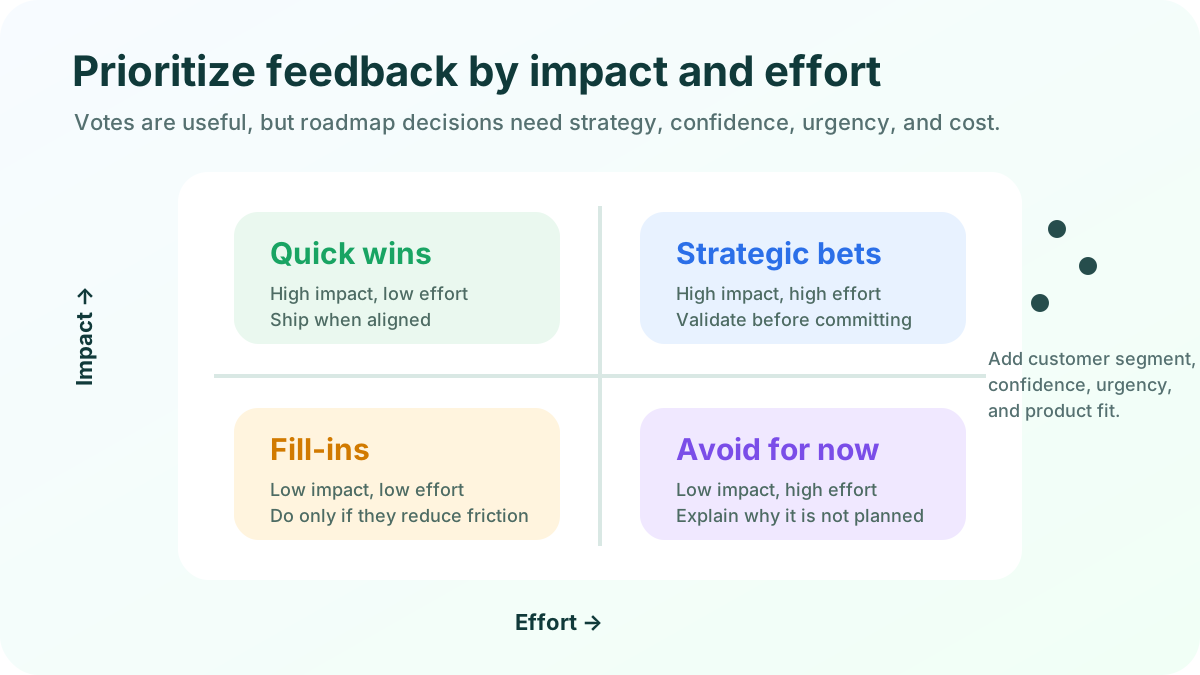
Collecting feedback is easier than deciding what deserves action. A vote count is helpful, but it is not a roadmap. Prioritization should combine customer evidence, business strategy, effort, and risk.
Start with product vision and current goals
First ask whether the feedback supports the product direction. If your goal is early-stage SaaS teams, a large enterprise request for complex procurement workflows may be profitable but distracting. A clear vision lets you say no without sounding dismissive.
Segment by customer fit and value
Feedback from different customers should carry different context. Consider plan, lifecycle stage, use case, company size, role, account health, and ideal customer fit. This does not mean only big customers matter; it means you should know who is asking and why.
Score impact, confidence, effort, and urgency
Use a simple scoring model. Impact asks what improves. Confidence asks how strong the evidence is. Effort asks how hard the work will be to build and maintain. Urgency asks whether there is a deadline, churn risk, compliance need, or blocked deal.
The RICE model popularized by Intercom is a common starting point for product teams because it separates reach, impact, confidence, and effort. Atlassian’s overview of <a href="https://www.atlassian.com/agile/product-management/prioritization-framework" rel="nofollow">prioritization frameworks</a> is also useful if you want to compare RICE, MoSCoW, opportunity scoring, and other lightweight methods.
Fix small high-confidence improvements quickly
Not every decision needs a formal roadmap meeting. If an improvement is low effort, aligned with your product, and repeatedly requested, ship it quickly. Just avoid “easy” changes that add permanent complexity.
Validate large ideas before committing
For major features, gather stronger evidence before you promise anything. Interview customers, test a prototype, measure workarounds, review willingness to pay, and compare the request with your strategy.
When a feature moves toward release, include customers in acceptance checks. A user acceptance testing guide can explain how to confirm that the shipped solution actually solves the user problem.
Close the loop, even when the answer is no
Customers keep sharing feedback when they see what happened. Closing the loop does not mean promising every request. It means acknowledging the input, explaining decisions when appropriate, and announcing shipped improvements.
Use clear statuses:
- New: received but not reviewed.
- Under review: being evaluated.
- Planned: aligned and scheduled.
- In progress: actively being built.
- Released: available to customers.
- Not planned: considered but not a fit now.
A public changelog or board update builds trust.
A simple workflow for small teams
Here is a lightweight feedback workflow you can run without hiring a research team.
- Create one central board for ideas, improvements, bugs, and CX themes.
- Add a widget or link inside your product, website, help center, and emails.
- Tag every item by feedback type, customer segment, source, and status.
- Merge duplicates weekly so votes and comments compound in one place.
- Review urgent bugs continuously and product ideas on a weekly or biweekly cadence.
- Score larger ideas by impact, confidence, effort, urgency, and strategic fit.
- Move selected items to your roadmap and keep customers informed.
- Review churn, NPS, onboarding, and support themes monthly.
This workflow is intentionally small. It gives you enough structure to make better decisions without turning feedback into a full-time operations burden.
FeaturAsk is built for small businesses and SaaS teams that want a clean feedback widget, voting board, and admin workflow without enterprise complexity. It costs $29.95/year, includes a 30-day free trial, and does not require a credit card to start.
Final takeaways
The five types of customer feedback are product or website bugs, product improvements, new feature ideas, customer experience feedback, and churn or retention signals. Each type needs a different response.
Bugs need fast triage. Improvements need context and grouping. New features need validation. CX feedback needs journey ownership. Retention feedback needs revenue and account-health context.
Once you collect these signals in one lightweight board, prioritization becomes much easier. You can see what customers are asking for, who is asking, how often it appears, and how it fits your strategy.