Effective Customer Onboarding: 7 Strategies to Boost Retention
Customer onboarding is the system that turns a new signup into a confident, active customer. It is not just a welcome email, a product tour, or a checklist. Effective onboarding helps people understand what to do first, why it matters, and how to recover when they get stuck.
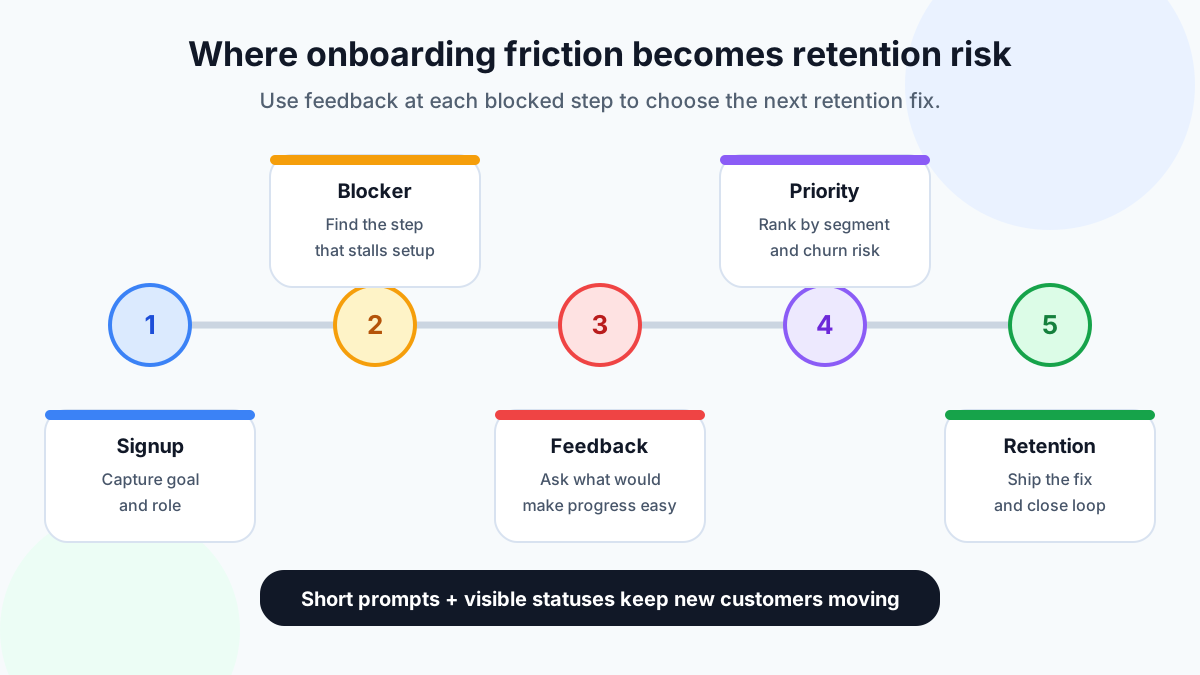
For small SaaS teams, onboarding matters because early confusion quickly becomes churn. A user who cannot import data, invite a teammate, publish a widget, connect an integration, or see a useful first result may not open a support ticket. They may simply disappear. That is why onboarding should be measured with both behavior and feedback: activation data shows what happened, while customer comments explain why.
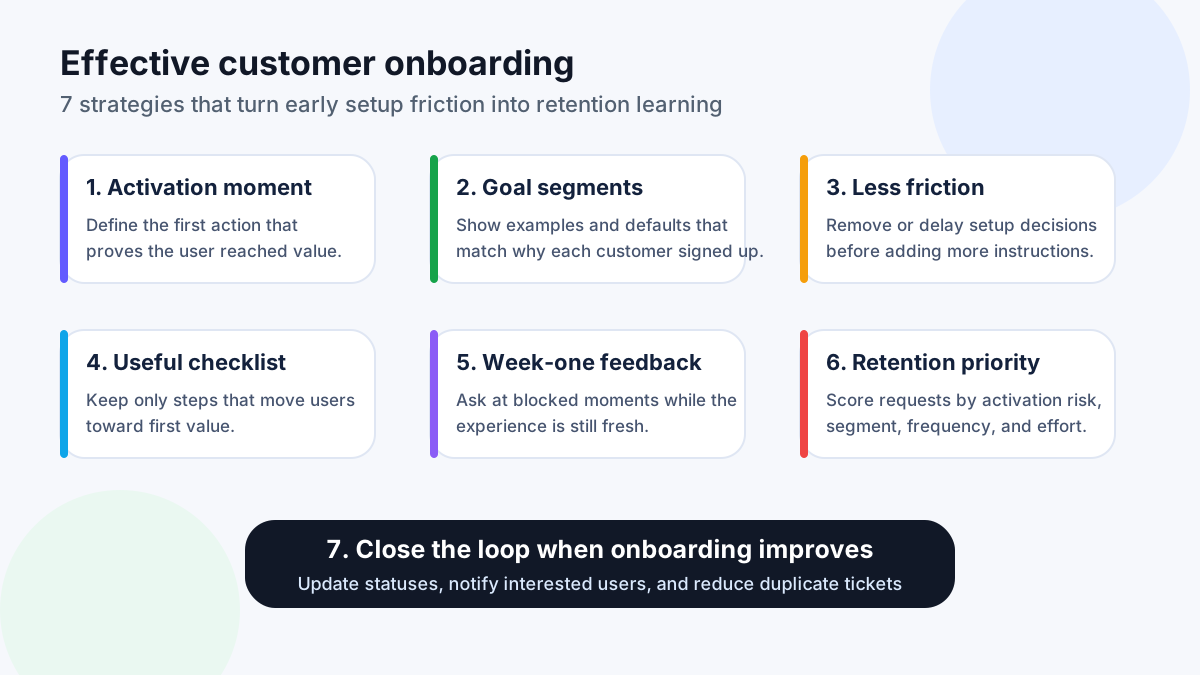
This FeaturAsk version uses seven strategies instead of the original six because one missing step deserves its own place: closing the loop. Collecting onboarding feedback is useful, but showing customers what changed is what builds trust and retention. If you need a lightweight way to capture those requests, start a FeaturAsk trial and collect onboarding ideas in one place — one month free, no credit card required, then $29.95/year.
Why customer onboarding affects retention
Onboarding is the first proof that your product can deliver the promise that sold the customer. When the first session feels clear, users are more likely to return, explore deeper features, and invite others. When the first session feels slow or confusing, every later retention effort has to fight that first impression.
The retention risk is especially high for self-serve SaaS. A sales-led customer may have an implementation manager and scheduled training. A self-serve buyer often has only your interface, help center, emails, and product prompts. If those pieces do not point toward a clear first win, the customer may conclude that the product is too hard before they ever experience its value.
Research from Nielsen Norman Group repeatedly emphasizes task clarity, user control, and reducing cognitive load. Those principles map directly to onboarding: new users need fewer unexplained decisions, clearer labels, and better recovery paths. McKinsey's experience-led growth research also connects improved customer experience with business growth, which is why onboarding should be treated as a revenue system rather than a one-time tutorial.
Strategy 1: Define the activation moment
The activation moment is the first meaningful result that proves the customer is on the right path. It might be publishing a feedback widget, sending the first campaign, importing the first customer list, creating a project, inviting a teammate, or receiving a useful report. Without a clear activation moment, onboarding becomes a collection of tasks rather than a path to value.
Start by asking what successful customers do early that unsuccessful customers do not. Then design onboarding around that behavior. If activated users usually create a board and receive their first vote, move those actions forward. If activated users usually connect an integration, make the integration step easier to understand and postpone optional configuration until later.
Do not confuse account setup with activation. A user can complete a profile, select preferences, and dismiss a tour without understanding the product. The better question is: what action makes the customer say, “Now I see why I signed up”?
Strategy 2: Segment onboarding by customer goal
Different customers buy the same SaaS product for different jobs. A founder may want proof that customers care about a roadmap item. A support lead may want fewer duplicate tickets. A marketer may want to collect website feedback. An ecommerce operator may want checkout friction reports. If all of them see the same onboarding path, the examples and defaults will feel generic.
Segment onboarding with simple signals: role, company type, team size, traffic source, plan, or the problem selected during signup. The goal is not to create a complex rules engine on day one. Even two or three paths can make onboarding feel more relevant. For example, a feedback product could show “collect feature requests,” “capture website feedback,” and “prioritize roadmap ideas” as first paths.
Segmentation also improves feedback quality. When users submit onboarding requests, you can see which segment is struggling. A request from five new ecommerce accounts may mean something different from one request by a mature enterprise admin. Pairing segment data with votes helps prevent the roadmap from being dominated by the loudest individual complaint.
Strategy 3: Remove setup friction before adding education
When customers get stuck, teams often add more instructions. Sometimes that helps. But many onboarding problems are caused by unnecessary decisions, fields, permissions, or concepts that appear too early. Before writing another guide, ask whether the step can be removed, delayed, pre-filled, or explained in one sentence.
Look at each setup step through the user's eyes. Do they know why the step matters? Do they have the information needed to complete it? Can they skip it safely? Is the label written in their language or in your internal terminology? A shorter path to first value usually beats a longer path with more tooltips.
This is where qualitative feedback matters. Analytics may show that users abandon an import step, but comments explain whether the file format is confusing, the sample template is missing, or the value of importing data is unclear. See FeaturAsk's guide to building better products with user feedback for a broader feedback loop you can apply after onboarding.
Strategy 4: Use checklists only where they reduce doubt
Onboarding checklists can be useful because they show progress and make the next step obvious. They can also become a dumping ground for every task the team wants users to complete. A checklist should reduce doubt, not advertise the whole product.
Limit the first checklist to actions that move the customer toward activation. Use plain language, show why each step matters, and celebrate real progress rather than empty completion. “Publish your first feedback board” is stronger than “Complete setup.” “Invite one teammate who handles customer requests” is clearer than “Configure collaboration.”
Keep secondary tasks outside the first checklist. Advanced settings, billing preferences, deep customization, and power-user workflows can wait until the customer has experienced value. If many users ask for help with a checklist item, treat that as a product signal. The step may need better defaults, better copy, or a product change rather than more reminders.
Strategy 5: Collect feedback in the first week
The first week is when onboarding feedback is most specific. Users still remember what they expected, what confused them, and which step almost made them quit. Waiting until cancellation turns a clear onboarding problem into a vague churn reason.
Ask for feedback at moments of friction: after a failed import, repeated help-center visits, an abandoned checklist, a skipped integration, or the first successful outcome. Keep the prompt short. Instead of a long survey, ask what blocked them or what would make the next step easier.
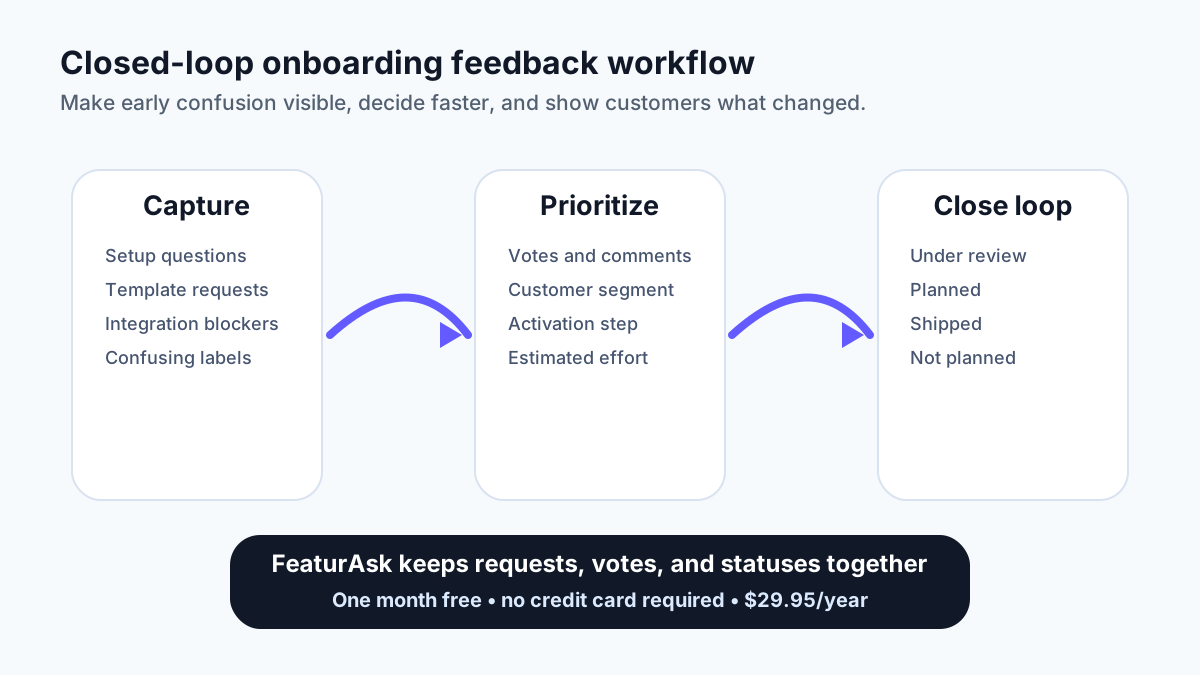
A public or semi-public request board can turn individual comments into patterns. If ten new users vote for a setup template, that is stronger evidence than one support ticket. If several users request the same integration during onboarding, you can investigate whether it blocks activation or simply supports a later workflow. For more on prioritizing these signals, read feature request tools and feature voting.
Strategy 6: Prioritize onboarding fixes by retention risk
Not every onboarding complaint deserves the same response. Some requests are convenience improvements. Others block first value and create churn risk. A retention-focused onboarding system separates those categories before assigning roadmap time.
Score onboarding feedback by four factors: activation step, customer segment, frequency, and effort. A small wording fix that helps many new customers reach first value can be more valuable than a large feature requested by a few advanced users. A missing template for new accounts may deserve faster action than a complex admin feature that only matters after months of usage.
Combine votes with context. Vote counts are useful, but they should not become automatic orders. Look for comments that explain the job behind the request. “I need a template” may mean the user lacks confidence. “I need this integration before I can invite my team” may mean activation is blocked. Good prioritization translates feedback into the real onboarding problem underneath.
Strategy 7: Close the loop when onboarding improves
The seventh strategy is the one many teams skip. They collect feedback, discuss it internally, maybe ship a fix, and then never tell the people who asked. That weakens trust and encourages duplicate support tickets.
Closing the loop is simple: mark a request as under review, planned, shipped, or not planned. When you ship a better checklist, clearer import example, new template, or onboarding email, update the related request and notify interested users. If you decide not to build something, explain the reason briefly.
This habit improves retention in two ways. First, customers see that their early friction led to action. Second, future users can find the existing request and vote instead of starting from zero. Use FeaturAsk to keep that onboarding feedback loop visible, with request statuses, votes, and comments for $29.95/year after the free trial.
Metrics to pair with onboarding feedback
The best onboarding reviews combine numbers with customer language. Track activation rate, time to value, checklist completion, import success, invitation rate, support volume, and feature adoption. Then connect those metrics to feedback themes.
For example, if activation is low and users keep asking for examples, the issue may be confidence rather than missing functionality. If users complete the checklist but do not return, the checklist may reward the wrong actions. If new admins repeatedly ask about permissions, the setup flow may need clearer defaults or a safer invitation path.
Review these signals weekly while the product is changing. A monthly review may be enough for mature onboarding, but early-stage teams learn faster by looking at recent cohorts. The goal is not to create a heavy dashboard. The goal is to identify the next onboarding fix most likely to reduce avoidable churn.
Practical onboarding review workflow
Run a short onboarding review with product, support, marketing, and whoever talks to customers most often. Bring five inputs: activation data, support tickets, feedback-board requests, sales or demo notes, and recent churn comments. Look for repeated language. Customers often describe the real problem more clearly than internal teams do.
For each repeated issue, decide whether the fix is education, interface copy, default settings, documentation, lifecycle email, or product work. This distinction keeps the roadmap cleaner. A confusing label should not become a new feature. A missing integration that blocks many right-fit customers may deserve discovery.
Record the decision on the related request so the next review starts with evidence instead of memory. If the fix ships, close the loop. If it waits, explain what you need to learn next. That operating habit turns onboarding from a static setup flow into a retention engine.
Keep the review lightweight. A weekly 20-minute pass over the newest onboarding requests is enough for many small teams. The discipline matters more than the meeting size: identify the blocker, choose the next fix, assign an owner, and tell customers when the status changes.
Bottom line
Effective customer onboarding reduces churn by helping users reach first value faster and by teaching the team where confusion still exists. Define activation, segment by goal, remove friction, use checklists carefully, collect early feedback, prioritize by retention risk, and close the loop when improvements ship.
If your onboarding feedback is scattered across support tickets, calls, notes, and spreadsheets, try FeaturAsk to collect requests, votes, comments, and status updates in one organized board. It includes a one-month free trial, no credit card required, and simple $29.95/year pricing for small teams that do not need enterprise complexity.