Collecting In-App Feedback: Best Practices and Top Tools for Small Teams
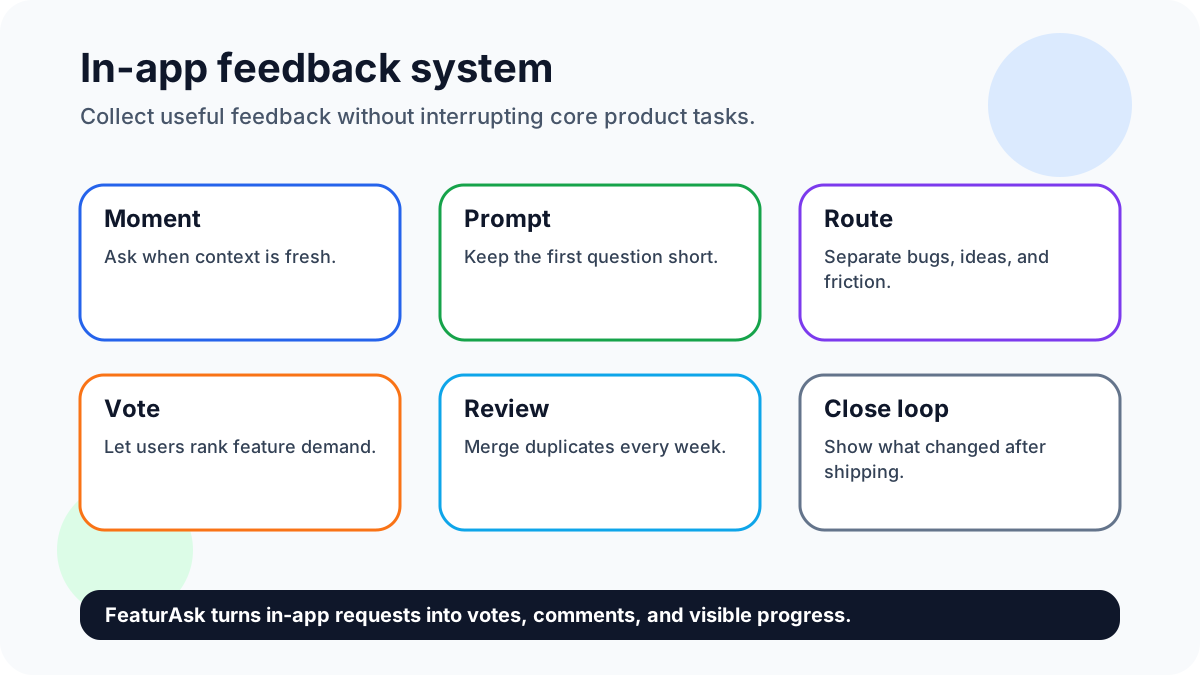
In-app feedback works because it catches users while the experience is fresh. Instead of asking people to leave the product, you give them a low-friction way to share ideas, vote on requests, and explain blockers in context.
Quick answer: collect in-app feedback with short contextual prompts, passive widgets, voting for feature demand, moderation, and a weekly review habit that turns comments into decisions. Connect the work with feature request templates, feature voting, and building better products with user feedback where useful.
Sign up for FeaturAsk to add a lightweight in-app feedback widget — one month free, no credit card required, and only $29.95/year after that.
Why this matters now
In-app feedback matters because the user’s memory is freshest inside the workflow. The right tool captures that signal quietly; the wrong prompt interrupts the task and lowers trust.
Best practices and top tools for in-app feedback
1. Ask at the moment of context
Place feedback prompts near the workflow they describe: checkout, onboarding, dashboard setup, or a completed action. Context improves recall and makes the comment easier to interpret later.
2. Keep the first question short
Start with one specific prompt such as “What stopped you today?” or “What should we improve next?” Long surveys can come after the user chooses to participate.
3. Offer voting for feature demand
Voting prevents duplicates and shows which ideas have broader support. It also gives quieter users a low-effort way to participate without writing a full request.
4. Separate bugs from ideas
A bug report needs reproduction details and urgency. A feature idea needs problem, use case, and demand. Routing them separately keeps both workflows cleaner.
5. Use moderation before public display
Moderation protects quality without hiding feedback. Merge duplicates, remove spam, clarify vague requests, and keep the board useful for new visitors.
6. Close the loop after shipping
When a request ships, update the idea and announce the change. Users are more likely to give feedback again when they see that feedback leads somewhere.
7. Avoid interrupting critical tasks
Do not interrupt checkout, payment, publishing, or account recovery with a survey. Use passive widgets or post-action prompts instead.
8. Segment feedback by user type
A new customer, admin, power user, and churn-risk account may ask for different things. Segmenting comments helps the team avoid averaging incompatible needs.
9. Review trends weekly
A feedback tool only works if someone reviews it. Schedule a short weekly pass for duplicates, popular requests, urgent complaints, and follow-up questions.
10. Publish what you learned
Share a short summary of what the team heard and what will happen next. Public learning creates trust even when you cannot build every request.
11. FeaturAsk
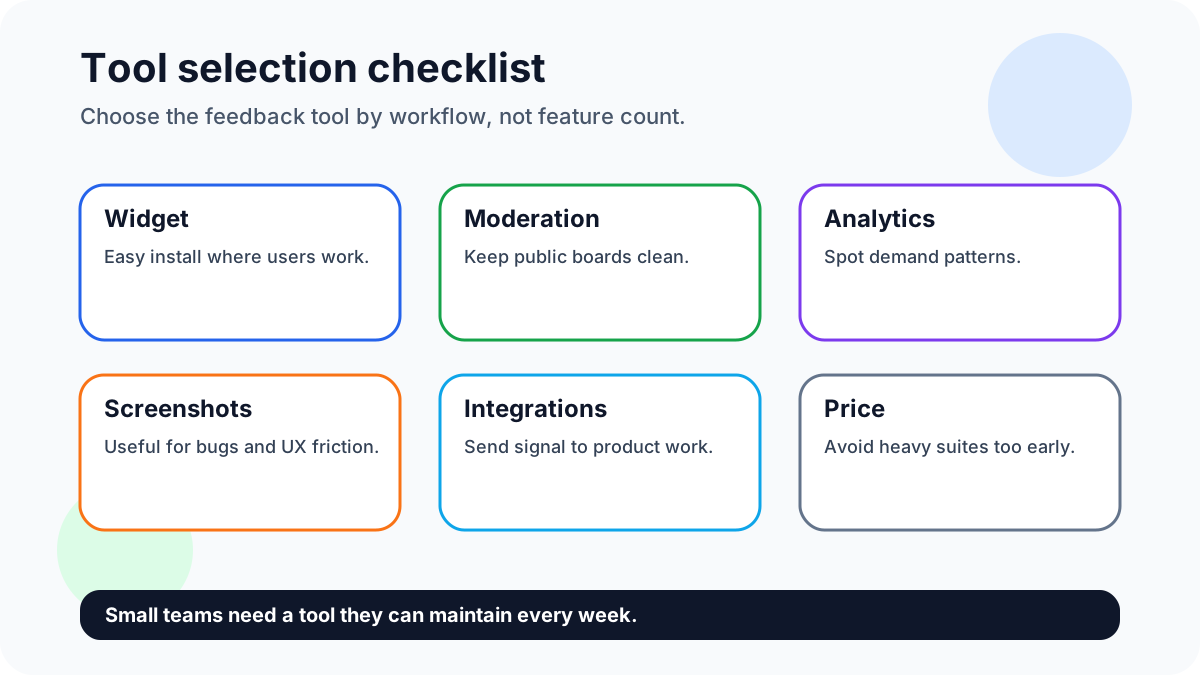
Best for small teams that want a simple website widget, request voting, moderation, analytics, and custom branding without enterprise complexity.
12. Canny
Useful for teams that want a more established product feedback portal, but it can be more tool than a small website needs when the goal is simple request intake.
13. Userback
Strong when visual bug reports and annotated screenshots matter more than public voting. It is a better fit for QA-heavy workflows than broad idea collection.
14. Featurebase
A good fit for teams that want feedback boards plus broader product communication. Compare complexity and price against the actual review habits of your team.
15. Usersnap
Helpful for visual feedback, QA, and customer screenshots. Use it when context capture is the priority; use a voting board when demand ranking is the priority.
FeaturAsk angle for smaller teams
FeaturAsk is strongest when the in-app feedback job is request collection and voting. Visitors submit ideas from the site, other users support existing requests, and admins manage the signal without a heavy product suite.
Try FeaturAsk free for one month and start ranking in-app ideas by votes with no credit card. The yearly price is $29.95/year.
Evidence and current references
Nielsen Norman Group’s survey best practices show why specific questions beat vague prompts. Product benchmark research such as Pendo’s Product Benchmarks Report reinforces the value of measuring behavior alongside direct feedback.
Tool choice should follow the job. Use FeaturAsk for simple request voting, Userback or Usersnap for visual bug context, and broader suites only when the team will use the extra workflow.
A simple weekly workflow
Each week, review new widget submissions, merge duplicate ideas, tag the workflow where feedback appeared, separate bugs from feature demand, and choose whether to ship, research, ask a follow-up, or decline with context.
How to choose the right in-app feedback tool
Choose based on the type of signal you need most. If you need feature demand, use a voting board and request workflow. If you need visual bug context, prioritize screenshot capture. If you need satisfaction measurement, use short surveys around key moments. Many teams buy a broad suite and then use only one small piece; start with the job you will review every week.
For small teams, FeaturAsk is strongest when the goal is visible request collection: users can suggest ideas, vote, and add context while admins moderate and prioritize. Pair it with analytics for behavioral data and support notes for urgent pain. Together, those sources show what users do, what they say, and what they want next.
The best prompt is usually passive and available: a widget users can open when they have something to say. Add targeted questions only after meaningful moments, such as finishing onboarding or abandoning a setup step.
Editorial checklist
Review prompts by asking whether the user can answer in under a minute. If the prompt requires a long explanation, split it into a request title plus optional details.
Tool selection matrix
Choose FeaturAsk when you need a public or embedded request board with voting, moderation, analytics, and simple setup. It is especially useful for small websites that want customer ideas in one place without paying for a complex monthly platform.
Choose a visual bug-reporting tool when screenshots, console data, or reproduction context matter more than idea voting. This is common for QA teams, agencies, and products with complex interfaces. Those tools can be excellent, but they solve a different problem from ranking feature demand.
Choose a broader product feedback suite when you have multiple product managers, several customer segments, and a formal discovery process. The tradeoff is setup time and cost. If nobody will review the extra fields and workflows, the suite becomes a storage cabinet rather than a decision system.
Prompt design for better responses
Good in-app prompts are specific. “What almost stopped you from completing setup?” will usually beat “Any feedback?” because it points the user toward a concrete experience. “Which product should we add next?” works for ecommerce. “What lesson should this course include?” works for creators. “What report do you wish this dashboard had?” works for SaaS.
Ask after meaningful moments. A user who just completed onboarding can comment on clarity. A user who abandoned setup can reveal friction. A repeat visitor can vote on missing improvements. Avoid blocking moments where interruption creates frustration, such as checkout or password recovery.
Review workflow
Collecting feedback is only half the job. Every week, merge duplicates, tag ideas, remove spam, and identify patterns. Decide whether each high-signal item should become a quick fix, research question, roadmap candidate, or clear no. Then communicate the decision. Users do not need every request accepted, but they do need evidence that the feedback space is alive.
In-app feedback examples by business type
A SaaS dashboard might ask, “What report would help you make a decision faster?” and route answers into feature requests. An ecommerce store might ask visitors to vote on product variants, sizes, bundles, or shipping options. A creator might ask subscribers which tutorial, template, or event should come next. A service business might ask which add-on service customers wish existed.
Each prompt works because it connects to the visitor’s current intent. The best in-app feedback does not ask users to become product strategists. It asks them to describe a missing outcome in language they already use.
Data to capture with each request
Capture the request title, short description, user type, page or workflow, vote count, comment thread, and status. If the request is public, keep language clean and easy to scan. If the request contains private account details, summarize it internally instead.
Combine direct feedback with behavior data. If many users request a feature but analytics show low usage of the existing related workflow, research the gap before building. Maybe users need education, maybe the current feature is hidden, or maybe the requested improvement is truly missing.
In-app feedback prompt library
Use different prompts for different moments. After a user completes a task, ask, "What almost slowed you down?" After they abandon a flow, ask, "What were you trying to do?" After they vote on a request, ask, "What would this unlock for you?" These prompts are short, contextual, and easier to answer than a generic "Any feedback?" box.
Keep the first response lightweight. Let users add screenshots, longer notes, or email addresses only after the core signal is captured. That protects completion rates and avoids interrupting the product experience.
Routing and review workflow
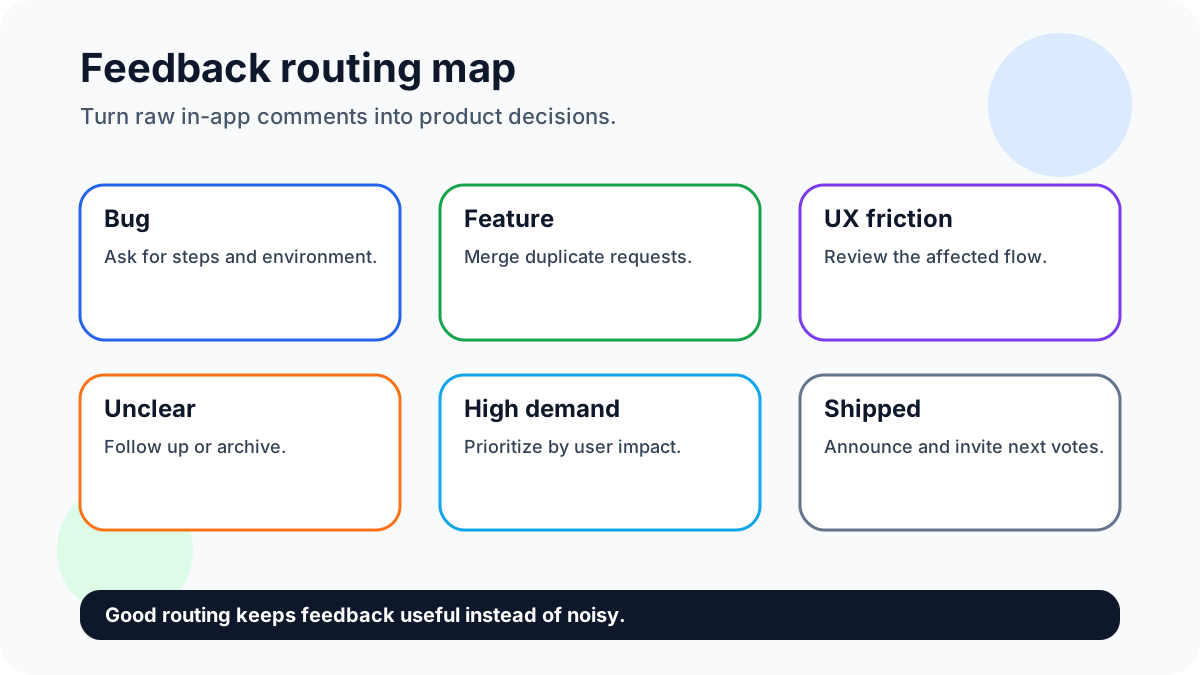
Route every submission into one of four buckets: bug, feature request, usability friction, or unclear. Bugs need reproduction details. Feature requests need duplicate merging and voting. Usability friction needs product review. Unclear notes need a short follow-up or should be archived. This routing makes in-app feedback useful instead of noisy.
For small teams, a weekly 30-minute review is enough to start. Look for repeated language, not just the loudest request. If three users describe the same problem in different words, merge the signal and update the public status so users see that feedback is being handled.
What to capture with each request
Capture the page or feature area, user segment, request text, vote count, comments, status, and owner. Avoid collecting private data you do not need. The goal is enough context to make a product decision, not a surveillance file.
Implementation checklist before launch
Before enabling an in-app prompt, decide where it appears, who reviews submissions, and how quickly visible requests get a status. Test the widget on desktop and mobile, then submit three fake requests: a bug, a feature idea, and an unclear complaint. If the team cannot route those examples cleanly, fix the workflow before inviting real users.
Also decide what not to ask. Avoid long surveys inside critical flows, avoid collecting personal details that do not affect the product decision, and avoid promising that every request will ship. A good in-app feedback system sets expectations: users can submit ideas, other users can vote, and the team will review demand regularly.
After launch, review the first week of submissions manually. If most notes are unclear, adjust the prompt. If many are duplicates, make existing requests easier to find. If users submit bugs through a feature request flow, add a separate bug path. The early pattern tells you whether the feedback system is helping users express demand or merely collecting noise.
FAQ
What is the fastest way to start?
Start with one passive widget and one short prompt tied to a real workflow. Review responses weekly before adding surveys or more tools.
How do you keep quality high?
Quality stays high with moderation, duplicate merging, segmentation, and a clear decision for each high-signal request.
Why use FeaturAsk?
FeaturAsk is a lightweight way to collect in-app ideas, votes, and comments without building a custom feedback workflow. Sign up for FeaturAsk and test the widget for one month free with no credit card; the annual plan is $29.95/year.
Sources
- Nielsen Norman Group’s survey best practices show why specific questions beat vague prompts. Product benchmark research such as Pendo’s Product Benchmarks Report reinforces the value of measuring behavior alongside direct feedback.