How to Use ChatGPT to Write Release Notes Without Sounding Generic
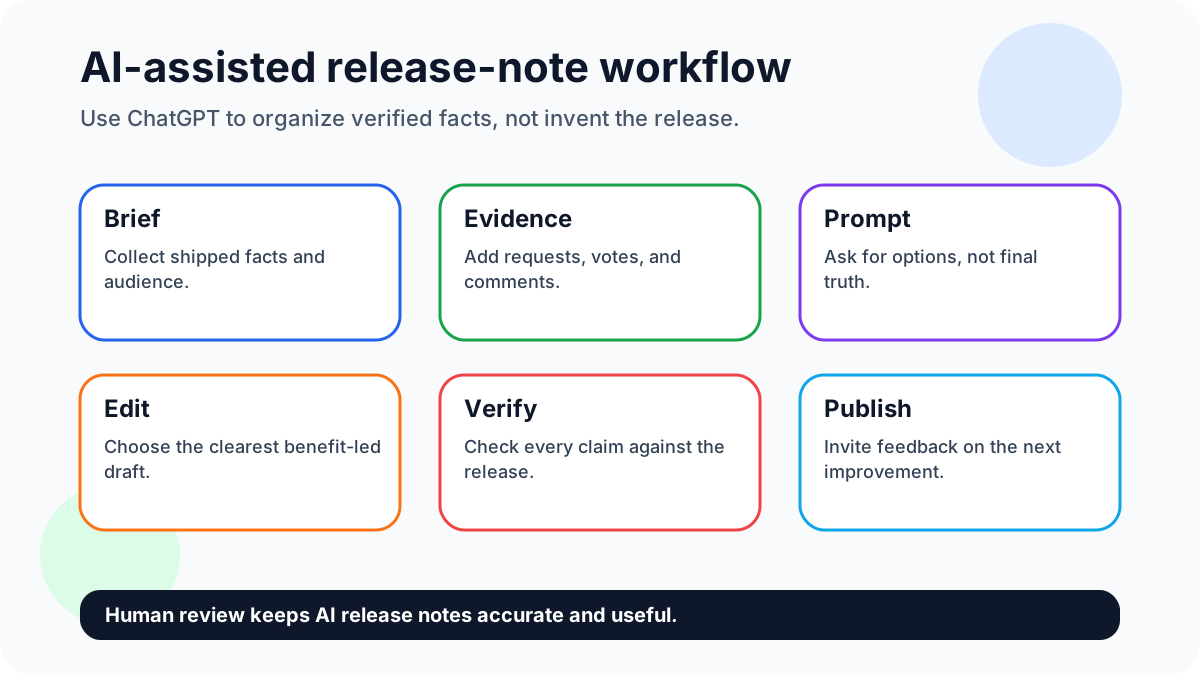
ChatGPT can help draft release notes, but it should not invent the story of a release. The best workflow uses AI to organize verified inputs: what shipped, who benefits, what changed in the user experience, and what users asked for next.
Quick answer: ChatGPT is useful for release-note drafts only when you feed it verified release facts, customer request context, limitations, and a strict review checklist. Connect the work with feature request templates, feature voting, and building better products with user feedback where useful.
Sign up for FeaturAsk to give ChatGPT better release-note source material — try it for one month free, no credit card required, then keep the widget for $29.95/year.
Why this matters now
Release-note drafting matters because AI can accelerate communication while also making it dangerously easy to publish vague or inaccurate claims. A careful workflow keeps the speed while protecting trust.
How to write release notes with ChatGPT in 9 steps
1. Define the reader and channel
Before prompting ChatGPT, decide whether the note is for a public changelog, in-app banner, email, help center, or developer update. The same shipped change needs different length, detail, and tone in each channel.
2. Collect the actual shipped changes
Paste verified facts, not rough memories. Include the feature name, old behavior, new behavior, affected users, availability, limitations, and any setup steps. Tell the model not to add claims beyond the input.
3. Add customer evidence and voting data
If the release came from customer requests, include the pattern: how many users asked, what pain they described, and which workflow was blocked. This is what keeps AI output from sounding generic.
4. Ask ChatGPT for three angles
Request a concise customer version, a technical version, and a support-safe version. Comparing angles helps you find the clearest framing without publishing the first draft.
5. Choose the clearest benefit-led draft
Pick the version that names the outcome first. If the title could apply to any product, rewrite it. “Faster duplicate merging for request boards” is stronger than “Request management improvements.”
6. Verify every claim against the release
Check screenshots, plan availability, pricing, dates, permissions, and limitations. AI can make a true release sound broader than it is, which creates avoidable support debt.
7. Rewrite jargon into plain language
Replace sprint, refactor, endpoint, and infrastructure language with what the user can do now. Keep technical detail only where the audience is technical.
8. Add visuals only when useful
Use a screenshot, short GIF, or diagram when it shows location or before-after behavior. Do not add visuals just to make an AI-written note look finished.
9. Publish and invite feedback
Close with a request for the next improvement. A release note should not end the conversation; it should move users into the next feedback loop.
FeaturAsk angle for smaller teams
FeaturAsk improves AI release-note drafting by supplying specific inputs: customer wording, vote patterns, request categories, and shipped statuses. Those facts help ChatGPT produce notes that sound grounded rather than generic.
Try FeaturAsk free for one month and collect the request context behind each release with no credit card. The simple annual plan is $29.95/year.
Evidence and current references
OpenAI’s prompt engineering guide emphasizes context and clear instructions, and the ChatGPT release notes page is a useful example of concise ongoing product communication.
Prompt example: “Turn these verified release facts into a customer-facing note under 120 words. Explain the benefit first, name the affected audience, preserve limitations, and do not add facts.” Weak draft: “We improved request management.” Strong draft: “Admins can now merge duplicate feature requests, keeping vote totals cleaner and making roadmap review faster.”
A simple weekly workflow
Each release cycle, create a factual brief before opening ChatGPT. Draft variants, compare them, verify every claim, then publish the version that best explains the customer benefit without exaggerating availability or scope.
A stronger prompt-and-review pattern
Use a two-pass prompt. First, ask ChatGPT to summarize only the verified facts: audience, change, limitation, and customer benefit. Second, ask for three versions of the same note: public changelog, in-app banner, and support reply. The comparison usually reveals which details are essential and which are noise.
Then run a human review checklist. Confirm the release is actually live. Confirm screenshots match the current interface. Confirm the note does not imply availability on plans or platforms that are excluded. Confirm the title is specific enough that a user can decide whether to read more.
A good release note sounds like a helpful product teammate: accurate, plain, and specific. AI can accelerate drafting, but customer evidence makes the note credible. Without request context, the model tends to produce safe phrases that could describe any SaaS product.
Editorial checklist
Review the draft by highlighting every factual claim. Availability, dates, limitations, pricing, screenshots, and user promises must trace back to the release brief, not to an AI assumption.
Prompt library for better release notes
Prompt for a public changelog: “Using only the facts below, write a changelog entry for existing customers. Start with the customer benefit, name the affected audience, keep it under 140 words, include one limitation, and end with a feedback question. Facts: [paste verified release notes].”
Prompt for an in-app banner: “Create a 35-word announcement for users who are already inside the product. Mention what they can do now, avoid hype, and include a button label under four words.”
Prompt for support enablement: “Turn this release into a support-ready explanation. Include what changed, who has access, the most likely customer question, and a safe answer if the customer asks for a related feature that is not shipped yet.”
Prompt for risk review: “List every claim in this draft that needs verification before publishing. Flag availability, pricing, dates, screenshots, compatibility, and promises about future work.”
Before-and-after example
Weak AI draft: “We are excited to announce improvements to feedback management that make collaboration seamless and efficient.” This says almost nothing. It does not name the user, the old pain, or the new behavior.
Stronger note: “Admins can now merge duplicate feature requests while preserving votes and comments. This keeps public boards cleaner and makes weekly roadmap review faster for teams with active customer communities.” The stronger version is still short, but it explains the workflow and the benefit.
Review rules for AI-assisted notes
Never paste sensitive customer data into a model. Summarize the request pattern instead: “multiple admins asked for duplicate merging,” not private account details. Keep a final human approval step for anything involving pricing, security, legal commitments, or future promises. Store the final note with the release record so support can reference the same wording later.
The main advantage of ChatGPT is speed through first drafts and variants. The main advantage of FeaturAsk is better input: real requests, votes, comments, and priorities. Combine them and the note becomes specific instead of generic.
What to give ChatGPT before drafting
Give the model the release facts in a structured block: product area, shipped behavior, old behavior, affected users, plan availability, screenshots or visual notes, customer request theme, and support caveats. The more structured the input, the less the model has to guess.
Add brand constraints. For FeaturAsk-style communication, that means practical, builder-focused, plain language, no inflated claims, and a clear connection to user feedback. Ask the model to avoid empty adjectives and to prefer concrete verbs such as merge, vote, filter, export, approve, or publish.
Ask for alternatives, not perfection. A useful prompt might request five titles, two summaries, and one support-safe explanation. You then choose and edit. This keeps control with the product team while still saving drafting time.
What not to automate
Do not automate final approval, legal-sensitive claims, pricing references, security language, or future roadmap promises. Do not let AI invent customer quotes. Do not paste private feedback directly into a third-party model. Summarize patterns instead.
The safest workflow is simple: gather verified facts, draft with AI, edit for specificity, verify claims, publish, and watch feedback.
FeaturAsk release brief template
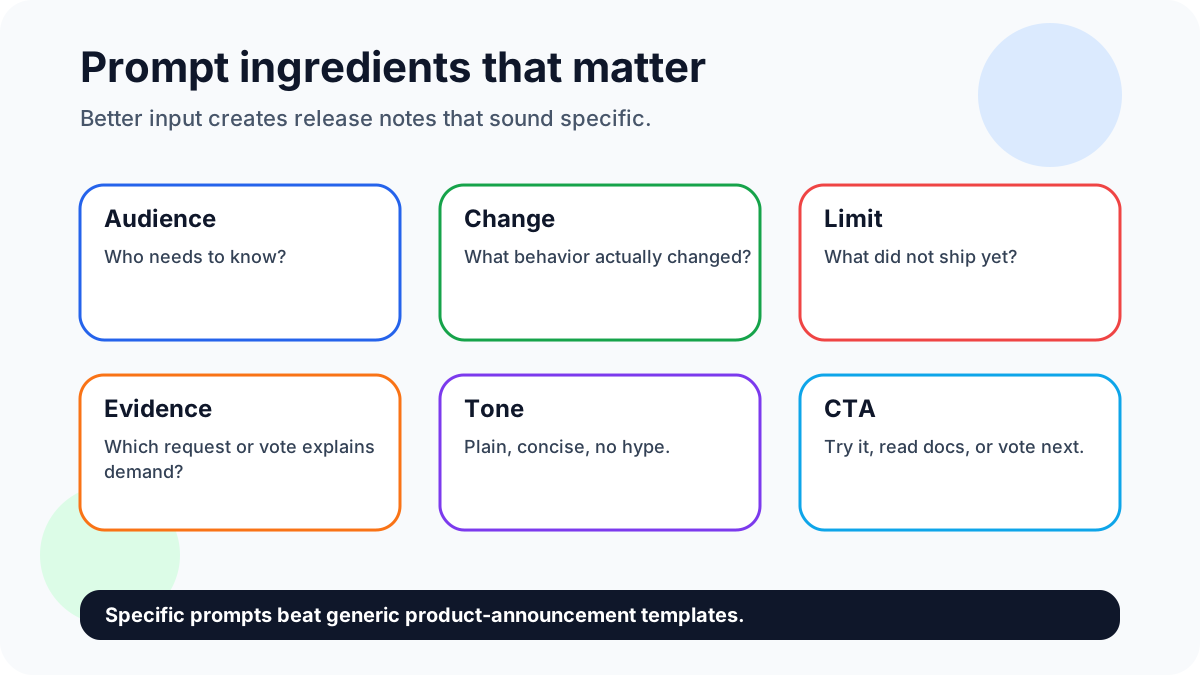
Give ChatGPT a release brief before asking for polished copy. Use these fields: audience, shipped behavior, excluded behavior, availability, customer evidence, vote count or comment theme, support caveat, and next action. The model should organize those facts; it should not invent missing product context.
Example input: "Audience: ecommerce store admins. Shipped: export filters for order status and date range. Excluded: custom columns. Evidence: 18 FeaturAsk votes and six comments from stores reconciling monthly orders. Caveat: large exports may take a few minutes. Next action: vote on custom fields." That input produces a release note grounded in real demand rather than generic AI enthusiasm.
Before-and-after release note example
Weak AI draft: "We are excited to announce enhanced exporting capabilities that improve productivity for all users." Better edited note: "Order exports now support status and date filters, so store admins can reconcile monthly orders without cleaning the CSV manually. This was one of the most requested reporting improvements in FeaturAsk. Try it from Reports, then vote on the next export field."
The second version is shorter, clearer, and safer. It names the workflow, avoids hype, explains the user benefit, and connects the release to feedback. That is the standard every AI-assisted note should meet before publishing.
Human review gate
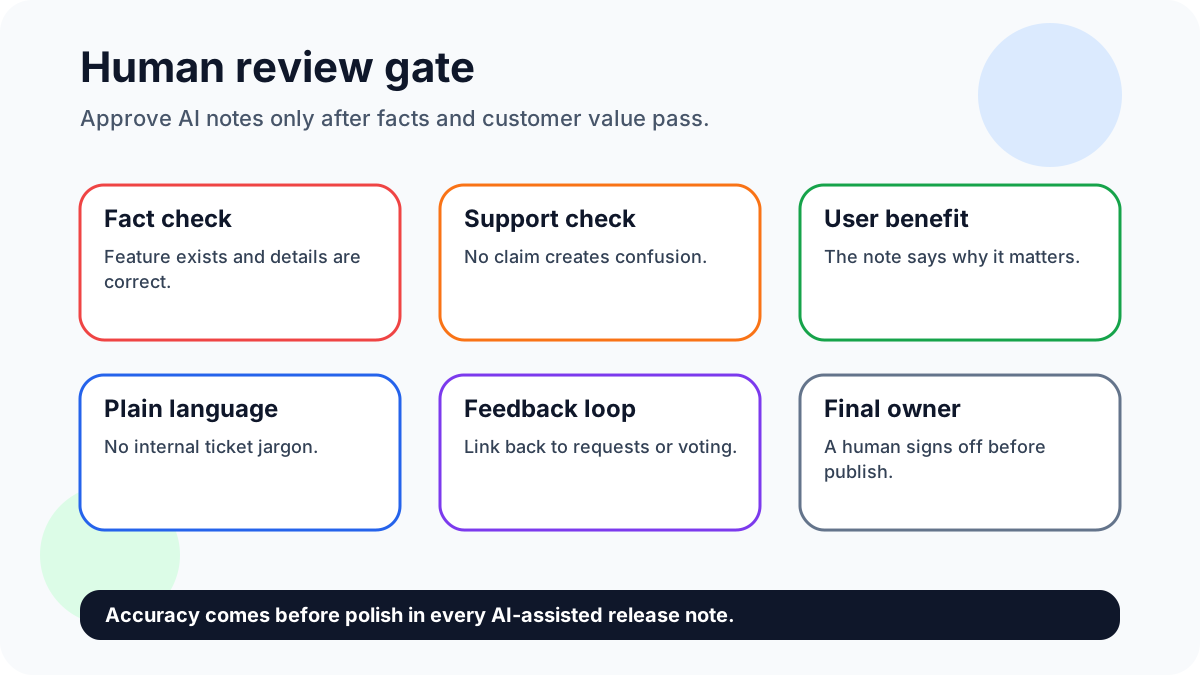
Approve a ChatGPT draft only after someone checks four things: the feature exists, the audience is correct, the limitation is stated honestly, and the next action is useful. If any claim would create a support ticket, rewrite it before improving the tone. Accuracy comes before polish.
Keep a short prompt library, but do not automate judgment. Prompts help with structure; product owners still decide what changed, what matters, and what users should do next.
Small-team workflow example
Here is a simple cadence for a founder or solo product manager. On Monday, review the top FeaturAsk requests and pick the ones tied to shipped work. On Tuesday, write a release brief for each item: request summary, affected users, shipped behavior, known limits, and link to the feedback thread. On Wednesday, ask ChatGPT for three draft styles: concise changelog, customer email, and in-app announcement. On Thursday, edit the best parts into one release note and verify every claim against the product. On Friday, publish the note and ask users to vote on the next related request.
This cadence keeps AI in the drafting lane. It also prevents the common mistake of publishing release notes that sound polished but have no evidence behind them. The request board supplies the words customers actually used, the vote count shows demand, and comments reveal the edge cases worth mentioning. ChatGPT can compress that material, but the team still decides what is true and what is worth saying.
Use the same brief after publishing. Save the final note, the prompt that produced the best draft, and any user replies that exposed confusion. Next time, feed those lessons into the prompt so the model learns your product vocabulary and your team avoids repeating vague phrases. Over a few releases, this creates a practical house style without turning release communication into a slow content project.
FAQ
What is the fastest way to start?
Start with a verified release brief, then ask ChatGPT for three versions instead of one final answer. Compare, edit, and approve manually.
How do you keep quality high?
Quality stays high when the final note is checked against the release brief and any vague AI phrasing is replaced with concrete product behavior.
Why use FeaturAsk?
FeaturAsk gives AI-assisted notes the customer evidence they need. Sign up for FeaturAsk and test the widget for one month free with no credit card; the yearly plan is $29.95/year.
Sources
- OpenAI’s prompt engineering guide emphasizes context and clear instructions, and the ChatGPT release notes page is a useful example of concise ongoing product communication.