6 Ways to Improve Dev Team Communication
Last updated March 18, 2026
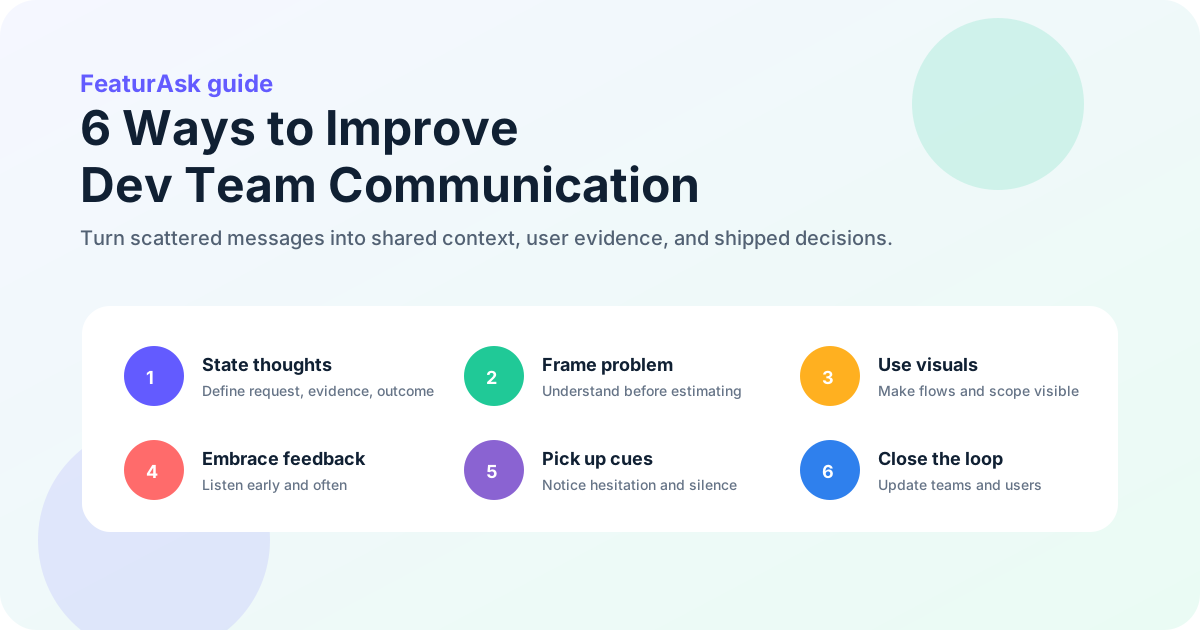
Quick answer: the 6 ways to improve dev team communication are to state ideas clearly, spend more time understanding the problem, communicate visually, embrace feedback, pick up subtle cues, and close the loop after decisions. For small teams, the biggest win is turning vague conversations into visible, prioritized, user-backed work. A lightweight feedback board helps product, support, founders, and developers discuss the same evidence instead of debating scattered opinions.
Development work fails less often because people are lazy and more often because people are solving different versions of the same problem. A founder says “users need better reporting.” A developer hears “build a dashboard.” Support hears “customers are confused by exports.” Sales hears “we need enterprise analytics.” Everyone is trying to help, but the words are too broad.
Good communication is not more meetings. It is a system that reduces ambiguity before code is written, during delivery, and after release. It makes assumptions visible. It gives quieter teammates a safe path to contribute. It connects technical tradeoffs to customer value. It also prevents the common small-team pattern where product direction lives in DMs, support tickets, and someone’s memory.
If you want a simple place to collect requests, clarify priorities, and show users what changed, start a FeaturAsk feedback board with a 30-day free trial, no credit card required, and simple pricing at $29.95/year.
Six communication habits that reduce rework for development teams
Improving communication for a development team starts with a practical goal: help the right people understand the right problem early enough to act. That means communication has to be specific, visible, and repeatable.
Google Cloud’s current 2025 DORA research emphasizes that software delivery performance depends on organizational capabilities, user focus, fast feedback, and healthy engineering practices. The report also highlights the complicated effect of AI-assisted development: teams can produce more code, but coordination, quality, and trust still need strong systems around the work. The lesson for small teams is clear: speed without shared understanding creates rework.
Stack Overflow’s 2025 Developer Survey is another useful signal. Developers continue to report heavy use of collaboration tools, AI tools, documentation, asynchronous communication, and learning resources. Modern dev teams do not communicate in one place. They communicate across issue trackers, pull requests, chat, docs, support tools, product boards, and customer conversations. The process has to make those signals coherent.
Use the six practices below as a working communication system, not a motivational poster.
1. Turn assumptions into explicit product decisions
Clear communication begins before you type the message. If your thought is fuzzy, the team will inherit that fuzziness. Before asking developers to estimate, build, review, or debug something, slow down long enough to define the request.
A clear dev-team message usually answers five questions:
- What is the problem or decision?
- Who is affected?
- What evidence do we have?
- What outcome do we want?
- What response is needed from the team?
Compare these two messages:
“Can we improve onboarding?”
“Three trial users asked how to invite teammates, and two abandoned setup before creating a board. Can we review whether the invite step should appear earlier in onboarding?”
The second version is not longer for the sake of being longer. It gives the team a sharper target. Developers can inspect the flow, product can compare options, support can add context, and the founder can decide whether the problem is urgent.
Use plain language even when the topic is technical. Jargon is useful only when everyone shares the same definition. If a phrase could mean several things, define it. “Real-time sync,” “permissions,” “dashboard,” “AI summary,” and “integration” can each hide multiple paths.
Clarity also means separating facts, assumptions, and preferences. Try this format in tickets and async updates:
- Fact: users are submitting duplicate requests for Slack notifications.
- Assumption: they do not see existing requests before posting.
- Risk: building notifications first may not solve the discovery problem.
- Proposal: add duplicate suggestions on the request form before prioritizing notifications.
- Question: does engineering see a simpler way to detect similar requests?
That structure keeps the conversation grounded. It also gives developers permission to challenge the plan without sounding negative. They are not rejecting “the feature”; they are evaluating an assumption.
For roadmap-heavy discussions, pair clear writing with a visible prioritization process. If your team is still organizing incoming ideas, read feature request templates and standardize how requests are captured before they become development work.
2. Diagnose the problem before debating the solution
Many communication problems are really problem-framing problems. Teams jump from symptom to solution too quickly, then spend days arguing about details because the real issue was never named.
A customer asks for “custom fields.” The team starts debating field types, validation, UI placement, and pricing. Later, someone discovers the customer only needed a way to mark requests by region. A tag would have solved the job. The team did not lack effort; it lacked problem understanding.
Before discussing implementation, ask:
- What user behavior or business result are we trying to change?
- What is happening today?
- How often does it happen?
- Which users experience it?
- What have they already tried?
- What would a good enough solution look like?
- What should we avoid building?
This is where user feedback boards reduce ambiguity between product and development. A board gives the team a visible record of the original request, votes, comments, duplicates, status changes, and customer language. Instead of “someone asked for reporting,” the developer can see the pattern: 18 users want export filters, 6 want scheduled emails, and 2 want charts. That changes the conversation.
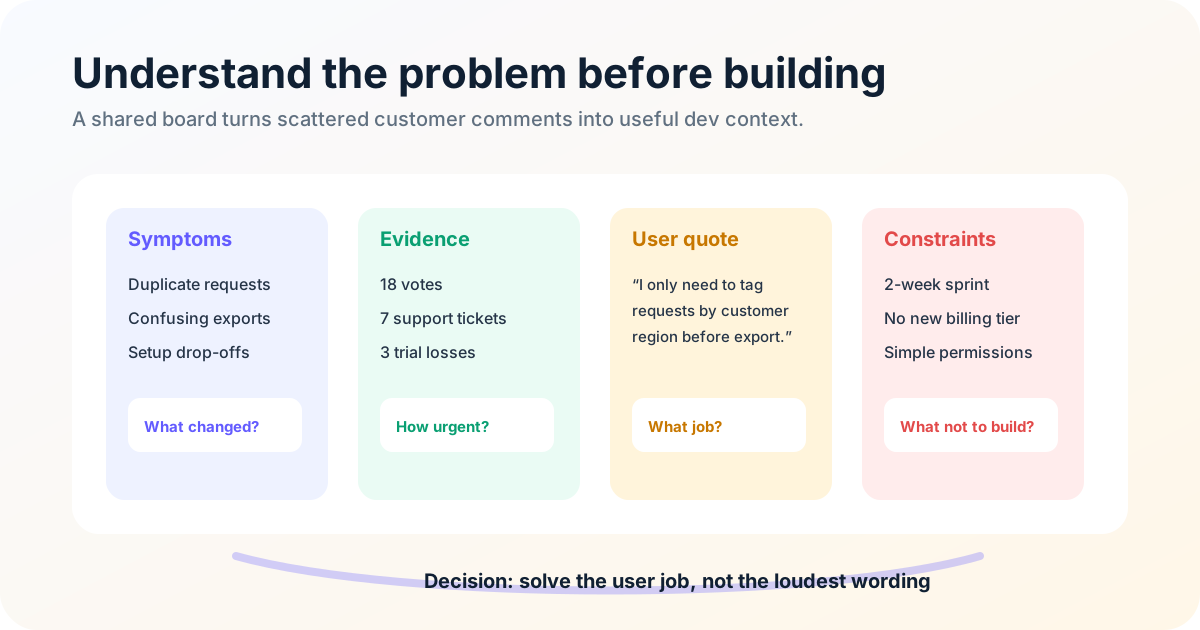
Small teams should be especially careful here because one broad feature can consume weeks. A large company can absorb some wasted discovery. A bootstrapped SaaS team often cannot. Better communication protects focus.
Use a lightweight problem brief for meaningful work:
- User problem: what users cannot do today.
- Evidence: feedback, votes, support examples, usage data, interviews.
- Scope: what is included and excluded.
- Constraints: technical, timing, security, pricing, support load.
- Success signal: what will be true after release.
- Open questions: what still needs a decision.
This does not need to become bureaucracy. A five-bullet brief in your issue tracker can save a five-day detour.
If feedback is part of your discovery process, connect it to prioritization instead of treating it as a suggestion box. The guide to feature voting explains how votes, comments, and segmentation can reveal demand without letting popularity override strategy.
3. Make complex trade-offs visible, not buried in chat
Development teams handle complex systems: flows, states, permissions, dependencies, edge cases, and tradeoffs. Words alone often force everyone to build a different mental picture. Visuals make the picture shared.
Use visuals when the conversation involves sequence, structure, comparison, or uncertainty. Good examples include:
- user journey maps;
- wireframes;
- state diagrams;
- architecture sketches;
- release timelines;
- before-and-after screenshots;
- annotated bug reports;
- voting boards grouped by theme;
- dependency maps.
A visual does not need to be polished. A rough sketch can be more valuable than a perfect spec if it reveals misunderstanding early. The point is not design quality; the point is shared context.
For example, a request like “add request statuses” may sound simple. A quick state diagram shows the real questions: Who can change status? Can users filter by status? Do subscribers receive notifications? Can a closed request reopen? What happens to duplicates? Should status names be customizable?
Visual communication also helps non-developers participate accurately. Support may not understand the database model, but they can look at a flow and say, “Users usually contact us before that step.” Sales may not know the API detail, but they can point out which part matters in demos. Founders can see whether scope is growing.
The most useful visuals often live next to the work rather than in a separate deck. Add screenshots to bug reports. Attach a sketch to a ticket. Put release timelines near status updates. Use a feedback board to show which requests are planned, in progress, or shipped.
When discussing customer-facing updates, connect visuals to launch communication. A changelog screenshot or simple release diagram can make the shipped value obvious. For larger releases, align engineering and go-to-market work with a product launch communication plan so users hear a clear message after the team ships.
4. Route feedback into one accountable system
Communication is not complete when a message is sent. It is complete when the sender and receiver have a shared understanding and a path to act. Feedback is how you test that understanding.
Dev teams need several kinds of feedback:
- peer feedback on design and implementation;
- product feedback on whether the solution matches the user problem;
- customer feedback on whether the change creates value;
- support feedback on where users remain confused;
- operational feedback on whether the release caused incidents or extra work.
The mistake is treating feedback as a late-stage critique. If feedback only appears in code review or after launch, it feels like rework. Bring it earlier. Ask developers to challenge assumptions during discovery. Invite support to comment on proposed copy. Let customers vote and explain why a feature matters before a roadmap decision is final.
A healthy feedback culture is direct and respectful. Critique the work, the assumption, or the tradeoff, not the person. Replace “this is wrong” with “this may not solve the onboarding drop-off because the confusion happens one step earlier.” Replace “engineering is slow” with “the scope changed three times after estimation; how do we freeze requirements sooner?”
Small teams also need feedback channels that do not depend on meetings. Not everyone thinks best in real time. A public or private board gives users and teammates a place to add context asynchronously. A developer can review comments before planning. A founder can see demand without interrupting the sprint. Product can mark duplicates and connect related requests.
If you are collecting requests in Slack, email, spreadsheets, and support tickets, try FeaturAsk to centralize feedback, let users vote, and keep your team aligned for $29.95/year after the free month.
5. Notice silence, hesitation, and handoff friction
Not every communication issue arrives as a clear objection. Sometimes the signal is hesitation, silence, over-agreement, vague estimates, short replies, or a teammate repeatedly saying “should be fine.” Strong dev-team communication includes noticing what is not being said.
Subtle cues matter because software work contains uncertainty. A developer may see a hidden dependency but not want to slow the meeting. A designer may feel the solution ignores the main user pain but assume the decision is already made. A support teammate may know customers will misunderstand the release but lack confidence to challenge product language.
Look for cues such as:
- silence from people who usually contribute;
- repeated clarification questions;
- estimates that come with nervous qualifiers;
- disagreement moved into private chats after a meeting;
- “quick” work that keeps expanding;
- low energy around a supposedly high-priority feature;
- teammates agreeing before tradeoffs are discussed.
Remote and hybrid work make this harder. You cannot rely only on body language. Use explicit check-ins:
- “What concern are we under-discussing?”
- “What would make this harder than it looks?”
- “Who sees this differently?”
- “If we had to cut scope by half, what would remain?”
- “What user evidence would change our mind?”
Create more than one path for input. Some people will speak in a meeting. Others will write a thoughtful comment afterward. Some users will join interviews. Others will vote on a request and add one sentence. Good communication systems respect those differences.
Subtle cues also come from customers. A feature request with many vague votes may indicate interest but not urgency. A request with fewer votes and detailed comments from paying users may deserve faster attention. A feedback board helps preserve that nuance because the team can read the comments, not just a summary.
6. Close the loop after roadmap decisions
The extra practice that turns five communication tips into a stronger system is closing the loop. Many teams communicate intensely before a decision, then go quiet after it. That silence creates confusion: Was the feature accepted? Did scope change? Why was a request declined? What shipped? Who needs to know?
Close the loop internally and externally.
Internally, every meaningful decision should leave a trail:
- what was decided;
- why it was decided;
- what alternatives were rejected;
- who owns the next step;
- when the decision will be revisited;
- where related context lives.
This can be a short note in the ticket, a status change on a board, or a comment in the roadmap. The important part is that people can find the answer later without asking the same question again.
Externally, closing the loop builds trust with users. If customers submit requests and never hear back, they learn that feedback is a black hole. If they see statuses, comments, and release notes, they learn that the team listens even when every request cannot be built.
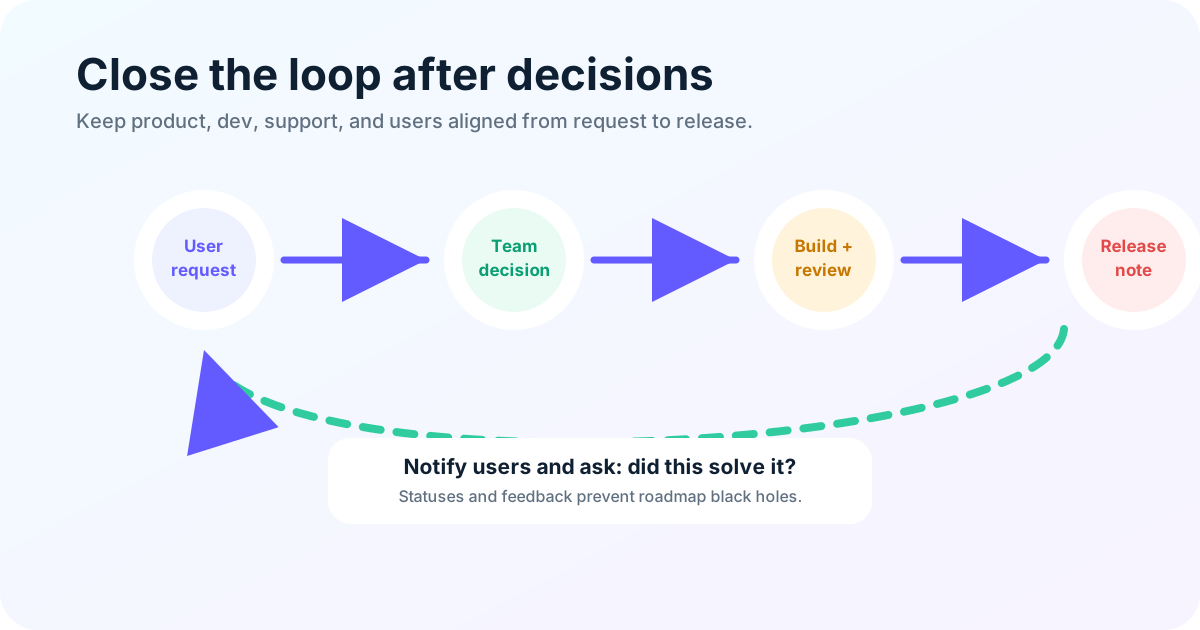
A simple closed-loop workflow looks like this:
- Capture the request in one visible place.
- Merge duplicates so demand is not fragmented.
- Ask clarifying questions when the problem is vague.
- Tag the request by theme, customer type, or impact.
- Discuss priority with product and engineering.
- Set a status such as under review, planned, in progress, shipped, or not planned.
- Notify interested users when the status changes.
- After release, ask whether the change solved the original problem.
This workflow improves dev team communication because it replaces memory with a shared system. Developers see why work matters. Product sees real demand. Support can answer users. Founders can make tradeoffs with evidence. Users see progress.
For a small team, closing the loop does not require an enterprise product-ops stack. It requires one place for feedback, a consistent review habit, and honest statuses. Use FeaturAsk to collect requests, prioritize with votes, and notify users when you ship; the trial is 30 days, no card required.
Final communication checklist
The best dev team communication is practical. It helps people understand the problem, make better tradeoffs, and deliver useful software with less rework.
Start with the six habits: clarify decisions, diagnose the problem, use visuals, route feedback into one system, notice handoff friction, and close the loop after decisions. Together, they turn scattered conversation into a repeatable product-development rhythm.
If your team is small, keep the process lightweight. Use short briefs, quick sketches, async comments, and visible customer feedback instead of giant specs and unnecessary meetings.
Better communication means making the important things easier to understand, challenge, prioritize, build, and explain.