6 Pillars of an Effective Product Adoption Strategy
Last updated January 30, 2026
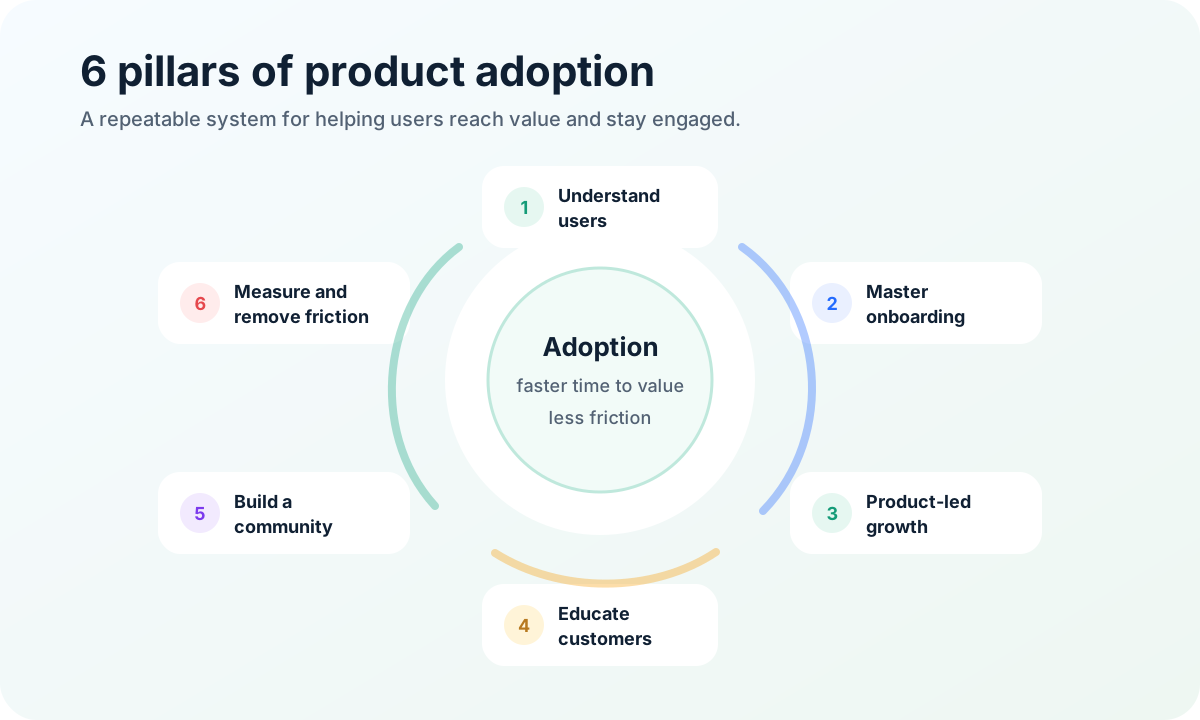
Quick answer: an effective product adoption strategy helps the right users discover your product, understand its value, try it safely, reach a meaningful outcome, and keep using it. The 6 pillars are user understanding, onboarding, in-product guidance, education, feedback loops, and measurement. For small SaaS teams, feedback and feature voting reveal which gaps block activation.
Understanding the Product Adoption Curve
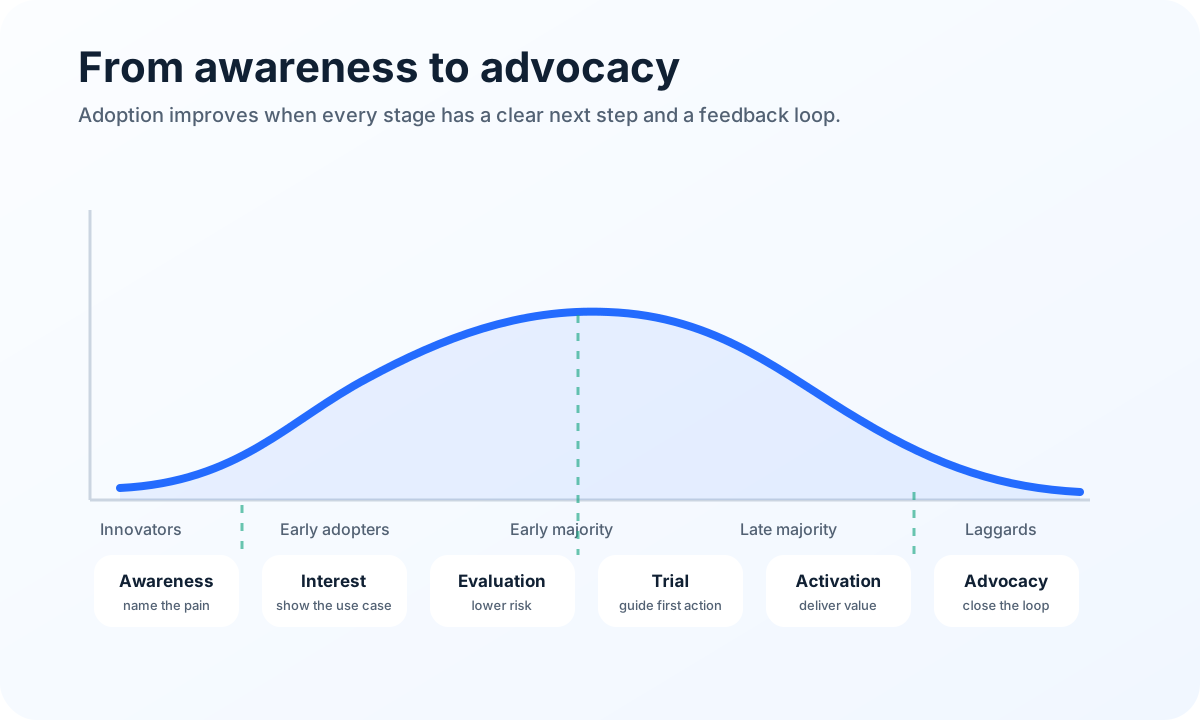
The product adoption curve describes how different groups adopt new products over time. Everett Rogers popularized the model in Diffusion of Innovations: innovators try new products first, early adopters follow when they see a promising advantage, the early majority waits for proof, the late majority wants lower risk, and laggards move only when the old way becomes harder than changing.
For product teams, the curve is useful because not every user needs the same message. Innovators may tolerate rough edges. The early majority wants evidence, templates, integrations, and lower setup risk. Late-majority users need clearer documentation, support, pricing transparency, and confidence.
Awareness
Awareness is the moment a potential user realizes your product exists and may solve a problem they already feel. The goal is accurate reach: getting in front of users who can experience your core value quickly. Good awareness content names the pain in the user’s language, such as scattered requests across email, Slack, support, DMs, and spreadsheets.
Awareness assets include landing pages, comparison pages, launch announcements, templates, demos, and educational articles. If you are planning a major release, connect adoption messaging to a structured product launch communication plan.
Interest
Interest begins when a user moves from “I have heard of this” to “this might help me.” At this stage, your job is to make the next step obvious. Avoid vague claims. Show specific use cases, short walkthroughs, examples, pricing, and realistic outcomes.
Users often abandon products during interest because the promise feels broad or setup cost feels unclear. Reduce uncertainty with screenshots, simple pricing, FAQs, “who this is for” sections, and quick-start flows.
Evaluation
Evaluation is where users compare your product against their current workaround and other options. They ask: will this fit our workflow, will it save time, can we trust it, and what happens if the team dislikes it?
A strong evaluation experience includes a low-friction trial, fast setup, examples, security basics, integration details, and a clear support path. A public feedback board, changelog, or roadmap also reassures evaluators that requests are not disappearing into a black box.
If feedback collection is part of your adoption plan, review the criteria in feature request tools for small teams. The best adoption stack is usually not the most complex one; it is the one your team will keep using every week.
Trial
Trial is the first hands-on experience. Users are now testing whether the product matches the promise. Your job is to reduce time to value.
A trial should start with one recommended path, not every possible feature. Ask only for information needed to personalize setup, show progress, use sample data when a blank state would be intimidating, and give users one clear success milestone.
Activation
Activation is the moment a user experiences the product’s promised value. It is not the same as signup. A user who creates an account but never reaches the key outcome is not adopted; they are only registered.
Activation metrics vary by product. For a feedback tool, activation might mean installing the widget, receiving the first request, merging a duplicate, adding a status, or inviting customers to vote.
Define one primary activation event and a few supporting events. Then inspect where users drop off before that event. Product analytics can show the step, but feedback explains the reason. That is why adoption strategy needs both measurement and conversation.
Key Components of a Successful Product Adoption Strategy
A successful adoption strategy connects positioning, onboarding, in-product guidance, customer education, feedback, and measurement. The goal is not to push users through a funnel once. The goal is to build a repeatable system that helps more of the right users succeed, learn, request improvements, and stay.
Below are the 6 pillars that make the system work.
1. Understand users
Adoption starts with user understanding. You need to know who is trying the product, what job they want done, what alternatives they use, what fears slow them down, and what “success” means in their context.
Use a mix of sources: signup questions, analytics, surveys, support tickets, interviews, and feature requests. Pendo’s current <a href="https://www.pendo.io/product-benchmarks/" rel="nofollow">product benchmarks</a> are a useful reminder to compare behavior across activation, retention, and engagement instead of relying on signup volume alone.
A practical user-understanding loop can be simple:
- Ask one setup question that segments the user by role or use case.
- Watch where new users abandon onboarding.
- Review support conversations weekly.
- Tag feedback by theme.
- Compare requested improvements with activation data.
Do not overcomplicate personas. For adoption, a useful segment changes what you show, ask, or build. “Founder with no product manager” is more actionable than “SMB user.”
2. Master onboarding
Onboarding is the bridge between intent and value. It should answer three questions quickly: what should I do first, why does it matter, and how do I know I succeeded?
Start with the minimum path to value. Remove optional steps, let users skip what they do not need, explain empty states, and add tooltips only where concepts are unfamiliar.
Nielsen Norman Group’s guidance on onboarding tutorials is a useful reminder that onboarding should support learning in context instead of forcing long, generic tours. Users rarely want a complete product lecture before they can try the thing they came to do.
For a feedback product, a strong onboarding path might be:
- Name your board.
- Choose public or private visibility.
- Copy the widget or share link.
- Add one example request.
- Invite users to submit and vote.
- Review the first request and set a status.
That sequence teaches the workflow while producing value. It is better than explaining every setting upfront.
3. Product-led growth
Product-led growth means the product itself helps users discover value, expand usage, and invite others. It does not mean you abandon sales, support, or marketing. It means the product experience carries more of the adoption burden.
In a PLG motion, users should be able to try the product, understand the core use case, and experience a meaningful win without waiting for a demo. This matters for small teams selling to other small teams: buyers want a useful tool that works today.
The 2024 Product Benchmarks Report from OpenView continues to emphasize efficient growth and the importance of product usage signals. Adoption teams should pay attention to which actions predict retention, expansion, and referrals.
Product-led adoption improves when you:
- Put the “aha” action early.
- Make sharing and inviting natural.
- Use templates and examples to reduce blank-page anxiety.
- Let users upgrade after they understand value.
- Trigger helpful guidance based on behavior, not generic schedules.
For FeaturAsk, product-led growth is straightforward: a team can create a board, embed a feedback widget, collect requests, let users vote, and close the loop without a heavy setup project.
Ready to make user feedback part of adoption instead of an afterthought? Start with FeaturAsk for $29.95/year, with one month free and no credit card required.
4. Educate customers
Customer education helps users move beyond first success. It includes docs, tooltips, videos, templates, examples, release notes, and in-app messages. The best education is timely and task-based.
Do not create a giant knowledge base before you understand the common blocks. Start with the top questions that stop users from activating: how to install, how to invite users, how to organize requests, how to moderate public feedback, how to prioritize votes, and how to announce updates.
Education should also set expectations. If users submit feature requests, explain how requests are reviewed. If voting is enabled, explain that votes guide prioritization but do not guarantee a feature will be built. Clear rules increase trust and reduce disappointment.
Connect education to launches. When you ship a requested feature, write a short update that tells users what changed, who asked for it, how to use it, and what to do next. This turns education into adoption fuel because users see that the product is alive and responsive.
5. Build a community
Community gives users a reason to stay engaged between releases. It can be a public feedback board, Slack group, forum, customer council, or email loop. The format matters less than the habit: users need a place to ask, suggest, learn, and see progress.
For small teams, the easiest community surface is often a feedback board with voting. It creates a shared space around product improvement without requiring you to manage a full social community. Users can see existing ideas, add context, vote on what matters, and follow status changes.
This is where feature voting supports adoption directly. Voting does not replace strategy, but it reveals demand patterns that are hard to see in one-to-one support. If five customers ask for the same integration in separate emails, the signal is easy to miss. If those requests are merged into one idea with comments and votes, the adoption blocker becomes visible.
A healthy community loop has four habits:
- Welcome new ideas with clear guidelines.
- Merge duplicates so demand is not fragmented.
- Add honest statuses such as under review, planned, shipped, or not planned.
- Close the loop when a user-requested improvement goes live.
The close-the-loop step is powerful. It tells users their input mattered, brings them back to try the improvement, and turns a feature launch into an adoption event.
6. Measure, prioritize, and remove friction
The sixth pillar is the operating system that keeps adoption improving. Without measurement and prioritization, adoption work becomes a collection of disconnected tactics.
Track a small set of metrics:
- Visitor-to-signup conversion.
- Signup-to-activation rate.
- Time to activation.
- Onboarding step completion.
- Feature usage after activation.
- Trial-to-paid conversion.
- Retention by cohort.
- Request themes and vote trends.
Then connect those numbers to qualitative evidence. If users drop during installation, read comments and support tickets. If activated users churn after two weeks, ask what expectation was not met. If a highly voted feature keeps appearing, test whether it blocks activation or mainly affects power users.
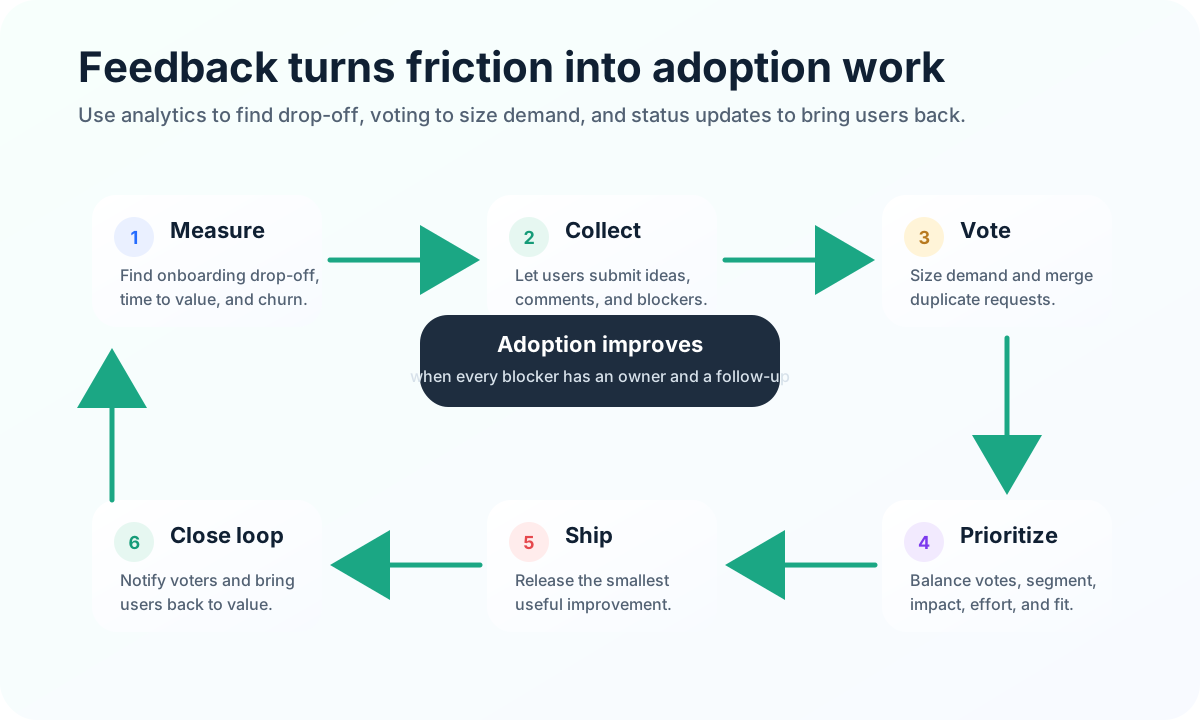
A feedback board is especially useful here because it turns friction into a visible backlog. Instead of guessing what to fix, you can compare vote volume, customer segment, effort, revenue impact, and strategic fit. The result is more disciplined adoption work: fewer random roadmap bets and more improvements tied to actual user problems.
If you need a simple way to collect requests, prioritize votes, and tell users what shipped, try FeaturAsk with a 30-day free trial, no card required. It is built for small teams that want ongoing product feedback without enterprise complexity.
How feedback and voting improve adoption
Feedback improves adoption because users often know exactly where the product stops working for their workflow. They may not describe the best solution, but they can identify friction: a missing export, confusing permissions, unclear onboarding step, absent integration, or manual workaround.
Voting adds a second layer. It shows whether friction is isolated or shared. A single request can be important, especially from a strategic customer, but repeated votes and comments reveal patterns. Those patterns help you prioritize adoption improvements that serve many users at once.
The most useful adoption feedback usually falls into five buckets:
- Setup blockers: users cannot install, configure, import, or invite.
- Value blockers: users cannot reach the outcome they expected.
- Workflow blockers: users need an integration, automation, export, or permission setting.
- Trust blockers: users need clarity on privacy, billing, reliability, or roadmap direction.
- Education blockers: users can do the task, but they do not know how.
Each bucket requires a different response. Setup blockers may need onboarding changes. Value blockers may need product improvements. Workflow blockers may need roadmap prioritization. Trust blockers may need clearer messaging. Education blockers may need docs or in-app guidance.
For teams that are still shaping their feedback process, a public or embedded board can also complement feedback board software comparisons and user acceptance testing. Feedback shows demand before you build; UAT confirms whether the shipped change actually works for the people who needed it.
Quick implementation checklist
You do not need a large product operations program to improve adoption. Start with a focused monthly loop: define your activation event, find the biggest drop-off before that event, collect user feedback about why it happens, ship one small improvement, and tell affected users what changed.
Audit the basics: clear positioning, one obvious trial action, useful empty states, a feedback channel inside the product, honest request statuses, weekly review, and launch messages tied to customer education. If several pieces are missing, start with activation and feedback. Those two signals tell you whether users are reaching value and what is blocking the ones who are not.
Want the feedback loop without a heavy tool stack? Use FeaturAsk to collect requests, let users vote, and manage updates for $29.95/year with one month free and no credit card required.
Final thoughts
An effective product adoption strategy is not a one-time campaign. It is a continuous system that helps users discover value, reach activation, learn, share feedback, and see progress.
The 6 pillars are simple: understand users, master onboarding, use product-led growth, educate customers, build a community, and measure friction through feedback and voting. Together, they help small teams move users from curiosity to long-term use.