11 Beamer Alternatives for SaaS User Feedback and Announcements
Beamer is a popular way to publish product updates, in-app announcements, and release notes. For many SaaS teams, it solves an immediate problem: users do not always read email, visit a changelog, or notice small improvements unless updates appear inside the product.
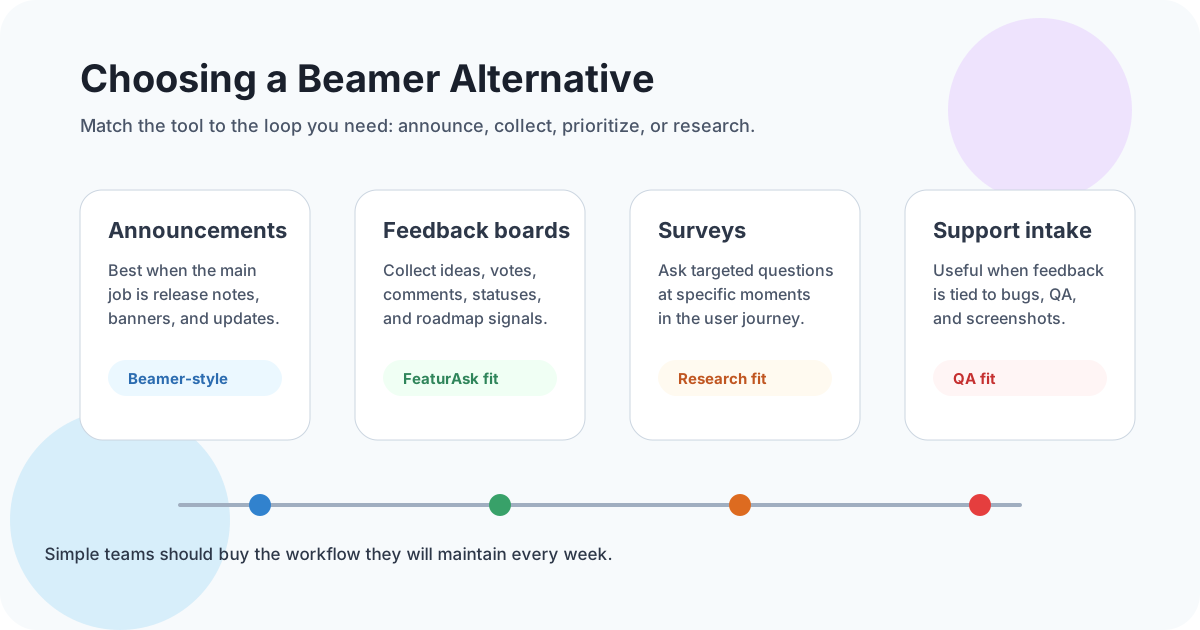
But Beamer is not the only option. Some teams need stronger feature request management. Others want public voting, a lighter feedback widget, a customer roadmap, embedded surveys, bug reporting, or pricing that makes sense for a solo SaaS, creator business, ecommerce store, agency, or small website. The best Beamer alternative depends on the workflow you want to improve.
This guide compares 11 Beamer alternatives for SaaS user feedback and announcements. It keeps the focus practical: what each tool is good at, when it is too much, and how to choose a system your team will actually maintain.
What can you do with Beamer?
Beamer is mainly an announcement and product update platform. Teams use it to show a changelog, publish release notes, display in-app notifications, send update emails, collect reactions, and highlight new features without relying only on a blog or newsletter.
That is valuable because product communication often fails at the last step. A team ships a useful improvement, but users never discover it. An in-app announcement can put the update where users already are. A public changelog can show prospects that the product is alive. Segmented announcements can help different user groups see the updates that matter to them.
Beamer also has feedback-related features, but many teams searching for alternatives are really asking a broader question: should our announcement tool also be our feedback system? The answer depends on the depth of feedback you need. If you only need reactions to releases, a product update feed may be enough. If you need customers to submit feature requests, vote on ideas, add context, and follow roadmap statuses, compare dedicated feedback board tools too.
Current pricing pages show why this comparison matters. Beamer’s own pricing page describes Free, Starter, Pro, and Scale options with a 14-day free trial and paid plans presented on a monthly basis (<a href="https://www.getbeamer.com/pricing" rel="nofollow">Beamer pricing</a>). Frill’s pricing page presents Startup and Business plans and notes annual billing incentives (<a href="https://frill.co/pricing" rel="nofollow">Frill pricing</a>). Usersnap’s pricing page shows both free and paid options for feedback collection (<a href="https://usersnap.com/pricing/" rel="nofollow">Usersnap pricing</a>). Pricing and packaging change, so verify the details before buying.
Common motivations to seek out a Beamer alternative
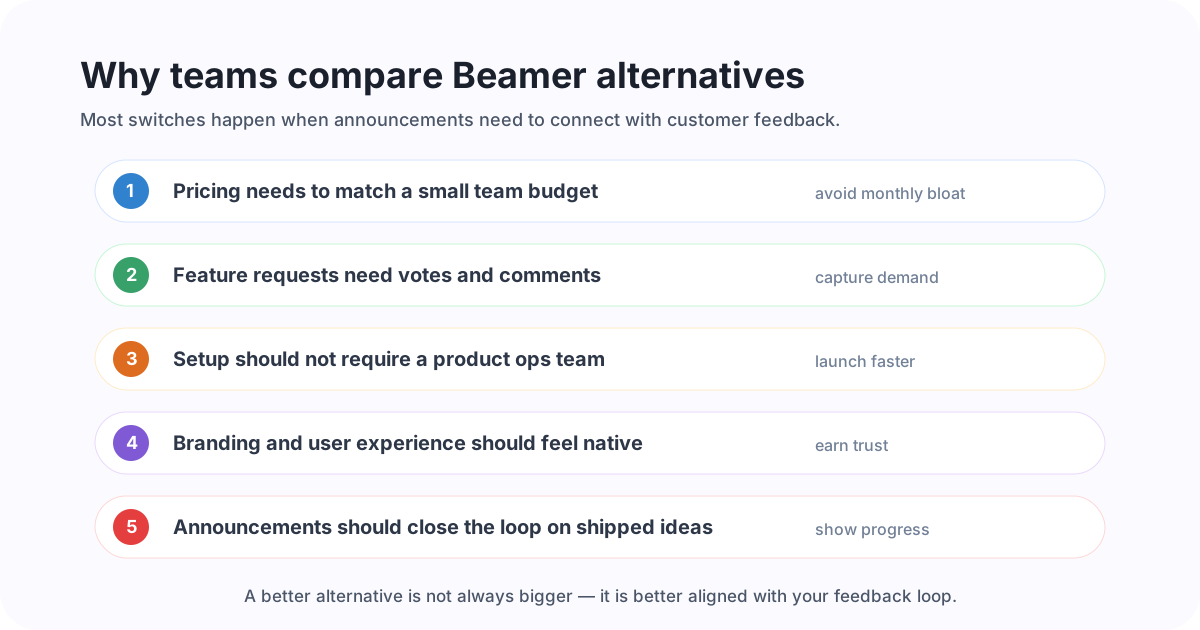
A Beamer alternative is not automatically better because it has more features. It is better if it matches the feedback and communication loop your team needs.
The first motivation is usually feedback depth. An announcement feed tells users what changed. A feedback board helps users tell you what should change next. If customers keep asking for improvements through email, chat, sales calls, reviews, and social comments, you may need a better intake system before you need another announcement channel. For the basics, see FeaturAsk’s guide to feature request tools.
The second motivation is prioritization. A release note can collect reactions, but product teams often need votes, comments, duplicate merging, categories, moderation, and status labels. A visible board helps turn scattered requests into a pattern. If you want to use votes without letting them become a popularity contest, read the related guide to feature voting.
The third motivation is affordability. A small SaaS, creator, WordPress plugin, Shopify app, agency portal, or ecommerce site may not need an enterprise product operations stack. It may need a simple widget and dashboard at a price that does not become painful during early growth.
The fourth motivation is simplicity. More settings can mean more maintenance. If nobody owns the roadmap, changelog, segmentation, and integrations, the tool becomes shelfware. Small teams should prefer a workflow they can review weekly.
The fifth motivation is closing the loop. Announcements are most powerful when they connect back to customer requests: “You asked for this, and it is now live.” That connection requires organized feedback, not just a broadcast channel. If you need a complete communication rhythm, the product launch communication plan covers how to turn releases into adoption.
Need a lightweight feedback loop before investing in a bigger announcement stack? Try FeaturAsk free for 30 days with no credit card required and collect feature requests, votes, and comments from your site for $29.95/year.
Top 11 Beamer alternatives
Below are 11 options worth comparing. Some are direct announcement competitors. Others are better described as feedback, roadmap, survey, or bug-reporting alternatives. That is intentional: teams searching for Beamer alternatives often discover that their real need is not another changelog, but a better customer input loop.
1. FeaturAsk
FeaturAsk is a strong first choice for small websites, solo SaaS products, creators, ecommerce stores, agencies, and bootstrapped businesses that want simple user feedback without heavy software. It gives you an embeddable feature request widget, a clean dashboard, voting, comments, moderation, analytics, and an easy way to collect ideas directly from users.
The advantage is focus. FeaturAsk is not trying to become a giant product management suite. It helps small teams capture what users want, identify repeated demand, and make better roadmap decisions. At $29.95/year after a one-month free trial, it is especially useful when monthly SaaS costs already feel too high.
Choose FeaturAsk if your main reason for leaving Beamer is that announcements alone do not tell you what to build next.
2. Frill
Frill combines feedback ideas, roadmaps, and announcements. It is a natural Beamer alternative for teams that want customer suggestions and product updates in one platform. Users can submit ideas, vote, and follow progress, while teams can publish announcements when features ship.
Frill is a good fit when you want a polished public portal and are ready to maintain the board. Smaller teams should compare limits, pricing tiers, and whether they need the full package immediately or only a simpler request workflow.
3. Upvoty
Upvoty offers feedback boards, roadmap views, and changelog functionality. It fits SaaS teams that want to collect ideas, show planned work, and publish updates from a single system. It can be useful when you are moving from one-way announcements to a more participatory product feedback process.
Evaluate Upvoty’s customization, integrations, and pricing against your expected feedback volume. As with any public board, the real value comes from merging duplicates, updating statuses, and responding to the requests that matter.
4. UserReport
UserReport focuses on surveys and feedback widgets. It is less of a direct changelog replacement and more useful when you want structured user research on your website. Teams can ask visitors questions, collect satisfaction data, and learn about audiences.
Choose UserReport if your primary question is “Who are our users, and what do they think?” rather than “Which feature request should we build next?” For ongoing product requests, a voting board may be easier for users to revisit.
5. Nolt
Nolt is a straightforward feedback board for collecting suggestions and votes. It is popular with teams that want a clean public idea board without the weight of a broad product management platform. Users can submit requests, vote on existing ideas, and follow status changes.
Nolt is worth considering if simplicity is your priority and your announcement needs are modest. Compare it with FeaturAsk if you care most about affordable request collection for a small website or early-stage product.
6. Hellonext
Hellonext offers feedback boards, roadmap tools, and changelog features. It is designed for teams that want to centralize customer ideas and communicate progress. The platform can help product teams organize feedback around statuses and roadmap categories.
It is a better fit when you have enough volume and team ownership to keep a portal current. If your team is still validating demand, start with a lightweight board before building a complex public roadmap.
7. Savio
Savio is built around centralizing feedback from sales, support, customer success, and product conversations. It is useful when customer requests arrive through many channels and you need to connect them to accounts, revenue, or segments.
Choose Savio if your feedback is mostly internal and B2B: sales notes, support tickets, churn reasons, and account-level signals. It may be less ideal if your immediate need is a simple public widget for casual website visitors.
8. Productboard
Productboard is a broader product management platform. It helps teams capture insights, prioritize features, create roadmaps, and align product work with strategy. Productboard can be powerful for product managers who need to connect customer evidence with planning and stakeholder communication.
For small teams, the question is whether you need that much structure. Productboard is often a better fit for mature SaaS organizations than for a solo founder who wants quick feature voting. Its current pricing and packaging should be checked on the Productboard site before purchase (<a href="https://www.productboard.com/pricing/" rel="nofollow">Productboard pricing</a>).
9. Qualaroo
Qualaroo is a user research and survey tool. It helps teams ask targeted questions in context, collect qualitative responses, and run website or product surveys. It is a useful alternative when your feedback gap is not feature voting but understanding user intent, friction, or conversion blockers.
Qualaroo is best for pointed research questions: “Why did you not finish setup?” or “What stopped you from buying?” It is not a full replacement for a public roadmap or changelog, but it can complement one.
10. Usersnap
Usersnap focuses on user feedback, visual bug reports, and QA-oriented collection. It is helpful when users need to submit screenshots, report problems, or give contextual feedback from inside a product. SaaS teams with frequent UI feedback or bug reports may find it more relevant than a general announcement feed.
Choose Usersnap when the feedback needs visual evidence. If your requests are mostly ideas and prioritization, a feature request board may be lighter.
11. UseResponse
UseResponse combines customer support, feedback, knowledge base, and help desk capabilities. It is broader than a typical changelog tool and can work for teams that want feedback management connected to support operations.
It is worth evaluating if your product feedback is tightly linked to tickets and community support. For teams that only need simple request collection or announcements, the platform may be more than necessary.
Beamer alternatives at a glance
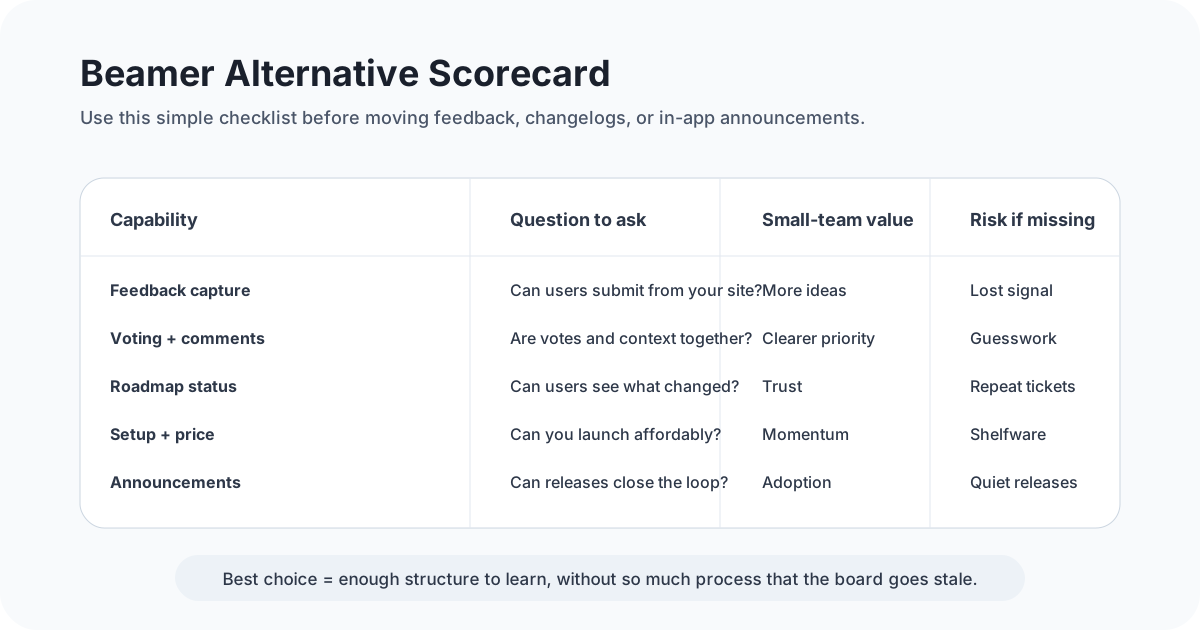
A quick way to narrow the list is to name the job you need most:
- If you mainly need in-app updates and release notes, compare announcement-focused tools.
- If you need users to suggest and vote on improvements, start with feedback board tools like FeaturAsk, Frill, Upvoty, Nolt, or Hellonext.
- If you need structured research, compare survey tools like UserReport or Qualaroo.
- If you need visual bug reports, evaluate Usersnap.
- If you need enterprise product planning, consider Productboard.
- If feedback is part of support operations, compare UseResponse.
For many small businesses, the mistake is buying for a future process instead of the current one. A public roadmap sounds impressive, but it only helps if someone updates it. Segmentation sounds powerful, but only if you have enough users and data to interpret it. Start with the smallest workflow that captures real signals.
If your team wants a simple way to collect requests now, sign up for FeaturAsk and get one month free with no credit card required. You can add a widget, let users vote, and review feedback from one dashboard for $29.95/year.
What to look for in a Beamer alternative
The best Beamer alternative should be judged on fit, not feature count. Use these criteria before switching.
Feedback collection where users already are
Users should not have to search for your feedback form. Look for an embeddable widget, public board, or simple link you can place inside your app, website, docs, or account area. The shorter the path, the more representative your feedback becomes.
Voting, comments, and duplicate management
If multiple users want the same feature, your tool should make that pattern visible. Voting is useful, but comments explain the use case. Duplicate merging keeps demand from being split across ten similar requests. A guide to feedback board software can expand on what makes boards stay useful over time.
Roadmap and status communication
A good system lets you show what is under review, planned, in progress, shipped, or declined. This does not mean every request deserves a promise. It means users should see that feedback is considered and organized.
Announcement quality
If you are replacing Beamer, do not ignore announcement needs. Check whether the alternative supports changelogs, in-app widgets, email notifications, segmentation, reactions, or release notes. Some teams will prefer two tools: one for feedback, one for polished product marketing announcements.
Setup time and maintenance load
A tool that takes days to configure may be a poor fit for a small team. Ask who will moderate requests, update statuses, publish announcements, and review analytics. If the answer is “nobody,” choose something simpler.
Transparent pricing
Pricing should match your stage. Enterprise tools can be worth it when they support a mature product organization. But for small websites and early SaaS products, an affordable annual tool can create a better return because you will actually keep it running.
Data ownership and export
Even lightweight teams should know whether they can export feedback, move data, or retain historical requests. Customer ideas become valuable product intelligence over time.
Final recommendation
Beamer is useful when your main problem is product announcement visibility. If users miss new features, an in-app update feed can help. But if your bigger problem is deciding what to build, you need more than announcements. You need a system for collecting ideas, organizing demand, reading comments, and communicating outcomes.
For small SaaS teams, creators, ecommerce stores, agencies, and solo founders, start with the simplest feedback loop that will stay active. Capture requests where users already are. Let people vote and comment. Review the board weekly. Ship the right improvements. Then announce what changed.
If you want that lightweight workflow without a large monthly subscription, try FeaturAsk free for 30 days, no credit card required. It is built for small teams that want clear feature requests, votes, and feedback management for $29.95/year.