10 Bug Report Templates to Boost Your QA Process
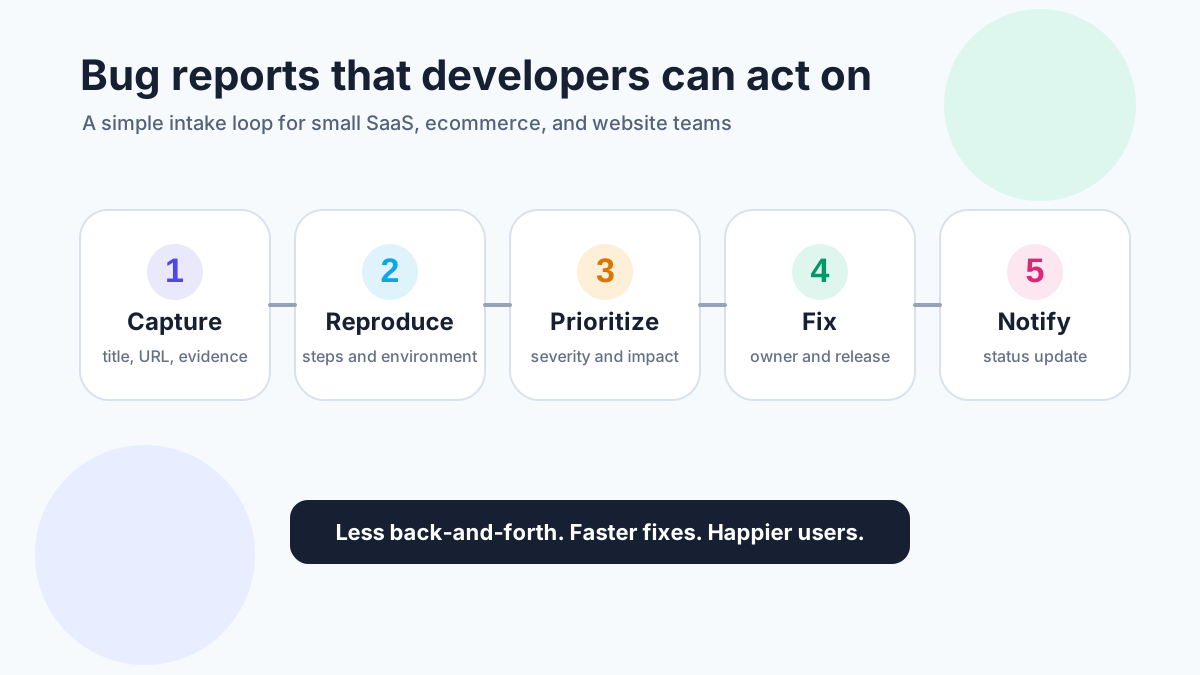
Bug report templates make defects easier to understand, reproduce, prioritize, and fix. They protect small teams from vague issues that bounce between customers, support, product, and developers before anyone knows what happened.
A useful bug report does not need to be long. It needs the right fields: a clear title, environment, steps to reproduce, expected result, actual result, evidence, severity, priority, and follow-up status. BrowserStack’s bug reporting guidance highlights those same core components, including environment, steps, expected result, actual result, visual proof, and severity/priority (<a href="https://www.browserstack.com/guide/how-to-write-a-bug-report" rel="nofollow">BrowserStack</a>). GitHub Issues also supports structured issue creation through labels, titles, body text, and templates, which is a good reminder that even lightweight trackers work better when intake is consistent (<a href="https://docs.github.com/en/issues/tracking-your-work-with-issues/creating-an-issue" rel="nofollow">GitHub Docs</a>).
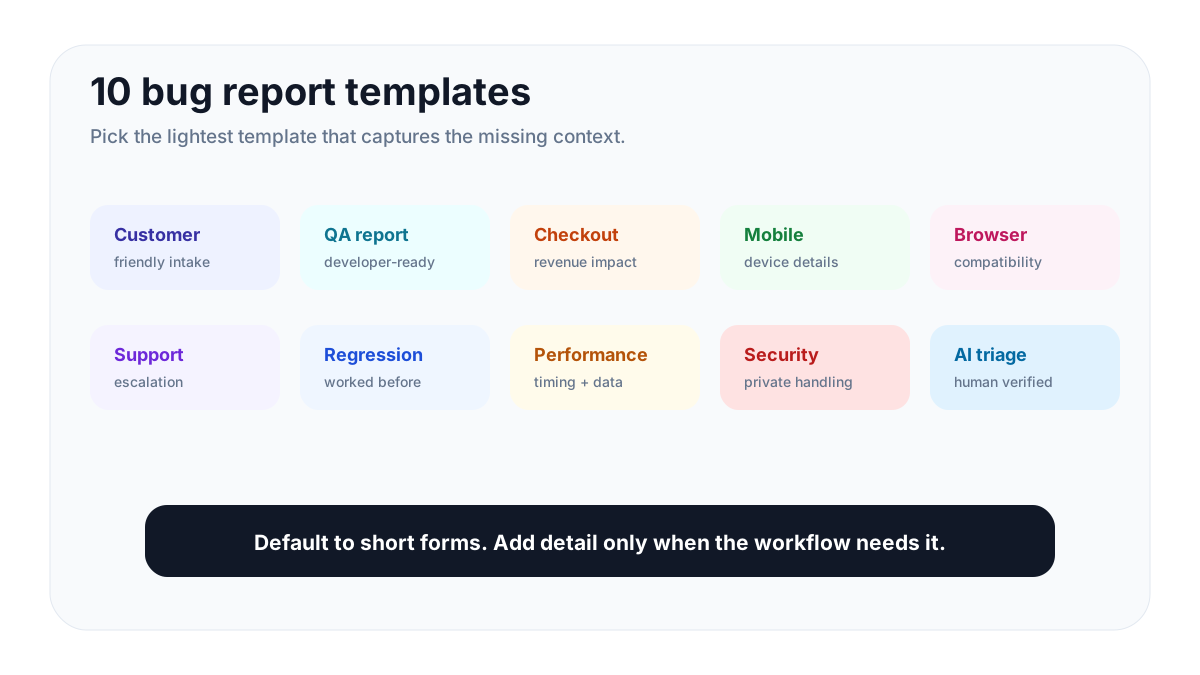
This guide gives you 10 practical bug report templates for SaaS teams, ecommerce sites, creators, agencies, internal tools, and small software businesses. It also shows how the templates fit tools such as FeaturAsk, Jira, GitHub Issues, ClickUp, Trello, Asana, Monday, Slack, or Teamwork. Use them as copy-ready starting points, then simplify fields for your audience.
What is a bug report template?
A bug report template is a reusable intake pattern for software problems. It explains what went wrong, where it happened, how to reproduce it, what the user expected, what actually happened, and how severe the issue appears to be.
For a small team, the template has three jobs: help the team reproduce the issue, decide urgency, and preserve evidence to verify the fix later. Customer-facing reports may start in FeaturAsk; developer-ready issues may move to Jira or GitHub; support escalations may begin in Slack, Asana, Trello, ClickUp, Monday, or Teamwork. The tool matters less than the fields and routing rule.
That structure matters because customers rarely describe bugs in engineering language. A user may say “checkout is broken” when the real issue is a Safari-only payment validation error, a coupon conflict, a slow third-party script, or an unclear error message. A good template gently guides them toward useful detail without making the form feel like homework.
Bug reports also belong inside your broader feedback system. Some submissions are true defects. Others are feature requests, usability complaints, onboarding confusion, or support questions. If you collect all of them in one clear place, you can route each item to the right workflow instead of losing signal in emails and chat threads. For related product-side intake, see these feature request templates and the guide to choosing feature request tools.
What every bug report template should include
Use the smallest set of fields that can answer these questions:
- Title: Can someone understand the issue in one sentence?
- Reporter: Who experienced it, and how can you follow up?
- Environment: Browser, device, OS, app version, account type, URL, plan, or integration.
- Steps to reproduce: What exact actions led to the bug?
- Expected result: What should have happened?
- Actual result: What happened instead?
- Evidence: Screenshot, screen recording, logs, console error, order ID, or affected file.
- Severity: How badly does this break the product?
- Priority: How soon should the team address it?
- Status and owner: Who is responsible for triage, fix, verification, and user update?
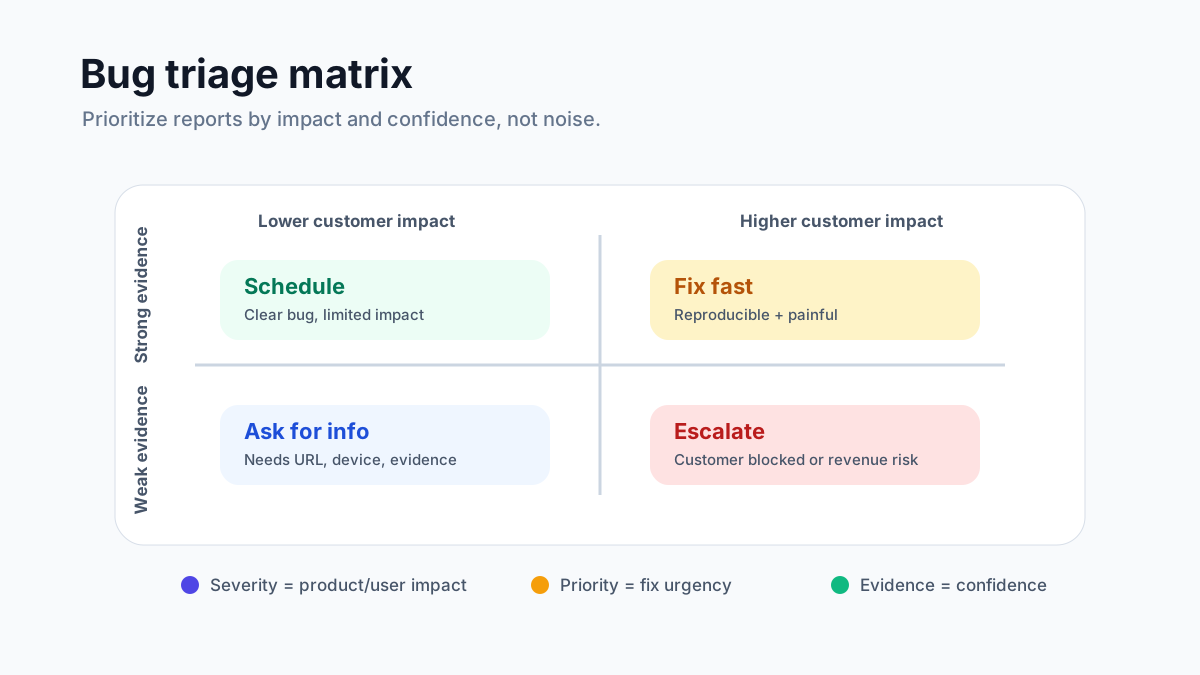
Severity and priority are related but not identical. BrowserStack’s severity-versus-priority guide explains that severity describes the technical or user impact of the defect, while priority describes how urgently the team should fix it (<a href="https://www.browserstack.com/guide/bug-severity-vs-priority" rel="nofollow">BrowserStack</a>). A typo on a high-traffic pricing page may be low severity but high priority. A rare crash in an admin-only export may be high severity but lower priority if it affects one internal workflow.
If your current feedback loop is scattered across forms, email, and spreadsheets, start by centralizing intake. FeaturAsk gives small SaaS teams, websites, creators, and ecommerce businesses a clean widget for feedback, bug reports, and ideas. Start with a 30-day free trial, no credit card required, then keep it for $29.95/year.
Template 1: The quick customer bug report
Use this template when customers report issues from your website, app, help center, or feedback widget. It is intentionally short because customers are more likely to complete it.
Copy this template:
- What went wrong?
- Where did it happen? Add the page, product area, or URL.
- What were you trying to do?
- What did you expect to happen?
- What happened instead?
- What device and browser were you using?
- Can you add a screenshot or short recording?
- How urgent is this for you: blocked, painful, annoying, or minor?
Why it works:
This template captures user language first, then adds reproduction context. It is ideal for public feedback buttons, small SaaS dashboards, creator tools, directories, courses, marketplaces, and ecommerce stores. Keep the labels friendly. A customer should not need to know what “repro steps” means.
Template 2: The developer-ready QA report
Use this when QA testers or internal team members file bugs for engineers. It asks for more detail because the reporter understands the product and can test repeatability.
Copy this template:
- Bug title:
- Build/version:
- Environment: OS, browser, device, screen size, app version, account type.
- Preconditions: What data, permissions, settings, or feature flags are required?
- Steps to reproduce:
- Expected result:
- Actual result:
- Reproducibility: always, sometimes, once, or unknown.
- Severity:
- Priority recommendation:
- Attachments: screenshots, videos, logs, network trace, console output.
- Related tickets, commits, or recent releases:
Why it works:
Developers need a reproducible path and enough environment detail to avoid guessing. This template is especially useful around releases, regression testing, and complex workflows with permissions, billing states, integrations, or imported data.
Template 3: The ecommerce checkout bug report
Checkout bugs can directly affect revenue, so they deserve a specialized template. Use it for carts, coupons, shipping, payments, tax, account creation, subscriptions, and order confirmations.
Copy this template:
- Store URL or checkout step:
- Product or cart contents:
- Customer location and currency:
- Device, browser, and payment method:
- Coupon, gift card, shipping method, or tax setting used:
- Expected result:
- Actual result or error message:
- Screenshot or screen recording:
- Order ID, abandoned cart ID, or test transaction ID:
- Is the customer blocked from buying?
Why it works:
Ecommerce bugs often depend on a combination of cart contents, region, taxes, discounts, and payment providers. This template helps you separate true product defects from failed payments, invalid coupons, inventory rules, third-party gateway errors, and unclear checkout copy.
Template 4: The mobile app bug report
Mobile bugs need device-specific information. A problem that appears on one Android model, iOS version, or screen size may not reproduce elsewhere.
Copy this template:
- App version and build number:
- Device model:
- Operating system version:
- Network state: Wi-Fi, cellular, offline, slow connection.
- User account or plan:
- Steps to reproduce:
- Expected result:
- Actual result:
- Frequency: every time, often, sometimes, once.
- Attachments: screen recording, crash log, screenshot.
- Did reinstalling, updating, or clearing cache change anything?
Why it works:
Mobile environments vary. The report should capture app version, OS version, network condition, and device model before the bug becomes impossible to reproduce. Add crash IDs or analytics event IDs when available.
Template 5: The browser compatibility bug report
Use this for layout problems, broken scripts, missing buttons, forms that do not submit, visual regressions, and issues that appear in one browser but not another.
Copy this template:
- Page URL:
- Browser and version:
- Operating system:
- Device type and screen size:
- Logged-in or logged-out state:
- Extension/ad blocker/VPN status:
- Steps to reproduce:
- Expected display or behavior:
- Actual display or behavior:
- Screenshot with visible viewport:
- Console errors, if available:
Why it works:
Browser compatibility bugs are often visual and contextual. A screenshot without browser, viewport, and URL may be almost useless. This template helps designers, developers, and QA reproduce the same state quickly.
Template 6: The customer support escalation template
Support teams see bugs first, but they should not be forced to diagnose everything. This template helps support escalate cleanly without losing the customer story.
Copy this template:
- Customer/account:
- Plan, segment, or business impact:
- Customer’s original description:
- Support’s reproduction attempt:
- Known workaround offered:
- Number of affected customers:
- URLs, order IDs, workspace IDs, or ticket links:
- Evidence collected:
- Suggested severity:
- Customer communication status:
- Deadline or renewal risk, if relevant:
Why it works:
Support escalation should preserve empathy and business context. A small visual bug reported by a high-value customer during renewal may need faster handling than its technical severity suggests. This template keeps the customer impact visible while giving product and engineering enough evidence to triage.
For more on separating bug reports, usability issues, complaints, and product ideas, read 4 types of feedback from customers and how to address them.
Template 7: The regression bug report
A regression is a bug that appears after something used to work. Regressions are common after releases, refactors, dependency updates, design changes, and feature flag rollouts.
Copy this template:
- Feature or flow that regressed:
- Last known working version/date:
- First broken version/date:
- Recent releases, merges, migrations, or config changes:
- Steps to reproduce:
- Expected result based on previous behavior:
- Actual result now:
- Users/accounts affected:
- Logs, screenshots, or monitoring links:
- Rollback or workaround available?
Why it works:
The most valuable field is “last known working.” It narrows investigation from the entire codebase to a release window. This template also helps teams decide whether to roll back, hotfix, or proceed with a normal patch.
Template 8: The performance bug report
Performance problems are often described vaguely: “slow,” “freezing,” “laggy,” or “timing out.” This template turns the complaint into measurable evidence.
Copy this template:
- Page, endpoint, job, or workflow:
- User action being performed:
- Expected speed:
- Actual speed or timeout:
- Time and timezone when observed:
- Dataset size, file size, cart size, or number of records:
- Device, browser, and network:
- Frequency and affected users:
- Screenshots, recordings, logs, traces, or monitoring links:
- Business impact: blocked work, abandoned checkout, failed import, support spike.
Why it works:
Performance bugs depend on timing, data volume, and environment. The template asks for those variables upfront. If your team tracks incident metrics, Atlassian notes that MTTR can mean mean time to repair, recovery, respond, or resolve depending on context, so define the metric consistently before using it in QA reporting (<a href="https://www.atlassian.com/incident-management/kpis/common-metrics" rel="nofollow">Atlassian</a>).
Want a simple place to collect public feedback and private bug reports without a complicated support portal? FeaturAsk installs with a lightweight widget and keeps voting, comments, statuses, and moderation manageable for small teams. Try the 30-day free trial with no credit card, then continue for $29.95/year.
Template 9: The security or privacy bug report
Security and privacy issues need careful handling. Do not ask users to post sensitive details publicly. Use private intake, restrict access, and move quickly.
Copy this template:
- Summary of the concern:
- Affected page, endpoint, account, or data type:
- Reporter contact:
- Steps to reproduce, if safe to share:
- Expected protection or permission behavior:
- Actual exposure or permission behavior:
- Evidence: redact secrets, tokens, personal data, and customer information.
- Potential impact: data access, account takeover, payment, admin action, compliance risk.
- Immediate mitigation taken:
- Internal owner and escalation path:
Why it works:
This template separates public bug reporting from sensitive disclosure. For small teams, the important habit is to collect enough information to verify the issue while avoiding extra exposure of private data. Add a clear note telling reporters not to include passwords, API keys, full payment details, or personal records.
Template 10: The AI-assisted bug triage template
AI can summarize reports, cluster duplicates, suggest severity, and draft reproduction steps, but it should not replace human verification. Use this template when you want AI to help triage without inventing facts.
Copy this template:
- Raw user report:
- Known facts confirmed by a human:
- Environment and account context:
- Suspected component:
- Similar reports or duplicates:
- AI-generated summary:
- AI-suggested reproduction steps:
- Human-verified reproduction steps:
- Risk if wrong:
- Final severity, priority, owner, and status:
Why it works:
AI triage is useful when intake volume grows, but it can overstate confidence. This template forces a separation between raw evidence, AI interpretation, and human-confirmed facts. That distinction protects your team from sending engineers on a chase based on a polished but inaccurate summary.
How to choose the right bug report template
Start with one default customer bug report and one internal QA report. Add specialized templates only where the cost of missing detail is high: checkout, mobile, browser compatibility, performance, regressions, support escalations, and security.
A practical small-team setup is simple: use a public widget for customer reports, a support escalation form for account context, an internal tracker for developer-ready QA, a regression report for releases, and a private inbox for security issues.
Keep each form short at submission. Add admin-only fields after triage. Customers should see a simple path to report a problem, while your team gets a structured backend for tags, comments, and status updates. If you are comparing options, this guide to feedback board software explains what to look for.
Bug report best practices for small teams
Use consistent titles. “Checkout fails when applying welcome coupon in Safari” is better than “bug” or “urgent problem.” Good titles make search and duplicate merging easier.
Ask for evidence, not essays. A screenshot, recording, URL, console error, or order ID often saves more time than a long description.
Separate bugs from feature requests. If behavior was never promised, it may be a feature request or usability issue rather than a defect.
Define severity and priority in plain language: blocked, painful, annoying, or minor.
Close the loop. When a bug is fixed, update the reporter or public status. Users are more forgiving when they see that reports are heard and resolved.
Review patterns monthly. Individual reports fix symptoms. Patterns reveal product debt: confusing flows, fragile integrations, browser issues, missing validation, weak onboarding, or unclear help content.
Final takeaway
Bug report templates improve QA because they reduce ambiguity. They help customers explain the problem, help support escalate it, help QA reproduce it, and help developers fix it faster. The trick is not to build one giant form. Use a short default template, then add specialized templates only for workflows where details matter.
For small SaaS teams, creators, ecommerce sites, and website owners, the simplest workflow is often best: collect bugs and ideas in one visible place, tag and prioritize them internally, and communicate progress clearly. FeaturAsk gives you that lightweight feedback loop with an embeddable widget, voting, request management, analytics, custom branding, moderation, and mobile-friendly collection. Start a 30-day free trial with no credit card required, then keep it running for $29.95/year.