Why Tracking Client Feedback Is Essential for Product and Support Teams
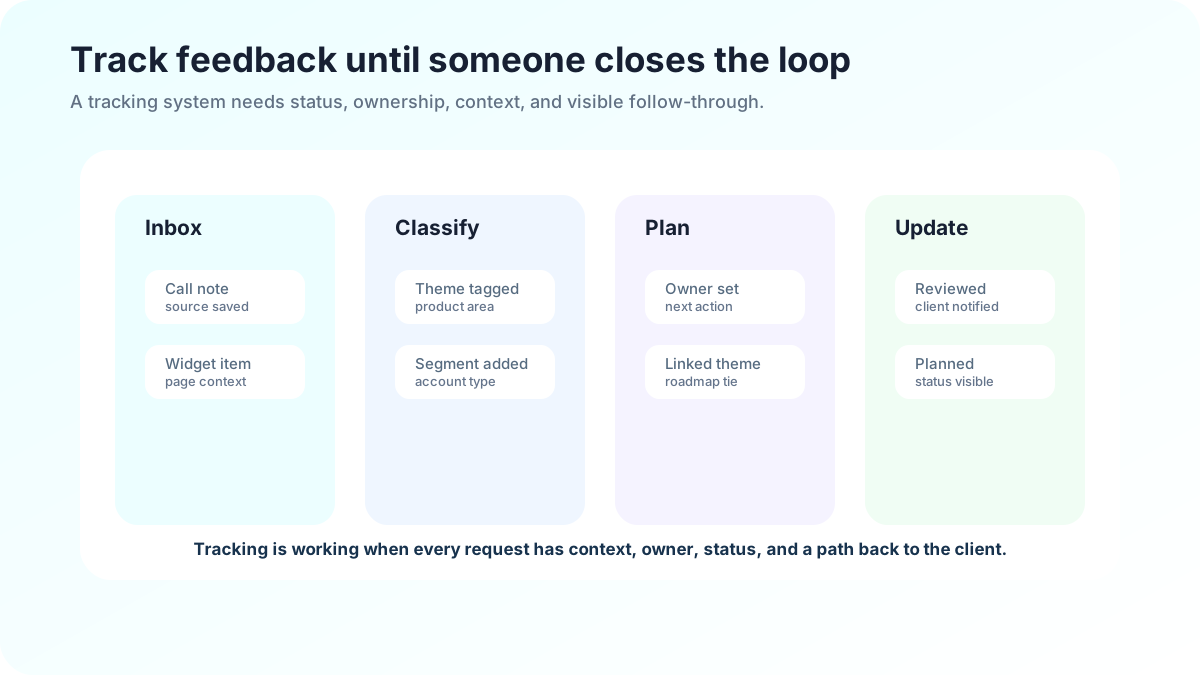
Tracking client feedback is essential when a team has outgrown memory. A founder may remember every request from the first ten customers. A growing product, support, or customer-success team cannot rely on memory once feedback arrives through tickets, calls, chats, sales notes, surveys, account reviews, and social messages. Tracking turns scattered comments into organizational knowledge.
Qualtrics describes customer feedback collection as a way to understand experiences and improve decisions across the journey (Qualtrics). SurveyMonkey likewise frames customer feedback as structured input that helps teams understand satisfaction, expectations, and improvement opportunities (SurveyMonkey). The tracking layer is what makes that collection useful over time. Without it, teams may feel like they are listening while still losing the patterns that should shape decisions.
Related FeaturAsk reading: feature request tracking, user feedback analysis software, customer feedback tools, and feedback board software.
Tracking turns comments into memory
Untracked feedback disappears in predictable places: a support agent’s notes, a sales call recap, a Slack thread, a spreadsheet nobody opens, or a founder’s memory. Each comment may be handled politely, but the organization cannot answer basic questions. How many clients asked for this? Which segment is affected? Did the issue increase after a release? Was the request declined before? Which clients should be notified if it ships?
A tracking system gives the team a shared record. It preserves the original client words, attaches context, groups related comments, records status, and shows the next action. That record is valuable for product decisions, but it is also valuable for support and account teams because clients do not have to repeat themselves.
If requests are scattered across support tickets and chats, FeaturAsk gives clients one visible request board for $29.95/year.
What teams learn when feedback is tracked
Tracked feedback reveals recurrence. A one-off complaint may be noise, but the same pain from several clients in the same workflow is a pattern. It reveals affected segments: many small accounts may need a simpler default, while a few strategic clients may need advanced controls. It reveals source: feedback from cancellation calls may carry different urgency than feedback from enthusiastic power users.
Tracking also reveals the type of work required. Not every client comment should become a feature. Some are bugs, unclear help articles, onboarding gaps, billing questions, pricing objections, or training needs. When comments are classified, teams can send them to the right owner instead of forcing every issue into the product backlog.
The most useful systems preserve raw language. Internal summaries are helpful, but the client’s wording often contains the real insight. A phrase like “I cannot trust this report in a board meeting” says more than “reporting improvement requested.”
What to track without overcomplicating the process
Start with a small set of fields: client or account, segment, source, product area, theme, original comment, status, owner, severity, and next action. Add revenue impact, plan, role, or renewal date only if the team uses those fields during review. A lightweight tracker that people maintain is better than a perfect taxonomy they avoid.
Status vocabulary should be simple. New means the team has not reviewed it. Reviewing means the team is studying the problem. Planned means the team intends to address it. Shipped means the improvement is live. Answered means support, education, or configuration solved it. Not now means the team considered it and declined or postponed it. These labels help clients and teammates understand what is happening.
How support and product should share feedback
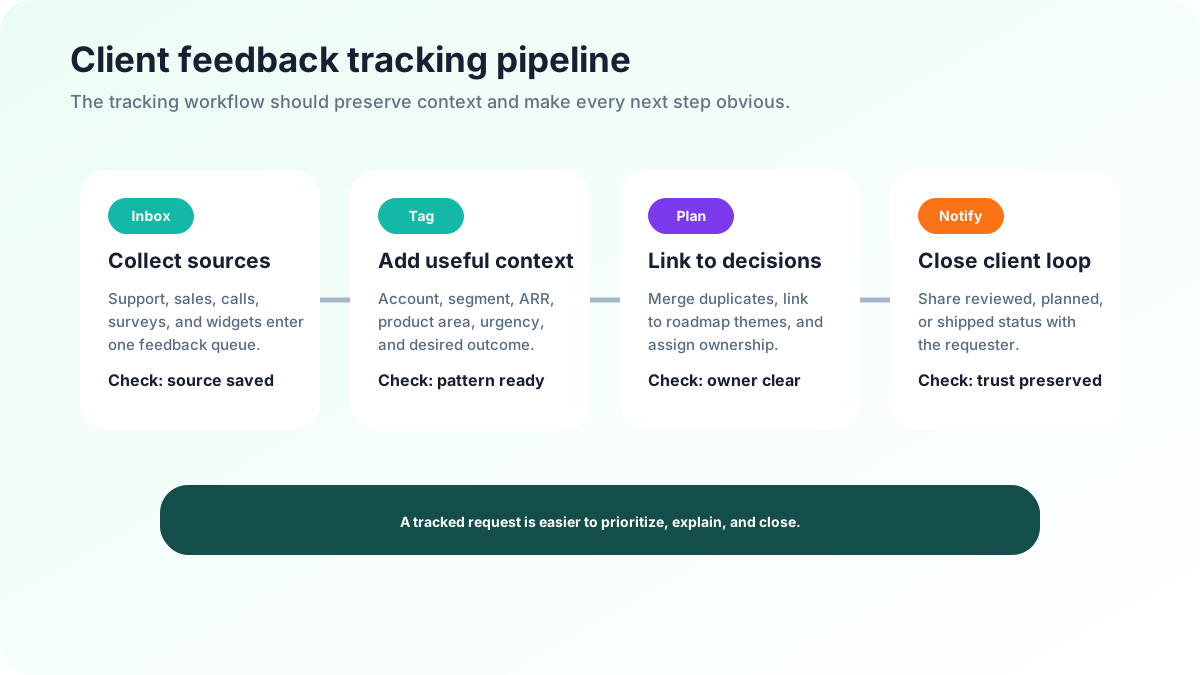
Support hears pain early. Product decides what changes. Customer success understands account context. Sales hears competitive pressure. Tracking is the handoff mechanism between those views. Without it, support may feel ignored, product may feel overwhelmed, and clients may hear inconsistent answers.
A practical handoff separates urgent support issues from product evidence. Bugs that block work need immediate response. Product requests need grouping, segment context, and review. Documentation gaps may need a content owner. The tracking system should make these routes clear so support can act quickly without burying patterns.
A weekly review between support, product, and customer success can be enough. Review new themes, merge duplicates, identify high-impact accounts, assign owners, and write decision notes. The meeting should produce outcomes: answered, needs discovery, planned, not now, or follow up with client. If the result is always “keep monitoring,” the process will lose credibility.
Turning tracked feedback into action
Action does not always mean shipping a feature. A tracked theme can lead to a bug fix, help article, onboarding checklist, pricing-page update, account playbook, training video, product discovery interview, or roadmap item. The correct action depends on the problem.
For example, if many clients ask how to invite teammates, the fix may be interface copy or onboarding. If strategic accounts request audit logs, the fix may be roadmap work. If clients complain that setup takes too long, the fix may be templates, migration help, or product changes. Tracking helps the team compare these possibilities instead of reacting to the latest message.
Decision notes are essential. “Not now” without context frustrates teammates and clients. “Not now because this is outside our target workflow; revisit if enterprise segment becomes priority” preserves reasoning. “Planned for reporting improvements, not the exact export format requested” sets expectations. Future team members will thank you for those notes.
How tracking affects client trust
Clients notice whether a company remembers. They notice when support says, “I can see you raised this before, and it is attached to the reporting improvement we are reviewing.” They notice when a shipped update references their request. They also notice when they explain the same issue every quarter.
Tracking builds trust by making the listening system visible. A public or client-facing board can show ideas, votes, comments, and statuses. A private system can still build trust if account teams have accurate updates. The key is follow-through. Asking for feedback and losing it is worse than not asking at all because it creates a broken expectation.
Salesforce’s research on connected customer expectations reinforces that customers expect companies to recognize them and respond consistently across interactions (Salesforce). A feedback tracker is one of the simplest ways to support that consistency.
Common tracking mistakes
The first mistake is overcollection. Long forms reduce participation and lead to incomplete records. Capture only what is needed to route and review the feedback. Add context automatically when possible.
The second mistake is under-review. Teams collect feedback enthusiastically, then never schedule a decision rhythm. The tracker becomes a museum of complaints. Prevent this by assigning an owner and choosing a review cadence before launch.
The third mistake is tool sprawl. Feedback in five disconnected systems creates partial truths. Choose one primary record for product-related client feedback and connect other channels to it. Support tickets, CRM notes, and chat messages can still exist, but product evidence needs a trusted home.
The fourth mistake is status ambiguity. “In progress” can mean discovery, design, engineering, or wishful thinking. Use precise statuses and short notes. Clients prefer clear uncertainty to vague optimism.
A lightweight setup plan
Begin with an audit of the last month of client conversations. Mark every product request, repeated complaint, bug, onboarding confusion, and documentation gap. Group them by theme. This audit shows where feedback currently lives and which channels produce the most actionable information.
Next, choose the primary tracker. For client-facing product requests, a board works well because clients can vote and see statuses. For private account-sensitive feedback, an internal tracker may be needed. Many teams use both, but they should not create duplicate decision records. Decide which system is authoritative for product themes.
Then define review rules. Who triages new feedback? How often does product review themes? Which issues require immediate escalation? What status vocabulary will clients see? How will shipped improvements be announced? Clear rules prevent feedback from becoming another vague responsibility.
To start that system without procurement drama, FeaturAsk includes a one month free trial and no credit card requirement.
Measuring whether tracking works
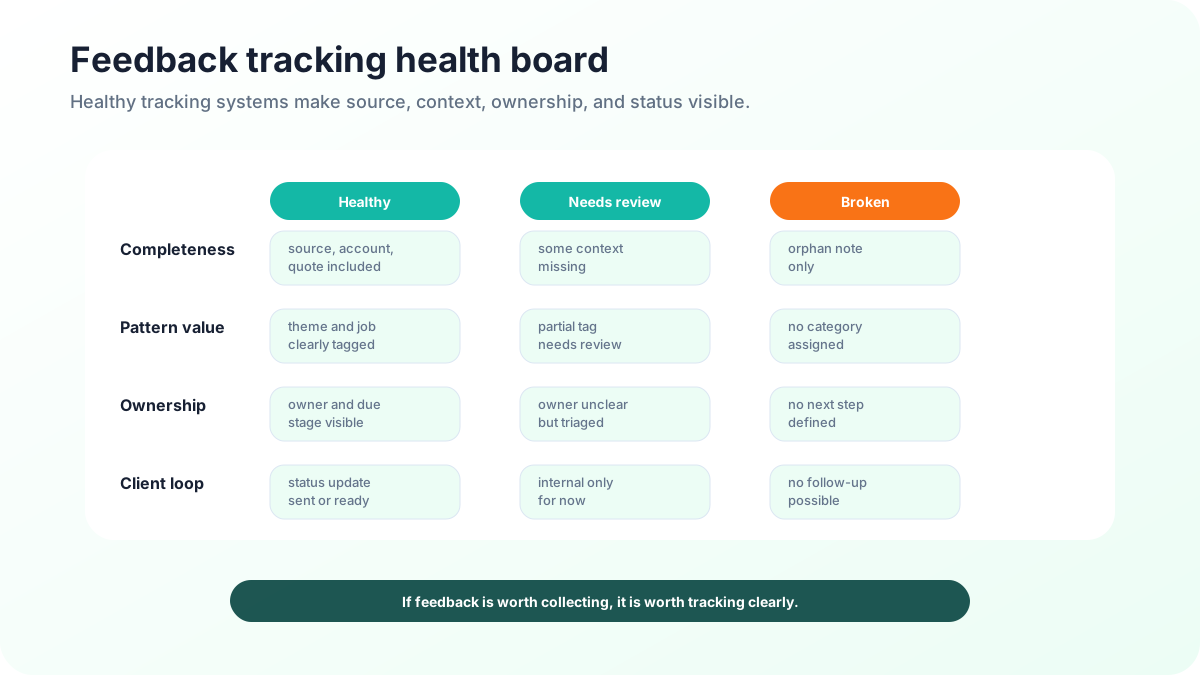
A feedback tracker should improve decisions and client experience. Measure duplicate reduction, time to acknowledge, time to decision, percentage of feedback with owners, number of themes reviewed, support volume after fixes, and clients notified after shipped improvements. If the tracker is full but decisions are not happening, the process needs ownership or a narrower scope.
Qualitative signs matter too. Support should feel that product sees repeated pain. Product should feel that incoming feedback has context. Customer success should have better answers during account conversations. Clients should hear fewer “let me check internally” responses and more specific updates.
Tracking makes prioritization fairer
Without tracking, the most recent or loudest client can dominate attention. That does not mean the request is wrong, but it means the team is making decisions with poor visibility. A tracker lets the team compare recency with recurrence, volume with segment fit, and urgency with strategic value. The conversation becomes more fair because the evidence is shared.
Fair prioritization also helps account teams. Instead of asking product for one-off answers every time a client raises a request, they can see whether the theme is new, under review, planned, shipped, or not aligned. That transparency reduces internal friction and gives clients more consistent expectations.
Tracking client feedback in regulated or enterprise contexts
Enterprise and regulated customers often need extra care. Feedback may include confidential workflows, security requirements, procurement details, or personal data. Tracking systems should separate public ideas from private account notes when necessary. A client-facing board is useful for general product requests, but sensitive details may belong in an internal record linked to the public theme.
Permissions matter. Support, success, product, and leadership may need different levels of access. Statuses that are safe for public viewing should be separated from internal estimates or commercial notes. The goal is to keep evidence connected without exposing information customers did not intend to share publicly.
How to avoid duplicate chaos
Duplicates are not just clutter; they are a signal. If ten clients ask for the same thing in slightly different words, the tracker should merge those requests into one theme while preserving each client’s context. That gives product a clearer demand picture and lets account teams notify everyone when the status changes.
Create a merging habit during triage. Search before adding a new item. Use plain-language titles customers can recognize. Add aliases or tags for common wording differences. Keep the original comments attached so nuance is not lost. Duplicate management is one of the main advantages of tracking over a spreadsheet of isolated notes.
What good follow-up sounds like
Follow-up should be specific, honest, and short. “We merged your request with a broader reporting theme and are reviewing examples this month” is useful. “This is planned for the next reporting cycle; we will update the board when design starts” is useful. “We are not prioritizing this because it falls outside the workflow we are focusing on this year” is also useful.
The worst answer is vague optimism that never changes. Tracking helps teams avoid that by tying every response to a status and decision note. Clients do not need to know every internal dependency, but they deserve to know whether their feedback is being watched, acted on, answered, or declined.
Start with one source of truth
Many teams try to fix feedback tracking by adding another channel, but the real need is one source of truth. Support can keep its ticketing system, sales can keep CRM notes, and success can keep account plans. Product-related feedback still needs a primary record where themes are merged and decisions are updated. Without that record, every team builds a partial version of reality.
The source of truth should be easy to search, easy to update, and trusted by the people who need answers. If teammates avoid it because the process is too heavy, simplify the fields. If clients cannot understand the public statuses, simplify the language. The right tracker is the one the organization actually uses when decisions are made.
Training the team to use the tracker
A tracker works only when teammates trust it. Train support to capture original wording, not just summaries. Train product to write decision notes, not just change statuses. Train account teams to check the record before promising timelines. These habits are small, but they turn feedback tracking from an administrative chore into a shared operating system.
FAQ
Why is tracking client feedback essential?
It prevents comments from disappearing, reveals repeated themes, connects support and product decisions, and gives clients confidence that their input was reviewed.
What fields should a feedback tracker include?
Start with client, segment, source, product area, theme, original comment, status, owner, severity, and next action. Add more only when the team uses it.
How often should teams review tracked feedback?
Small teams should review weekly or biweekly. The right cadence is the one the team can maintain and communicate honestly to clients.
Should all tracked feedback become roadmap work?
No. Some feedback should become support answers, documentation, onboarding improvements, bug fixes, account follow-up, or product discovery rather than new features.
When support and product need the same feedback record, FeaturAsk keeps client ideas, votes, and statuses easy to review.