How to Launch and Optimize Your In-App NPS Survey [2026 Guide]
Published: 2026-05-18
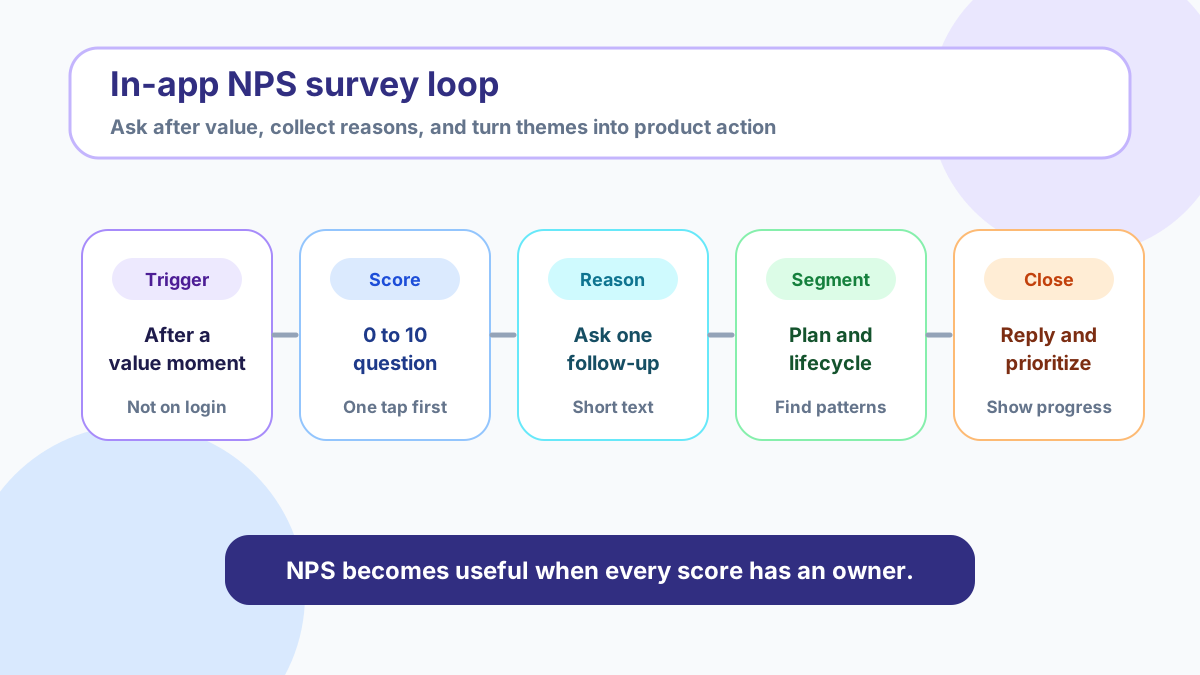
An in-app NPS survey asks users how likely they are to recommend your product while they are inside the product experience. Instead of asking people to remember days later, you catch feedback near the workflow, feature, support interaction, onboarding milestone, or account moment that shaped their opinion.
The best in-app NPS programs are not just score collection. They are a compact system for learning who is delighted, who is uncertain, who is frustrated, and which improvements would create the most loyalty.
If you already collect feature ideas, votes, and comments in FeaturAsk, NPS can become another signal in the same product feedback rhythm. Start with a simple prompt, tag responses by lifecycle stage or plan, and route recurring requests into your idea board. You can try FeaturAsk free for one month with no credit card and keep the full feedback workflow affordable at $29.95/year.
Quick answer
An in-app NPS survey works best when it is short, contextual, and tied to action. Ask the standard 0-to-10 recommendation question after users have experienced value, add one open follow-up question, segment responses, and review the themes every week. Treat promoters, passives, and detractors differently: invite promoters to share details, learn what would move passives forward, and personally follow up with detractors when the issue is important.
Use NPS as a relationship signal, not a roadmap by itself. A high score can hide product gaps, and a low score can reflect pricing, support, onboarding, bugs, or missing features. Combine NPS comments with votes, roadmap demand, customer tier, and product usage before deciding what to build next. For a practical decision framework, see our guide on how to prioritize feature requests.
What is NPS, and why does it matter?
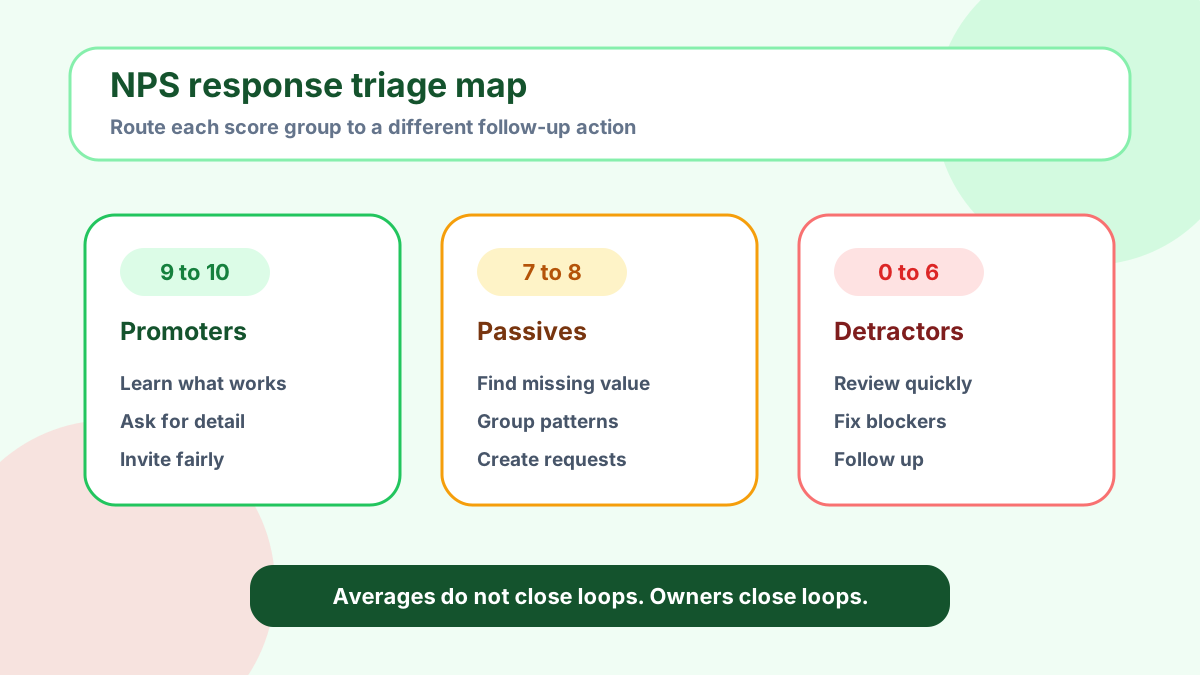
Net Promoter Score, usually called NPS, is based on one core question: “How likely are you to recommend this product to a friend or colleague?” Respondents answer on a scale from 0 to 10. Scores of 9 and 10 are promoters, 7 and 8 are passives, and 0 through 6 are detractors. The score is calculated by subtracting the percentage of detractors from the percentage of promoters.
Bain, the firm associated with the NPS system, explains the method as a way to measure advocacy and growth potential, while many CX platforms emphasize that the real value comes from pairing the score with reasons and follow-up action. Qualtrics describes NPS as a loyalty metric rather than a complete satisfaction diagnosis, and Medallia’s NPS guidance similarly separates score interpretation from the operational work of responding to customers.
That distinction matters for product teams. NPS does not tell you exactly what to build. It tells you where trust is strong, weak, or fragile. The score gives you a sorting mechanism; the comment gives you the work.
Why use in-app NPS instead of email or offline methods?
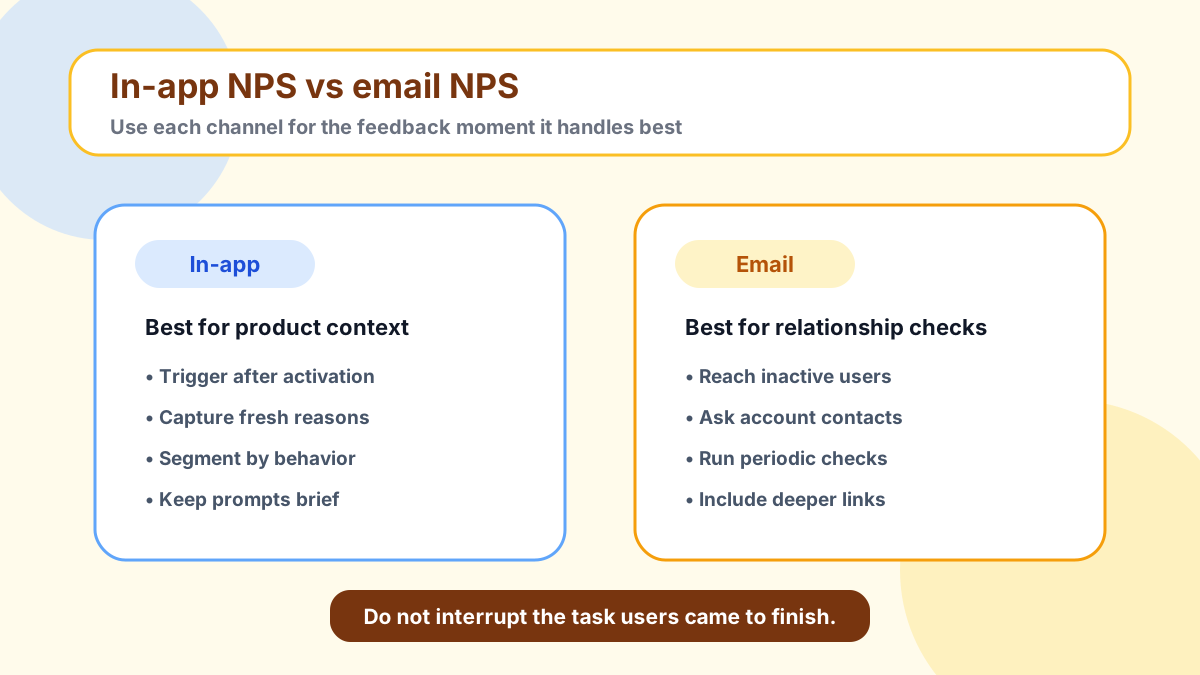
Email NPS can still be useful, especially for account-level relationship checks, customer success outreach, or periodic executive reporting. Offline interviews are valuable when you need depth. But in-app NPS has three advantages for product-led teams.
First, the context is fresher. A user who just completed onboarding, used a new dashboard, or resolved a support issue can explain what affected the score. Second, response friction is lower because the prompt appears where the user already is. Third, you can trigger the survey based on behavior rather than calendar guesses.
That does not mean you should interrupt every session. Nielsen Norman Group’s survey guidance cautions that surveys should be brief, purposeful, and respectful of the user’s task. The right approach is event-based, limited, and easy to dismiss.
A simple rule: ask after a meaningful moment, not before one. Do not ask a new user for NPS before they have reached activation. Do not ask during a complex workflow. Do not ask immediately after an error. Good in-app NPS timing feels like a natural check-in, not a toll booth.
How to create an in-app NPS survey
Step 1. Define your goals and timing
Start by deciding what decision the survey should improve. Are you measuring onboarding quality, post-support confidence, reaction to a feature release, expansion readiness, or general product loyalty? Each goal implies different timing and segmentation.
For onboarding, ask after the first meaningful success event. For a feature release, ask after the feature has been used enough to form an opinion. For support, ask after the issue is marked resolved and verified.
Avoid surveying too frequently. A common small-team cadence is to wait at least 30 to 90 days before asking the same user again, unless a specific transactional event justifies a separate check. If your user base is small, fewer high-quality responses are better than a large pile of irritated dismissals.
Step 2. Set up the widget or prompt
Your in-app survey needs four basic parts: the 0-to-10 score question, an optional open comment, user context, and a destination for the response. The score question should use the standard NPS wording so the result remains interpretable. The open question should be customized to the moment.
Examples:
- “What is the main reason for your score?”
- “What would make this product easier to recommend?”
- “What nearly stopped you from getting value today?”
- “Which missing capability would most improve your workflow?”
If you are using FeaturAsk for product feedback, route feature-related comments into a feedback board when they represent reusable demand. FeaturAsk is not a heavy enterprise research suite; it is a lightweight way to collect requests, votes, comments, analytics, moderation decisions, and status updates with custom branding. That makes it useful when NPS comments turn into concrete product ideas. If you need a broader comparison of formats, read our guide to using a website feedback tool.
Step 3. Customize the survey experience
Small wording choices change response quality. Keep the first screen minimal: one question, one scale, and a visible dismiss option. Put the open question after the score, not before it.
Branding also affects trust. A prompt that looks native to the product usually feels safer than a generic third-party modal. Use your brand colors, plain language, and a calm thank-you message.
For privacy, collect only what you need. Do not add hidden sensitive data to survey payloads. If responses may include personal information, make sure access is limited to the people who need it and that your retention practices match your privacy commitments.
Step 4. Collect, route, and review responses
An NPS response should not land in a spreadsheet nobody opens. Decide in advance who owns triage: product reviews themes, support handles urgent detractors, customer success follows up with strategic accounts, and product operations turns recurring requests into roadmap evidence.
This is where FeaturAsk can be useful for small teams. You can launch a branded FeaturAsk board in minutes to turn repeated NPS comments into visible feature requests, voting, and status updates. The trial lasts one month, requires no credit card, and the paid plan is $29.95/year.
Best practices for effective in-app NPS surveys
Ask at the right time and not too often
Trigger NPS after value, not after login. Good moments include completing setup, using a core feature several times, resolving a ticket, finishing a trial milestone, or returning after a new release. Bad moments include first page load, checkout, error states, time-sensitive workflows, and mobile screens where space is limited.
Frequency caps matter. If the user dismisses the prompt, respect that. If they respond, give them time before asking again.
Keep the follow-up question simple
The open comment is where the insight lives. Ask one question. Do not combine “why did you score this way, what features do you want, and can we contact you?” into a single prompt. If you need permission for follow-up, ask after the comment.
The best follow-up wording depends on score group. For promoters, ask what they value most. For passives, ask what would make the product more useful. For detractors, ask what problem they ran into.
Use microcopy to improve engagement
Microcopy should reduce uncertainty. Tell users the survey takes a few seconds, explain why you are asking, and reassure them that comments are read.
The thank-you state should match the score. Promoters can receive appreciation and an optional link to share details. Passives can be thanked for helping improve the product. Detractors can be told that the team will review the issue and may follow up if contact is allowed.
Segment results by plan, behavior, and lifecycle
A blended NPS number can hide the important story. Segment by plan, role, account size, activation stage, feature usage, acquisition channel, geography when relevant, and support history. A score of 30 among activated customers and -10 among new trial users points to a different problem than a flat score of 10 across every group.
Do not over-segment tiny samples. Use segmentation to form hypotheses, then look at comments and behavior.
How to interpret your Net Promoter Score
NPS ranges from -100 to 100. A positive score means promoters outnumber detractors. A negative score means detractors outnumber promoters. But benchmarks vary widely by industry, audience, product maturity, and survey method. In-app responses may differ from relationship emails because the context and timing are different.
Use the number as a trend and diagnostic entry point. Track it over time, but do not worship it. If it falls after a price change, read the comments before assuming the product got worse.
A healthy NPS dashboard shows the score, response count, group percentages, trend, usable segments, top themes, priority accounts, and feature requests linked to existing ideas or roadmap items.
The comments and themes should be visible next to the score. Without that, NPS becomes a vanity chart.
Closing the loop for promoters, passives, and detractors
Promoters: learn what is working
Promoters are not just a marketing list. Ask what they value most and which workflow made them confident. Those answers help positioning, onboarding, and product strategy.
If you invite promoters to leave public reviews or referrals, keep the request honest and compliant. The FTC’s endorsement guidance stresses that endorsements should reflect genuine experience and that material connections or incentives must be disclosed. Do not pressure users for positive reviews or route only happy customers to public sites while hiding unhappy feedback.
Passives: find the missing value
Passives are often the most interesting group. They may like the product but lack a strong reason to recommend it. Look for comments about missing integrations, confusing setup, weak reporting, slow performance, unclear pricing, or incomplete workflows.
A passive follow-up should sound collaborative: “What would make this a product you would confidently recommend?” If several passives name the same gap, add or merge the idea in your feedback board so other users can vote and add context. For a board-specific workflow, see our guide to feedback board software.
Detractors: resolve pain points quickly
Detractors deserve the fastest review. Some responses are simple bugs or misunderstandings. Others reveal deep gaps in product-market fit. Route urgent issues to support, tag product gaps, and follow up personally when the account or issue matters.
Do not argue with the score. Thank the user, acknowledge the issue, and ask one clarifying question if needed.
In-app NPS survey examples and templates
Onboarding NPS
Trigger: after the user completes the first success event.
Question: “Based on your setup experience so far, how likely are you to recommend this product?”
Follow-up for low scores: “What made setup harder than expected?”
Use this to identify confusing activation steps, missing docs, and moments where users need human help.
Post-support NPS
Trigger: after a resolved ticket and a short waiting period.
Question: “After this support experience, how likely are you to recommend us?”
Follow-up: “What did we handle well, or what should we improve?”
Use this when support quality is a major part of the product promise.
Feature release NPS
Trigger: after the user has used the new feature enough to judge it.
Question: “After trying the new reporting dashboard, how likely are you to recommend our product?”
Follow-up: “What should we improve before this feels complete?”
Use this to separate launch excitement from actual utility.
Churn-risk NPS
Trigger: declining usage, repeated errors, downgrade attempt, or cancellation flow.
Question: “Based on your recent experience, how likely are you to recommend us?”
Follow-up: “What is the biggest reason for your score?”
Use this carefully. If the user is already frustrated, keep the prompt optional and route negative answers quickly.
FAQ
What is a good in-app NPS response rate?
There is no universal benchmark because timing, audience, product category, and prompt design vary. Focus first on response quality and repeatability. A smaller set of contextual responses can be more useful than a larger email sample with vague comments.
How often should SaaS teams ask for NPS?
Many teams use a 30-to-90-day cooldown per user for relationship NPS, plus separate transactional prompts after important events. The key is to avoid asking before users have enough experience or asking so often that the survey becomes noise.
Should NPS replace feature voting?
No. NPS tells you sentiment and loyalty. Feature voting shows demand for specific improvements. The strongest workflow combines the two: use NPS comments to discover pain, then use a board to collect context, votes, and status updates.
Can small teams run NPS without enterprise software?
Yes. Start with one in-app prompt, a clear owner, simple segmentation, and a weekly review habit. If recurring comments turn into feature demand, use FeaturAsk to collect and prioritize those requests. It includes custom branding, moderation, voting, and analytics, with a one-month free trial, no credit card required, and pricing of $29.95/year.
Final take
An in-app NPS survey is valuable when it helps you act. Keep the prompt short, trigger it after meaningful product moments, segment the responses, and read the comments before reacting to the score. Promoters show what to amplify. Passives show what is not yet compelling. Detractors show where trust is breaking.
The score is only the front door. The real system is what happens next: triage, follow-up, feature request tracking, roadmap decisions, and user-visible closure. Build that loop, and NPS becomes more than a number.
Further reading: Bain on Net Promoter System, Qualtrics NPS overview, Medallia NPS guide, Nielsen Norman Group on writing better survey questions, and FTC endorsement guides.